Bookkeeping Basics for Non-Accountants: What You Actually Need to Know
Bookkeeping is the process of recording every financial transaction your business makes. It is not optional, it is not just for tax season, and it does not require an accounting degree. If you earn money from a business, you are already doing bookkeeping -- the question is whether you are doing it well enough to avoid IRS problems, missed deductions, and cash flow surprises.
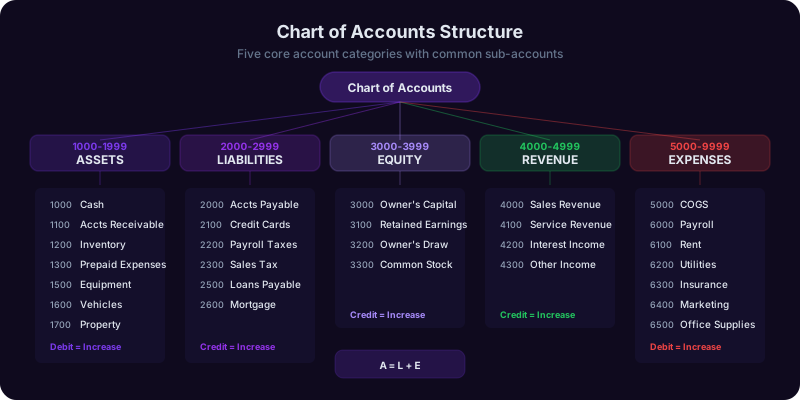
At its core, bookkeeping answers three questions: How much money came in? How much went out? Where did it go? Every transaction falls into one of five categories: assets (what you own), liabilities (what you owe), equity (your ownership stake), revenue (what you earned), and expenses (what you spent). These five categories form the foundation of double-entry bookkeeping, which has been the standard since the 15th century and remains the standard today.
Single-Entry vs. Double-Entry
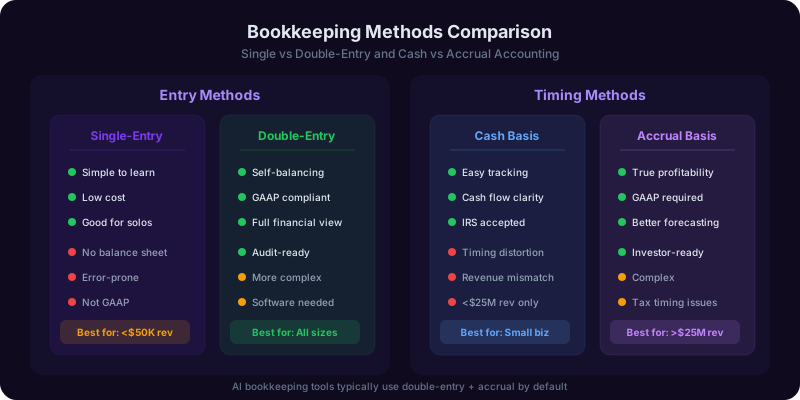
Single-entry bookkeeping is like a checkbook register: you record each transaction once. It works for very simple businesses with minimal transactions. Double-entry bookkeeping records every transaction twice -- once as a debit and once as a credit. When you pay $500 for office supplies, you debit the office supplies expense account (increasing expenses) and credit the cash account (decreasing cash). The total debits always equal total credits, which is how you catch errors.
Most AI bookkeeping tools use double-entry by default, even if they hide the mechanics from you. QuickBooks, Xero, and FreshBooks all operate on double-entry principles behind their user-friendly interfaces.
Cash Basis vs. Accrual Basis
The IRS allows most small businesses to choose between cash-basis and accrual-basis accounting. Cash basis records income when you receive it and expenses when you pay them. Accrual basis records income when you earn it and expenses when you incur them, regardless of when money changes hands. If you invoice a client on December 20 and they pay on January 5, cash basis puts the income in January; accrual basis puts it in December.
For businesses with less than $29 million in average annual gross receipts, the IRS permits cash-basis accounting. Nearly all solopreneurs and small businesses use cash basis because it is simpler and gives you more control over the timing of income and expenses for tax purposes. AI bookkeeping tools support both methods but default to cash basis for small businesses.
Why This Matters for AI
Understanding these basics matters because AI bookkeeping tools are not magic. They automate the repetitive parts of bookkeeping -- transaction recording, categorization, matching -- but they operate within these same frameworks. When QuickBooks AI categorizes a transaction, it is assigning it to the correct account in a double-entry system. When Xero reconciles your bank feed, it is matching recorded transactions to actual bank movements. Knowing the fundamentals helps you verify the AI is doing its job correctly and catch the 5-10% of transactions it misclassifies.
The Small Business Administration financial management guide provides foundational resources for business owners getting started with financial record-keeping.
Setting Up Your Chart of Accounts With AI: The Foundation of Organized Finances
Your chart of accounts (COA) is the master list of every category your business uses to classify transactions. Think of it as a filing system for money. A well-structured COA makes tax preparation straightforward, financial reports meaningful, and AI categorization accurate. A poorly structured one creates confusion that compounds every month.
Most small business owners either use the default chart of accounts that came with their software (too generic) or create one with 200 categories (too detailed). The sweet spot for a solopreneur or small business with fewer than 10 employees is 30-50 accounts. AI tools can help you find that sweet spot based on your industry and business structure.
The Essential Account Categories
Every small business needs these accounts at minimum:
Assets:
- Business Checking Account
- Business Savings Account
- Accounts Receivable (money clients owe you)
- Equipment and Furniture
- Prepaid Expenses (annual subscriptions paid upfront)
Liabilities:
- Accounts Payable (bills you owe)
- Credit Card Payable
- Sales Tax Payable (if applicable)
- Loan Payable (if applicable)
Revenue:
- Service Revenue (or Product Sales)
- Other Income (interest, affiliate income)
Expenses (this is where most customization happens):
- Advertising and Marketing
- Bank and Processing Fees
- Contractor Payments
- Insurance
- Office Supplies
- Professional Services (legal, accounting)
- Rent and Utilities
- Software and Subscriptions
- Travel and Transportation
- Meals (business)
How AI Streamlines COA Setup
QuickBooks AI and Xero now offer industry-specific chart of accounts templates. When you tell QuickBooks you run a freelance design business, it generates a COA with relevant categories like "Design Software," "Stock Photography," and "Client Entertainment" already included. Xero's AI assistant asks questions about your business and builds a custom COA in under five minutes.
The Bookkeeping Copilot can walk you through the COA setup process, recommend which accounts to add or remove based on your specific business, and explain what each account is for in plain language. This is especially valuable if you are setting up bookkeeping for the first time and the terminology feels overwhelming.
Common COA Mistakes to Avoid
Do not create a separate expense account for every vendor. "Adobe Creative Cloud" is not an account; it is a transaction that goes into "Software and Subscriptions." Do not mix personal and business transactions in the same accounts. And do not skip the Accounts Receivable account even if you think you will remember who owes you money. After three months of active business, you will not remember. Finally, align your expense categories with IRS Schedule C categories. This makes tax filing dramatically simpler because your bookkeeping categories map directly to the tax form lines.
AI Transaction Categorization: How It Works and How to Train It
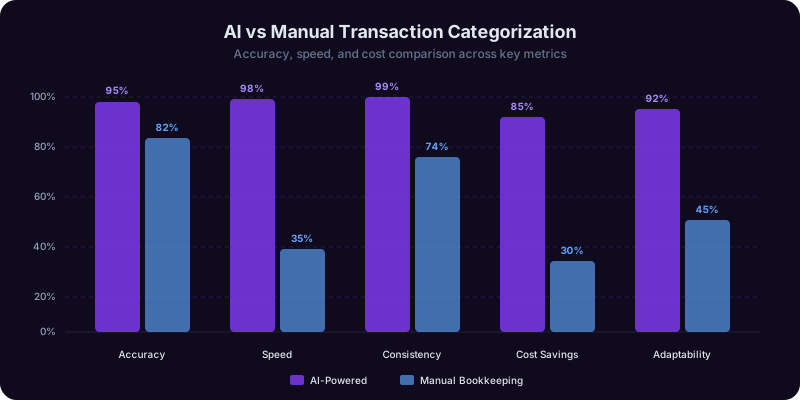
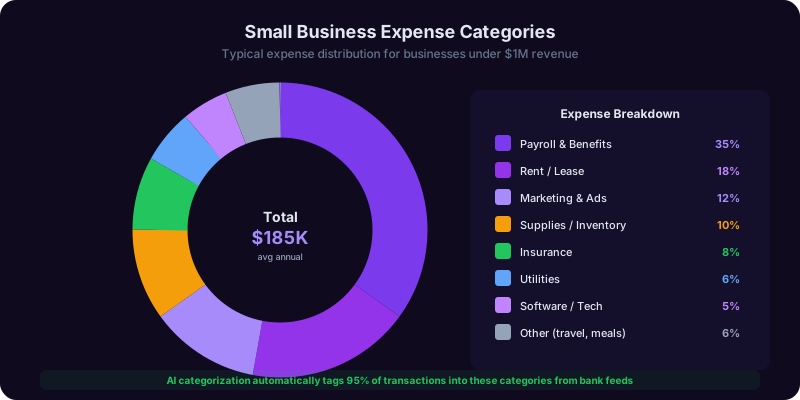
Transaction categorization is where AI delivers the most immediate value in bookkeeping. Instead of manually reviewing every bank and credit card transaction and assigning it to the correct account, AI reads the transaction description, amount, date, and merchant category code, then assigns it automatically. Across all major platforms, AI categorization accuracy starts at 70-80% out of the box and reaches 90-95% after two to three months of corrections.
This single capability saves the average small business owner 5-8 hours per month. At the median small business owner's effective hourly rate, that is $250-$500 in recovered productive time monthly, or $3,000-$6,000 per year.
How the Major Platforms Handle Categorization
QuickBooks AI: QuickBooks uses machine learning models trained on anonymized transaction data from millions of small businesses. When you connect your bank account, it begins categorizing transactions using vendor name matching, merchant category codes (MCCs), and patterns from similar businesses. The QuickBooks AI bookkeeping features include a confidence score for each categorization -- transactions with low confidence scores are flagged for manual review. QuickBooks also learns from your corrections: if you re-categorize "AMZN Mktp US" from "Office Supplies" to "Inventory" three times, it remembers.
Xero with JAX: Xero's AI assistant JAX analyzes transaction descriptions and cross-references them with your existing chart of accounts. JAX is particularly strong at handling recurring transactions -- once it learns that your $49.99 monthly Canva charge is "Software and Subscriptions," it auto-categorizes every future occurrence. JAX also suggests new account categories when it encounters transaction types that do not fit your existing COA.
Botkeeper: Botkeeper combines AI categorization with human bookkeeper oversight. Their AI handles initial categorization, and a human bookkeeper reviews the results. This hybrid approach claims 99%+ accuracy but costs significantly more: $399-$799/month compared to $30-$80/month for QuickBooks or Xero alone.
Training Your AI for Better Accuracy
The single most important thing you can do to improve AI categorization is correct mistakes immediately and consistently. Every correction teaches the model. Specific tips:
- Be consistent with your corrections. If you categorize a coworking space fee as "Rent" one month and "Office Expenses" the next, the AI cannot learn.
- Use bank rules for recurring transactions. In QuickBooks, you can create rules: "If vendor contains 'AWS,' categorize as Cloud Hosting." This overrides AI guessing.
- Split transactions when necessary. A $200 Amazon purchase that includes $150 of business supplies and $50 of personal items should be split, not categorized entirely as one or the other.
- Review the AI's work weekly. Spending 15 minutes each week reviewing and correcting categorizations keeps your books accurate and improves the AI over time.
For a deeper understanding of how AI handles financial categorization in the tax context, see our guide on whether AI can do your taxes.

Get Answers From the Finance Copilot
The Finance Copilot helps you set up your chart of accounts, categorize transactions, track expenses, and generate tax-ready reports -- all without needing an accounting background. Ask it anything from bank reconciliation to estimated tax payments.
Invoicing Automation: From Creation to Payment Collection Without Manual Follow-Up
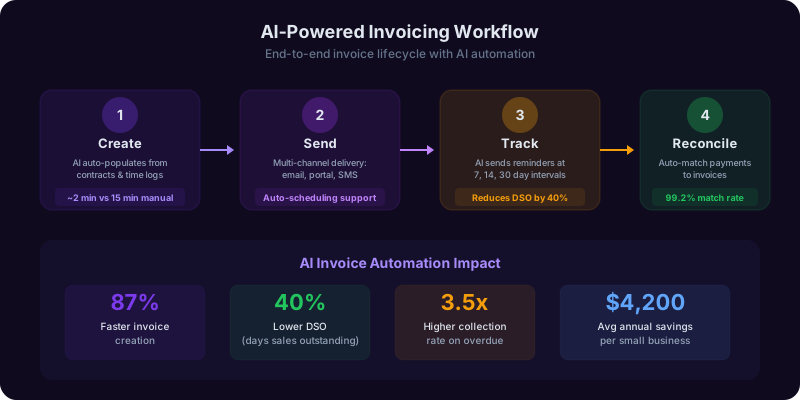
Invoicing is the second most time-consuming bookkeeping task after transaction categorization, and it has the most direct impact on your cash flow. Late invoicing leads to late payments, and late payments lead to cash flow problems that cause 82% of small business failures according to a U.S. Bank study. AI-powered invoicing eliminates the bottlenecks at every stage: creation, delivery, follow-up, and reconciliation.
The average small business sends 15-30 invoices per month and spends 3-5 hours creating, sending, and following up on them. AI invoicing reduces that to under 30 minutes.
AI Invoice Generation
Modern invoicing tools like QuickBooks, FreshBooks, and Wave use AI to pre-populate invoices based on your history. When you start a new invoice for a recurring client, the system suggests line items, rates, and payment terms based on your previous invoices to that client. Some platforms go further: time-tracking integrations like Harvest or Toggl automatically generate invoice line items from tracked project hours, eliminating manual data entry entirely.
AI also handles the formatting and compliance details that solopreneurs often get wrong. It ensures every invoice includes the legally required elements: your business name and address, the client's information, a unique invoice number, itemized services or products, applicable tax, payment terms, and accepted payment methods. Missing any of these can delay payment or create legal complications.
Automated Payment Reminders
The average accounts receivable cycle for small businesses is 34 days. AI-powered reminder sequences reduce this to 21-25 days. Here is a typical automated sequence that platforms like QuickBooks and FreshBooks support:
- Day 0: Invoice sent automatically after service delivery or on a set schedule
- Day 7: Friendly reminder email with a direct payment link
- Day 14: Second reminder noting the invoice is approaching its due date
- Day 30: Firm reminder that the invoice is past due
- Day 45: Final notice before the account is escalated
Each message is customizable, and AI can adjust the tone based on client history. A client who always pays on day 28 does not need aggressive reminders at day 14. A client who has two past-due invoices gets earlier and firmer notifications.
Recurring Invoices and Subscription Billing
If you charge clients the same amount monthly (retainer agreements, subscription services, ongoing consulting), set up recurring invoices once and the system handles them indefinitely. AI monitors for changes: if your retainer rate increases, it flags the old recurring invoice for update. If a client's payment method expires, it notifies you before the next billing cycle fails.
Connecting Invoicing to Your Books
The real power of AI invoicing is automatic reconciliation. When a client pays Invoice #1042, the payment is automatically matched to the outstanding receivable, the Accounts Receivable balance decreases, and the cash account increases. No manual journal entry required. This closed loop means your financial reports are always current, not waiting for month-end data entry. The Bookkeeping Copilot can help you set up this automation and troubleshoot common integration issues between invoicing and accounting platforms.
AI Expense Tracking: Capturing Every Deduction in Real Time
Expense tracking is where most small business owners lose money -- not from overspending, but from failing to record deductible expenses. A 2025 survey by the National Small Business Association found that the average solopreneur misses $4,200 in legitimate deductions annually simply because they did not track expenses consistently. AI expense tracking tools close this gap by capturing expenses at the point of purchase rather than reconstructing them months later.
The shift from manual to AI-powered expense tracking is not just about convenience. It is about completeness. When you rely on memory and end-of-month bank statement reviews, you miss cash transactions, forget the business purpose of meals, and overlook small recurring charges that add up to significant deductions.
Receipt Scanning and OCR
AI-powered receipt scanning has improved dramatically. Tools like Dext (formerly Receipt Bank), QuickBooks receipt capture, and Expensify use optical character recognition (OCR) combined with machine learning to extract vendor name, date, amount, tax, and payment method from a photograph of a receipt. Accuracy rates now exceed 95% for printed receipts and 88% for handwritten ones. You photograph the receipt, the AI extracts the data, categorizes the expense, and attaches the image to the transaction record -- all in under 10 seconds.
This matters for IRS compliance. The IRS requires receipts for all business expenses over $75. Without them, deductions can be disallowed in an audit. AI receipt scanning creates a searchable digital archive that satisfies IRS documentation requirements without the shoebox of crumpled paper.
Mileage Tracking
The 2026 standard mileage rate is $0.70 per mile. For a small business owner driving 10,000 business miles per year, that is a $7,000 deduction. But the IRS requires a contemporaneous mileage log -- you cannot estimate at year-end. AI mileage trackers like MileIQ and Everlance use your phone's GPS to automatically detect and log drives. You swipe to classify each trip as business or personal. MileIQ reports that its users claim an average of $6,500 in mileage deductions they would have otherwise missed.
Subscription Auditing
The average small business pays for 12-18 software subscriptions, and studies show that 25-30% of those subscriptions are unused or underused. AI expense tracking tools identify recurring charges and flag subscriptions you have not used recently. Trim and Rocket Money pioneered this for consumers, and now QuickBooks and Xero offer similar features for business accounts. One analysis found the average small business saves $1,200-$2,400 per year by canceling unused subscriptions identified by AI.
Separating Personal and Business Expenses
If you use the same credit card for personal and business purchases (which you should avoid, but many solopreneurs do), AI can help sort them. QuickBooks AI flags transactions from vendors it recognizes as typically personal (grocery stores, streaming services, clothing retailers) and asks you to confirm before categorizing them as business expenses. This prevents the common and dangerous mistake of claiming personal expenses as business deductions. For a complete list of what qualifies as a deduction, see our freelancer tax deductions guide.
Tax-Ready Reports: Generating the Documents Your CPA (or the IRS) Needs
The ultimate purpose of bookkeeping is producing accurate financial reports. These reports tell you how your business is performing, help you make informed decisions, and satisfy the IRS when tax season arrives. AI bookkeeping tools generate these reports automatically from your categorized transaction data, eliminating the month-end scramble that used to require a bookkeeper.
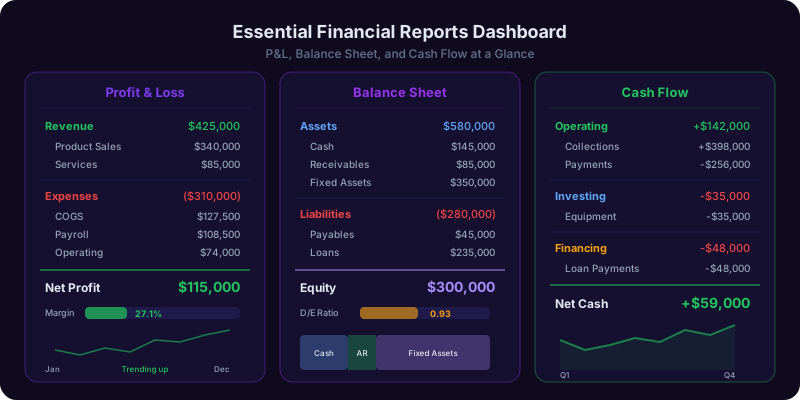
Three reports form the core of small business financial reporting: the profit and loss statement (also called an income statement), the balance sheet, and the cash flow statement. A fourth report, the accounts receivable aging report, is critical for service businesses. Together, these four documents give you a complete picture of your financial health.
Profit and Loss Statement (Income Statement)
This report shows your revenue minus expenses over a specific period, typically monthly, quarterly, or annually. AI tools generate this in real time. You do not wait until month-end to know how your business is performing. A well-categorized chart of accounts means your P&L automatically maps to IRS Schedule C categories, making tax preparation straightforward.
Key line items your P&L should show: gross revenue, cost of goods sold (if applicable), gross profit, operating expenses broken down by category, net operating income, other income and expenses, and net profit. If your AI bookkeeping is set up correctly, this report requires zero manual work -- it generates itself from categorized transactions.
Balance Sheet
The balance sheet shows what your business owns (assets), what it owes (liabilities), and the difference (equity) at a specific point in time. For a solopreneur, this might seem unnecessary, but it becomes critical when you apply for a business loan, seek investment, or plan to sell your business. Banks and investors always ask for a balance sheet. AI bookkeeping tools maintain your balance sheet continuously as transactions are recorded.
Cash Flow Statement
Your P&L might show a profit, but if your cash is tied up in unpaid invoices, you cannot pay your bills. The cash flow statement tracks actual money movement: operating activities (day-to-day cash in and out), investing activities (equipment purchases), and financing activities (loans, owner draws). AI tools like QuickBooks generate cash flow projections using historical patterns, alerting you weeks before a potential cash crunch.
Schedule C Mapping
For sole proprietors and single-member LLCs, the IRS Schedule C is the tax form that matters most. It reports your business profit or loss. AI bookkeeping tools that map expense categories to Schedule C lines save hours during tax preparation. QuickBooks offers a Schedule C report that pulls directly from your categorized transactions, and Xero provides similar mapping through its tax preparation reports. When your bookkeeping categories align with Schedule C, your CPA spends less time reclassifying expenses, which means a lower bill for you. For solopreneurs considering other business structures, our LLC vs. sole proprietorship comparison explains how entity choice affects your reporting requirements.
Bank Reconciliation With AI: Matching Every Dollar Automatically
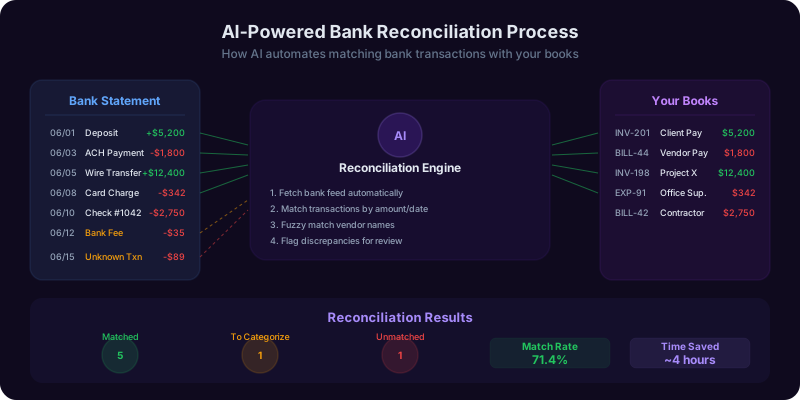
Bank reconciliation is the process of comparing your bookkeeping records against your actual bank and credit card statements to make sure they match. It catches errors, identifies unauthorized transactions, and ensures your financial reports reflect reality. Before AI, reconciliation was a tedious monthly ritual that took 2-4 hours for a typical small business. With AI-powered bank feeds and automatic matching, it takes 10-15 minutes.
The importance of reconciliation cannot be overstated. The Association of Certified Fraud Examiners reports that small businesses lose a median of $150,000 per fraud incident, and most fraud is detected through reconciliation discrepancies. Even without fraud, unreconciled books can contain duplicate entries, missed transactions, and timing differences that make your financial reports unreliable.
How AI Bank Reconciliation Works
Modern accounting platforms connect directly to your bank through secure API feeds (using services like Plaid or Yodlee). Transactions flow into your bookkeeping system daily, sometimes hourly. The AI then performs three-way matching:
- Exact match: The amount, date, and vendor in your records match a bank transaction exactly. The AI marks these as reconciled automatically.
- Fuzzy match: The amounts match but dates differ by a day or two (common with credit card processing delays), or the vendor name appears differently in your records versus the bank statement. The AI matches these with a confidence score and flags low-confidence matches for review.
- Unmatched: Transactions that appear in the bank feed but not in your records (a charge you forgot to enter) or in your records but not the bank feed (a check that has not cleared yet). These require manual investigation.
Common Reconciliation Issues AI Catches
- Duplicate transactions: You manually entered an expense and the bank feed also imported it. AI identifies duplicates by matching amount, date range, and vendor.
- Missing transactions: Cash expenses, manual checks, or transactions from accounts not connected to your bookkeeping system. AI flags these as unmatched bank items.
- Timing differences: A check written on January 30 that clears on February 3 appears in different periods depending on your accounting method. AI tracks outstanding checks and matches them when they clear.
- Bank errors: Rare but real. Duplicate bank charges, incorrect amounts, or unauthorized transactions. Reconciliation is how you find them.
Best Practices for AI-Assisted Reconciliation
Even with AI, follow these practices. Reconcile monthly, not quarterly or annually. Monthly reconciliation keeps discrepancies small and manageable. If you wait six months, untangling errors becomes exponentially harder. Reconcile every account -- checking, savings, credit cards, PayPal, and any other account that handles business money. Investigate every discrepancy. A $12 unexplained difference is not rounding error; it is a transaction you missed or a categorization mistake. Keep a reconciliation log. Note the date you reconciled, the period covered, and any adjustments made. This documentation is valuable during audits. The Finance Copilot can explain reconciliation concepts and help you troubleshoot common discrepancies.
When You Still Need a CPA: The Limits of AI Bookkeeping
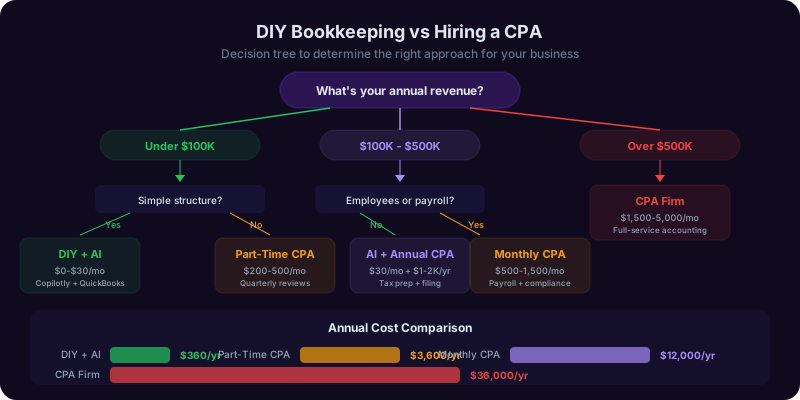
AI bookkeeping tools have made it possible for millions of solopreneurs and small business owners to manage their finances without a full-time bookkeeper. But there are situations where a human CPA, enrolled agent, or tax professional is not just helpful -- it is necessary. Knowing when to call in a professional protects you from costly mistakes that AI cannot prevent.
The AICPA reports that 72% of CPA firms now encourage clients to use AI bookkeeping tools for day-to-day record-keeping, with the CPA focusing on strategic advisory, tax planning, and compliance review. This division of labor gives small businesses the best of both worlds: AI efficiency for routine tasks and human expertise for complex decisions.
Tax Planning and Entity Structure
AI can record transactions and generate reports, but it cannot advise you on whether to operate as a sole proprietor, LLC, or S-corp. Each entity type has different tax implications, liability protections, and administrative requirements. A CPA evaluates your total financial picture -- income level, growth trajectory, risk exposure, state-specific rules -- and recommends the structure that minimizes your tax burden. For a solopreneur earning $120,000, the difference between the right and wrong entity choice can be $5,000-$15,000 in annual taxes. See our LLC vs. sole proprietorship guide for more on this decision.
Annual Tax Preparation and Filing
AI bookkeeping gets your financial data organized and tax-ready, but filing a business tax return involves judgment calls that software cannot make reliably. Should you take the standard deduction or itemize? Should you use the simplified or actual method for your home office? Is that large client entertainment expense defensible in an audit? A CPA makes these calls based on experience with similar clients and knowledge of current IRS enforcement priorities. CPA tax preparation typically costs $400-$1,500 for a sole proprietor and $1,000-$3,000 for an S-corp or partnership return.
Multi-State and International Situations
If you have clients or contractors in multiple states, tax compliance requirements multiply quickly. Each state has its own nexus rules, filing thresholds, and tax rates. AI bookkeeping tools track the transactions, but a CPA determines your filing obligations.
IRS Notices and Audits
If you receive an IRS notice or are selected for an audit, you need human representation. An enrolled agent or CPA can correspond with the IRS on your behalf, negotiate payment plans, request penalty abatement, and represent you in person if necessary. AI tools cannot do any of this. The Tax Copilot can help you understand what an IRS notice means and prepare your documentation, but the actual response should involve a qualified professional.
The Annual CPA Review
Even if you handle bookkeeping yourself with AI tools all year, schedule an annual review with a CPA. A one-hour review session (typically $200-$400) catches categorization errors, identifies missed deductions, and ensures your books are ready for tax filing. Think of it as an annual checkup for your business finances. The cost is almost always recovered in errors corrected and deductions identified. For side income tax obligations, see our side hustle taxes guide.
Frequently Asked Questions
Recommended Copilots
Recommended Copilots
Get real-time guidance on cash flow management, expense optimization, and financial strategy for your small business
Try Free →Calculate quarterly estimated payments, identify deductions from your bookkeeping data, and model tax scenarios before filing
Try Free →Walk through chart of accounts setup, transaction categorization best practices, and reconciliation troubleshooting step by step
Try Free →Related Articles
Get Answers From the Finance Copilot
The Finance Copilot helps you set up your chart of accounts, categorize transactions, track expenses, and generate tax-ready reports -- all without needing an accounting background. Ask it anything from bank reconciliation to estimated tax payments.