What AI Can Actually Do for Your Taxes in 2026
The marketing from AI tax platforms paints a picture of effortless, fully automated tax filing. The reality is more specific and more useful than that broad promise. AI handles certain tax tasks exceptionally well, others adequately, and some not at all. Understanding the boundaries is the first step toward using these tools effectively.
AI tax tools in 2026 fall into three categories: general-purpose LLMs (ChatGPT, Claude) that answer tax questions conversationally, specialized tax platforms (TaxGPT, FlyFin, Keeper) that combine AI with tax-specific data pipelines, and domain-specific copilots that guide you through tax decisions without attempting to file on your behalf.
Where AI Excels: Pattern Recognition at Scale
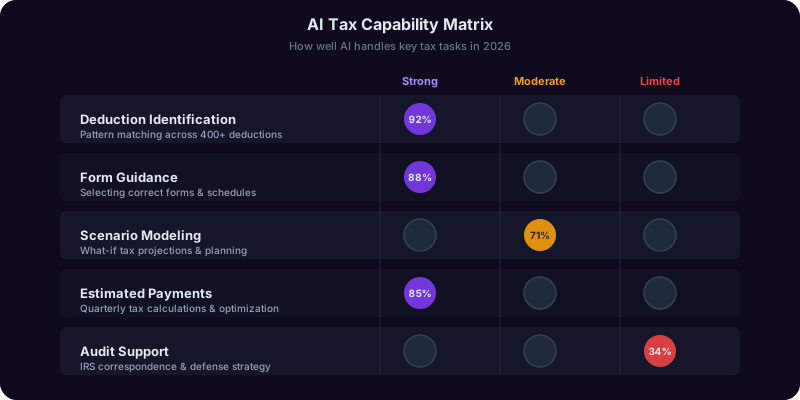
AI is fundamentally good at pattern matching, and tax preparation is full of patterns. When you connect a bank account to an AI tax tool, it scans thousands of transactions and categorizes them against known deduction categories in seconds. A CPA reviewing your expenses might overlook that your $14.99/month Canva subscription is deductible for freelance design work. The AI flags it every time. According to Thomson Reuters research on AI in tax and accounting, 83% of tax professionals reported that AI reduced data entry and categorization time by 40-60% in 2025.
The Five Core Strengths
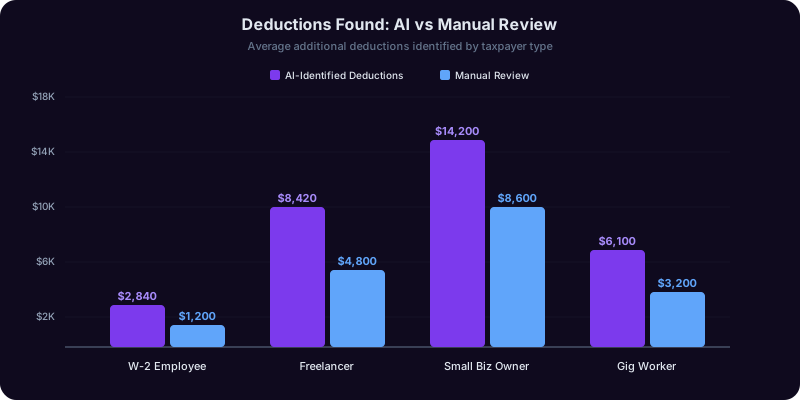
- Deduction identification: AI tools typically find $1,500-$4,200 in additional deductions for self-employed filers compared to manual review.
- Form guidance: Explaining which forms you need and walking you through line-by-line completion. The Tax Copilot handles this well for W-2 employees and sole proprietors.
- Scenario modeling: Running what-if calculations instantly. What if you contribute $6,000 more to your SEP IRA? What if you elect S-corp status?
- Estimated payment calculation: Computing quarterly estimated taxes based on year-to-date income and projecting full-year liability.
- Plain-language explanations: Instead of citing IRC Section 199A, an AI tool explains that you may qualify for a 20% deduction on qualified business income if your taxable income is below $191,950 as a single filer.
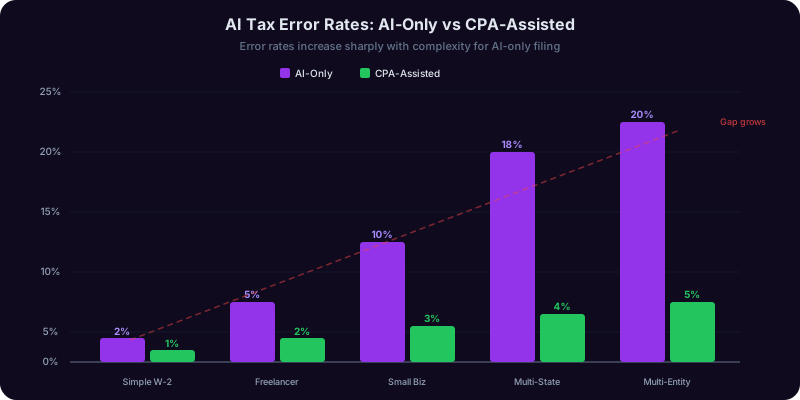
These strengths make AI valuable for the 70-80% of tax situations that follow standard patterns. The remaining 20-30% is where the limitations become important.
What AI Cannot Do: The Hard Limits of Automated Tax Preparation
No AI tax tool in 2026 can fully replace a qualified tax professional for complex situations. The IRS does not care whether your return was prepared by a human or a machine. If there is an error, you owe the difference plus interest and penalties.
Complex Multi-State Filing
If you earned income in three states, moved mid-year, and had a remote work arrangement that crossed state lines, AI tools struggle. State tax reciprocity agreements, allocation formulas, and credit-for-taxes-paid calculations vary significantly across jurisdictions. A freelance consultant who lives in New York, has clients in California and Texas, and traveled to Illinois for a week-long project faces filing obligations that most AI tools handle poorly. The potential cost of getting this wrong: $2,000-$8,000 in misallocated state taxes, penalties, and interest.
Business Entity Selection and Restructuring
Should you convert your sole proprietorship to an S-corp? AI can model the tax savings (a freelancer earning $150,000 might save $8,000-$12,000 annually in self-employment tax). But AI cannot evaluate state-specific S-corp taxes, reasonable compensation requirements, payroll administration costs, and the long-term implications for exit strategy or partnership formation.
Audit Representation
If the IRS audits your return, an AI tool cannot represent you. Only enrolled agents, CPAs, and tax attorneys have the legal authority to represent you before the IRS. The AICPA tax advocacy resources outline the professional standards that govern human tax representation.
Nuanced Judgment Calls
- Hobby vs. business: If your Etsy shop lost money for three of the last five years, the IRS applies a nine-factor test. AI can list the factors but cannot weigh them against your specific circumstances.
- Reasonable compensation for S-corp owners: What counts as reasonable depends on industry, geography, hours worked, and comparable positions. AI tools often default to conservative estimates.
- Related-party transactions: Sales between family members, your businesses, or you and a trust have special rules that AI frequently mishandles.
- International income and FBAR reporting: Foreign bank accounts and overseas investments involve requirements with severe penalties: up to $12,909 per account for non-willful violations in 2026.
AI is a powerful assistant for tax preparation, not a replacement for professional judgment in complex situations.
Comparing AI Tax Tools: TaxGPT, FlyFin, Keeper, and Domain Copilots
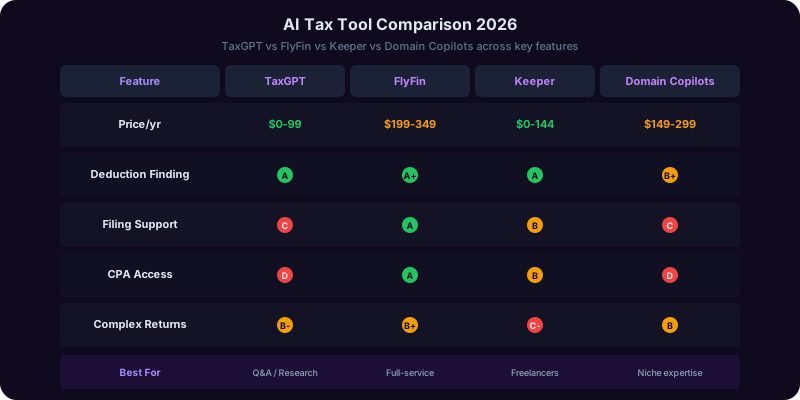
The AI tax tool landscape has expanded rapidly. Each platform takes a different approach, and the right choice depends on your tax situation, comfort level, and budget.
TaxGPT
TaxGPT uses large language models fine-tuned on IRS publications, tax code, and court rulings. Its strength is conversational tax guidance: you describe your situation in plain English, and it provides citation-backed answers referencing the relevant IRC section. However, TaxGPT does not connect to your financial accounts or file returns directly. Pricing runs $15-$50/month.
FlyFin
FlyFin targets freelancers and self-employed workers. It connects to your bank accounts, auto-categorizes expenses as deductions, and pairs AI analysis with human CPA review. The CPA reviews your return before filing, addressing the biggest weakness of pure AI. FlyFin reports users claim an average of $3,700 more in deductions than they found on their own. Pricing: $200-$350/year including CPA review and filing.
Keeper (formerly Keeper Tax)
Keeper focuses on expense tracking for gig workers and freelancers. It monitors connected accounts and sends notifications when it identifies deductions. AI categorization accuracy is roughly 85-90%. Keeper also handles quarterly estimated tax calculations and can file returns. Pricing: $16/month or $192/year.
Domain-Specific Copilots
Tools like the Copilotly Tax Copilot focus on education, decision support, and scenario modeling rather than filing. You bring your tax questions, and the copilot walks you through the analysis, explains the rules, and models different scenarios. This works well for year-round planning, not just during tax season.
Head-to-Head Comparison
| Feature | TaxGPT | FlyFin | Keeper | Domain Copilot |
|---|---|---|---|---|
| Deduction scanning | Manual input | Automated | Automated | Guided |
| Return filing | No | Yes (CPA files) | Yes | No |
| CPA review | No | Yes | Optional add-on | No |
| Scenario modeling | Strong | Limited | Limited | Strong |
| Best for | Tax research | Freelancers | Gig workers | Decision support |
For a deeper look at how AI tools compare for broader financial decisions, see our guide on using AI as a professional second opinion.

Get Answers From the Tax Copilot
The Tax Copilot models deduction strategies, calculates estimated payments, and flags audit risk factors so you file with confidence. Ask it anything from S-corp election math to Roth conversion timing.
AI Deduction Identification: Real Scenarios With Dollar Amounts
The most immediately valuable use of AI in tax preparation is finding deductions you would otherwise miss. Here are four real-world scenarios showing exactly what AI catches and what it misses.
Scenario 1: W-2 Employee With a Side Hustle
Sarah earns $95,000 as a marketing manager and $8,400/year from freelance writing on a 1099-NEC. AI identifies deductions against her freelance income she did not know she could claim:
- Home office deduction (simplified method, 120 sq ft): $600
- Laptop used 40% for freelance work ($1,400 cost): $560
- Adobe Creative Cloud (50% freelance use): $330
- Professional writing course: $299
- Total additional deductions: $1,789
- Tax savings at 22% bracket: $394
What the AI missed: Sarah could deduct a portion of her internet bill, adding $180-$240. She needed to be prompted to provide that information.
Scenario 2: Full-Time Freelance Developer
Marcus earns $142,000 freelancing. FlyFin scans his bank transactions and identifies $18,340 in deductions: cloud hosting ($2,880), SaaS subscriptions ($1,740), home office at 15% ($5,220), health insurance premiums ($6,600), and conference travel ($1,900). The AI also recommended S-corp election, projecting $9,800 in SE tax savings. But it did not account for $2,400/year payroll processing, $800 state franchise tax, or reasonable compensation complexity. Net savings after costs: closer to $6,600. The Tax Copilot can model these all-in comparisons.
Scenario 3: Gig Worker With Multiple Platforms
Diana drives for Uber, delivers for DoorDash, and does freelance design. Combined 1099 income: $47,000. AI finds $11,200 in deductions: vehicle mileage (14,200 miles at $0.70 = $9,940), phone bill at 75% ($810), delivery supplies ($280), and design software ($170). Without these, she would owe approximately $8,600. With them, her liability drops to $5,200, a savings of $3,400.
Scenario 4: Small Business Owner
James runs a landscaping business with three employees and $320,000 in revenue. AI identifies $24,500 beyond the obvious deductions, including employee retirement contributions, vehicle depreciation via actual expense method, and a Section 179 deduction on a $38,000 truck. However, the AI miscategorized a $4,200 personal home improvement expense charged to his business card as a deduction. This error would have triggered an IRS notice. James caught it during review. For the complete list of self-employment write-offs, see our freelancer tax deductions guide.
Estimated Payments and Audit Risk: Where AI Adds the Most Value
Two areas where AI delivers outsized value are estimated quarterly tax payments and audit risk assessment. Both involve ongoing calculations that benefit from automation and pattern recognition.
Estimated Quarterly Payments
If you are self-employed, the IRS expects you to pay taxes quarterly. Underpay and you face penalties. Overpay and you give the government an interest-free loan. Consider a freelancer whose monthly income varies between $4,000 and $12,000. Manual estimates use either the safe harbor method (pay 100% of last year's tax, 110% if AGI exceeded $150,000) or the current-year estimate (project annual income and pay 25% each quarter).
AI takes the current-year approach but recalculates continuously. The Tax Copilot tracks year-to-date income and adjusts each quarter. If Q1 income was $28,000 but Q2 drops to $18,000, the AI adjusts Q3 payments downward rather than overpaying based on Q1 projections.
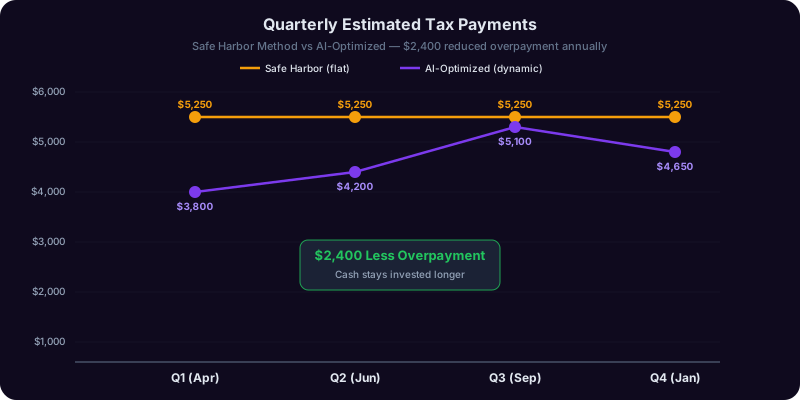
For a freelancer earning $95,000 with variable income, AI-optimized payments save $1,800-$3,200 in cash flow compared to the safe harbor method, without triggering penalties.
Audit Risk Assessment
The IRS audits approximately 0.4% of individual returns, but certain patterns dramatically increase your odds. The IRS examination statistics provide official audit rate data by income level. AI can evaluate your return against known triggers before you file:
- Schedule C losses for three-plus consecutive years: Audit rate jumps to 2.5-4%.
- High deduction-to-income ratio: Deductions exceeding 50% of Schedule C gross income. AI compares your ratios to industry averages.
- Round numbers: Reporting exactly $5,000 in travel suggests estimation. AI tools using bank data produce exact figures automatically.
- Home office deduction: Historically attracts scrutiny. AI verifies your claimed square footage is reasonable.
- Large charitable deductions: Cash donations exceeding 3-5% of AGI draw attention.
Before filing, run your return through an AI audit-risk check. Flag items outside statistical norms, then decide whether to prepare additional documentation or consult a CPA. For retirement planning that factors in tax efficiency, read our 401(k) vs. Roth 401(k) guide.
AI vs. CPA: When to Use Each and When to Use Both
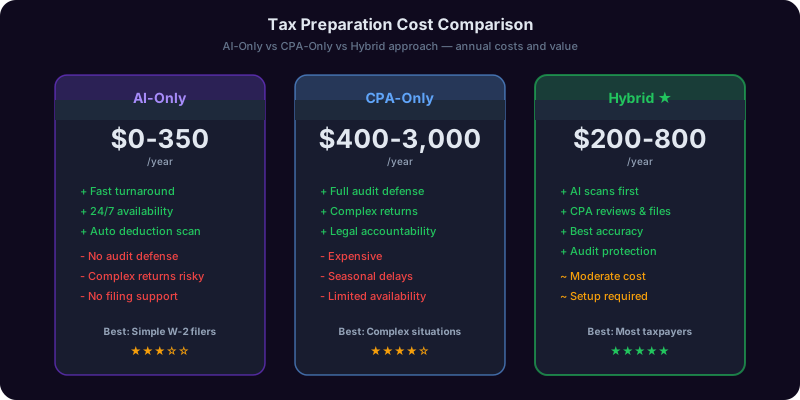
The AI-versus-CPA debate frames the question incorrectly. The real question is which tasks benefit from AI, which require a CPA, and how to combine them for the best result at the lowest cost.
Use AI Alone When:
- Single W-2 with standard deductions. AI or free filing software handles this perfectly. A CPA would charge $200-$400 for the same result. The Finance Copilot can verify your withholding is optimized.
- Estimated quarterly payments. AI excels at ongoing calculations. Let it track income and compute payments.
- Understanding specific tax concepts. Ask the Tax Copilot to explain the QBI deduction or Roth versus traditional contributions.
- Scenario modeling. Should you contribute to a traditional or Roth 401(k)? What is the tax impact of a $15,000 capital gain? AI calculates instantly.
Use a CPA When:
- Multi-state filing. Average CPA cost: $500-$1,200.
- Business entity change. S-corp election, partnership formation. Cost: $1,000-$3,000.
- International income or assets. FBAR, FATCA, foreign tax credits. Cost: $800-$2,500.
- IRS notice or audit letter. You need representation. Cost: $1,500-$5,000+.
- Major life changes. Marriage, divorce, inheritance, business sale.
The Hybrid Approach: Best of Both
The most cost-effective approach for moderately complex situations:
- Year-round: Use AI to track income, categorize expenses, and calculate estimated payments. Cost: $0-$200/year.
- Pre-filing: Use the Tax Copilot to model scenarios, identify deductions, and prepare your tax data. Cost: $0.
- Review: Bring AI-organized data to a CPA for a review-only engagement. Cost: $200-$600 instead of $500-$1,500 for full preparation.
- Filing: The CPA files with their professional signature, providing audit protection.
Total: $200-$800. A survey by AICPA found that 67% of CPA firms now encourage clients to use AI tools for preliminary preparation, reducing overall engagement costs.
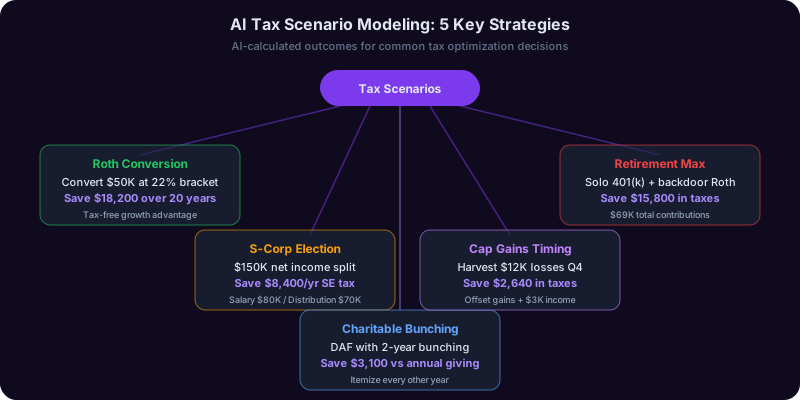
Tax Scenario Modeling: Five Questions AI Answers Better Than Spreadsheets
One of the most underutilized AI tax capabilities is real-time scenario modeling. Instead of spreadsheets or paying a CPA $300/hour for what-if calculations, you get instant answers that directly affect your tax strategy.
Scenario 1: Roth Conversion Timing
You have $85,000 in a traditional IRA and taxable income of $72,000. Converting the full amount pushes you to $157,000, hitting the 24% bracket. Federal tax on the conversion: approximately $16,780. But converting $28,525 this year (filling up the 22% bracket) costs only $6,276. Spreading over three years saves roughly $3,400 versus a single-year conversion.
Scenario 2: S-Corp Election Break-Even
Your sole proprietorship nets $130,000. An S-corp lets you pay $80,000 salary and take $50,000 as distributions:
| Factor | Sole Prop | S-Corp |
|---|---|---|
| SE tax (15.3%) | $18,387 | $12,240 |
| Payroll processing | $0 | $1,800 |
| State franchise tax | $0 | $800 |
| Tax prep complexity | $400 | $1,200 |
| Net annual savings | -- | $3,347 |
The break-even point: approximately $85,000-$90,000 in net self-employment income.
Scenario 3: Charitable Donation Bunching
You donate $8,000/year. With the 2026 standard deduction at $15,700 (single), your $8,000 donations plus $6,500 SALT plus $2,800 mortgage interest totals $17,300 in itemized deductions, barely exceeding the standard deduction. AI models bunching: donate $16,000 this year and $0 next year. This year you itemize at $25,300. Next year, take the standard deduction. Two-year savings from bunching: approximately $1,200 more than even annual donations.
Scenario 4: Capital Gains Timing
You hold stock with a $22,000 unrealized gain. If you expect lower income in 2027 (job transition), waiting to sell in January could push you from the 15% long-term rate to 0%, saving $3,300 in federal tax.
Scenario 5: Stacking Retirement Contributions
You earn $110,000 as a W-2 employee plus $25,000 from freelance work. AI identifies you can contribute $23,500 to your employer 401(k) plus approximately $4,635 to a SEP IRA on freelance income. Combined tax savings at the 24% bracket: $6,752. Most people miss the SEP IRA opportunity on side income. The Tax Copilot specializes in these stacking strategies across income sources.
Building Your AI-Assisted Tax Workflow for 2026 and Beyond
The most effective approach to AI-assisted taxes is not a one-time event during tax season. It is a year-round system that keeps you prepared and ensures you capture every legitimate deduction.
Monthly: 15-Minute AI Check-In
Once a month, review AI-categorized transactions and correct misclassifications. If you use the Tax Copilot, update it on new income sources, large purchases, or life changes. Key tasks: review and approve deductions, flag unusual transactions, update projected annual income, and verify estimated payment amounts.
Quarterly: Estimated Payment and Strategy Review
Aligned with IRS deadlines (April 15, June 15, September 15, January 15):
- Calculate and pay estimated taxes based on AI-computed optimal amounts
- Review deduction categories. Are there personal expenses that should run through your business?
- Run scenario models. Is this the quarter for an extra retirement contribution or income deferral?
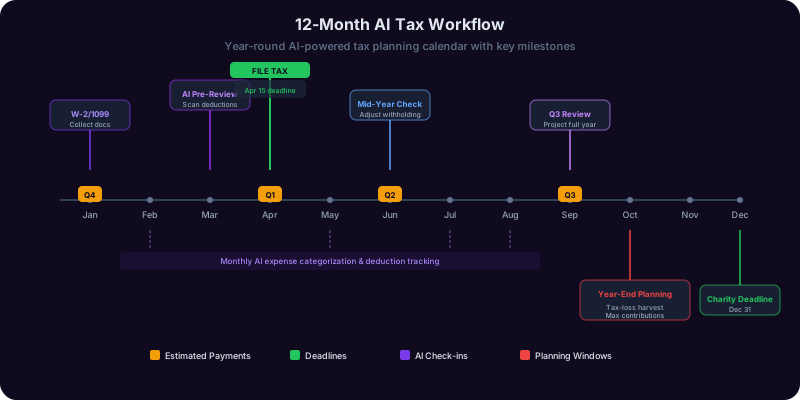
October-December: Year-End Tax Planning
This is where AI scenario modeling delivers the highest value. With 9-10 months of data, AI can project your full-year liability and identify optimization strategies:
- Retirement contributions: 401(k) by December 31, SEP IRA by filing deadline including extensions
- Tax-loss harvesting: Sell investments at a loss to offset gains, accounting for wash-sale rules
- Charitable giving: Donate appreciated stock instead of cash to avoid capital gains while claiming the full market value
- Income timing: Defer December invoices to January if next year's bracket will be lower
January-April: Filing Season
With year-round tracking, filing becomes confirmation rather than discovery:
- Gather tax documents (W-2s, 1099s, 1098s) and verify against AI records
- Run a final AI audit-risk assessment on your completed return
- If complex, bring AI-organized data to a CPA for review
- File by April 15 or file an extension (extends filing to October 15 but not the payment deadline)
The Legal Copilot can help you understand implications of any IRS notices after filing. The Finance Copilot provides year-round guidance that integrates with your tax strategy.
This article is for informational purposes only and does not constitute tax advice. Tax laws change frequently. Consult a qualified tax professional for guidance specific to your situation.
Frequently Asked Questions
Recommended Copilots
Recommended Copilots
Model tax scenarios, calculate estimated payments, and identify deductions specific to your filing situation
Try Free →Integrate tax planning with broader financial strategy including investments, retirement, and budgeting
Try Free →Understand IRS correspondence, audit procedures, and the legal implications of tax decisions
Try Free →Related Articles
Get Answers From the Tax Copilot
The Tax Copilot models deduction strategies, calculates estimated payments, and flags audit risk factors so you file with confidence. Ask it anything from S-corp election math to Roth conversion timing.