Kids and AI in 2026: The Numbers Parents Need to Know
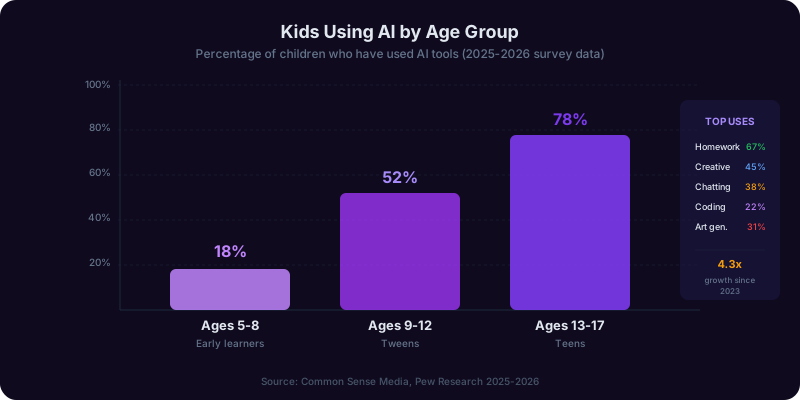
Generative AI has gone from a novelty to an everyday fixture in children's lives faster than any previous technology wave. Social media took roughly a decade to reach saturation among teens. AI chatbots accomplished the same in under three years. By mid-2026, survey data from the Common Sense Media annual family technology report shows that 73% of children between ages 8 and 17 have used a generative AI tool at least once, and 41% use one weekly or more often. Among high schoolers specifically, that weekly figure rises to 62%.
The adoption curve has been steeper than most parents anticipated. In 2023, ChatGPT was a curiosity that older teens experimented with. By 2025, AI tools had been embedded into homework apps, gaming platforms, social media filters, and even children's creative writing tools. The result is that many children are interacting with large language models daily, often without their parents realizing it, because the AI layer is embedded invisibly into products they already use.
Meanwhile, parental preparedness lags dramatically behind. A 2026 Pew Research survey found that only 29% of parents felt confident they understood enough about AI to guide their children's use of it. This confidence gap is not about intelligence or effort. It reflects the genuine difficulty of governing a technology that is evolving monthly, embedded in dozens of consumer products, and accessible to any child with a web browser.
Schools have responded unevenly. According to data compiled by the International Society for Technology in Education (ISTE), approximately 67% of U.S. school districts had some form of AI use policy by spring 2026, but these policies ranged from outright bans to full integration with AI tutoring platforms. Only 22% of districts had updated their policies within the preceding six months, meaning the majority of school AI guidelines were written before the most recent generation of tools existed.
This patchwork leaves parents as the primary line of defense. Whether your child is 5 or 17, you need a practical framework for deciding what AI access looks like in your household, how to protect privacy, when to say yes, and when to say not yet. That is what this guide provides.
Age-by-Age Guide: AI Boundaries from Kindergarten to High School
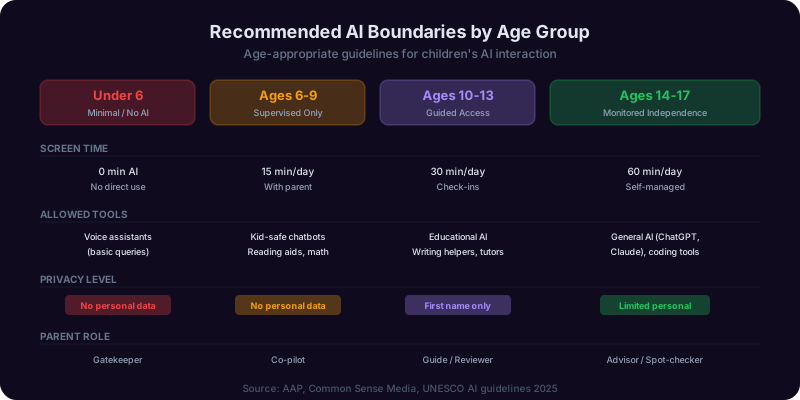
Children's cognitive development, emotional maturity, and academic needs vary enormously across age groups. The AI boundaries that work for a 15-year-old would be reckless for an 8-year-old, and the restrictions appropriate for a second grader would be counterproductive for a high school junior. Here is a research-informed framework organized by developmental stage.
Ages 5 to 8: The Protection Stage
Children in this age range are still developing the cognitive skills to distinguish between real and fictional, reliable and unreliable. They cannot evaluate AI output critically, and they should not be expected to. The American Academy of Pediatrics (AAP) recommends that screen-based learning tools for this age group be used only with a parent or caregiver co-present. For AI specifically: no access to general-purpose chatbots. Curated educational apps with embedded AI (adaptive math games, phonics tools) are acceptable in supervised sessions of 15 to 20 minutes. The AI in these tools should be invisible to the child, driving adaptive difficulty rather than generating open-ended text responses.
Ages 9 to 12: The Guided Exploration Stage
This is the critical transitional window. Children aged 9 to 12 are increasingly curious, have better reading comprehension, and face growing academic demands. Many will encounter AI through peers even if parents have not introduced it. The goal at this stage is structured access with active supervision. Allow purpose-built educational AI platforms with parent dashboards. Introduce the concept that AI can be wrong. Establish the attempt-first rule: try independently for 5 to 10 minutes before asking AI. Limit sessions to 20 to 30 minutes. Review AI interactions weekly.
Ages 13 to 15: The Structured Independence Stage
Teenagers in this range are developing abstract reasoning and should be learning to evaluate information sources critically. AI use becomes increasingly difficult to monitor or restrict entirely. The effective approach shifts from gatekeeping to coaching. Create a family AI agreement that specifies which tools are approved, what constitutes cheating, and what the consequences are for violations. Allow supervised access to general-purpose AI with clear guidelines. Require that AI-assisted homework be disclosed to teachers when the school requests it. Have monthly conversations about what they are using AI for and what they notice about its limitations.
Ages 16 to 17: The Guided Autonomy Stage
Older teens are preparing for college and careers where AI proficiency will be expected. Overly restrictive policies at this stage can be counterproductive, preventing them from developing the judgment they will need when parental oversight disappears. The emphasis here is on self-regulation and ethical reasoning. Trust them with broader access while maintaining the homework-test gap monitoring. Discuss college AI policies and workplace AI ethics. Encourage them to teach you what they have learned about AI tools. Let them make supervised mistakes now rather than unsupervised ones in college.
| Age Group | Access Level | Parent Role | Session Limit | Key Rule |
|---|---|---|---|---|
| 5-8 | Curated apps only | Co-present | 15-20 min | No chatbots |
| 9-12 | Educational platforms | Weekly review | 20-30 min | Attempt first |
| 13-15 | Approved tools with agreement | Monthly coaching | Flexible | Disclose use |
| 16-17 | Broad with integrity focus | Advisory | Self-managed | Own your work |
AI and Homework: Preventing Cheating Without Starting a War
Academic integrity is the issue that keeps parents up at night. The hard truth is that AI makes cheating trivially easy and nearly impossible to detect reliably. AI-generated text detectors remain inaccurate, with false positive rates between 9% and 26% depending on the tool and subject matter. Schools that rely on detection tools end up punishing students who write fluently while missing students who use AI and then deliberately introduce errors to defeat detectors. It is a losing strategy.
A more productive approach starts with understanding why students turn to AI for homework. Research from Stanford's Graduate School of Education identifies three primary motivations: time pressure from excessive workload, confusion about the material with no readily available help, and low perceived value of the assignment. Each motivation suggests a different intervention. If your child is overwhelmed, the conversation should be about workload management and communication with teachers. If they are confused, the issue is access to legitimate help. If they do not see the point, the discussion is about learning goals versus grade optimization.
The Tutor Test: A Family Framework
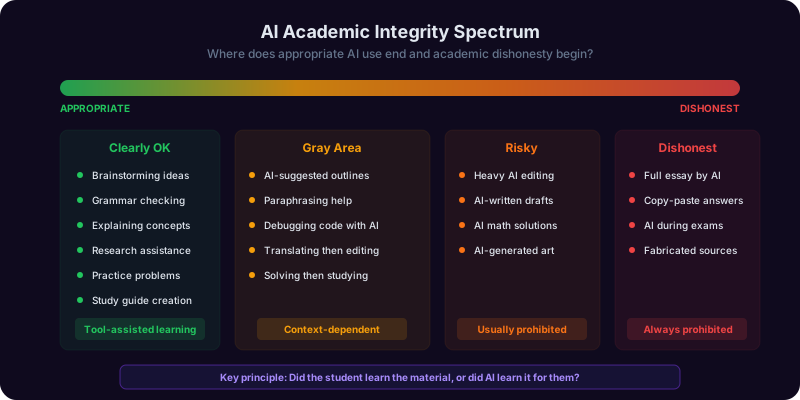
Before using AI for any school task, your child should apply a simple filter: Would I ask a human tutor to do this for me, or to help me understand how to do it myself? If the answer is the former, that is cheating regardless of whether a human or AI does it. This framework is powerful because it does not require policing specific tools or behaviors. It anchors the decision in the child's own judgment about learning versus shortcutting.
The Homework-Test Gap: Your Best Diagnostic Tool
The single most reliable indicator of AI misuse is a growing gap between homework performance and proctored test performance. If your child consistently earns A grades on homework but C grades on tests, that discrepancy deserves a direct, non-accusatory conversation. Frame it around concern rather than suspicion: "I notice your homework grades are strong but your test scores are lower than I would expect. Let us figure out what is happening and how to help."
What to Do When You Catch AI Misuse
If you discover your child has used AI to complete assignments dishonestly, avoid the temptation to treat it as a moral catastrophe. Studies of academic integrity interventions show that punitive approaches alone do not change behavior and often increase concealment. More effective: acknowledge the temptation, discuss the real-world consequences of not learning the material, apply a natural consequence (redo the assignment without AI), and adjust the family AI agreement to provide more structure. The goal is building internal motivation, not external compliance.
School policies vary widely. As a parent, your job is to ensure your child understands their school's specific rules and that the family standard may be higher than the school minimum. Check your district's AI policy page, attend parent information sessions, and ask teachers directly how they expect AI to be used in their classroom.

Get Answers From the Parenting Copilot
Copilotly's Parenting Copilot helps you evaluate AI tools for child safety, build family technology agreements, navigate school AI policies, and set age-appropriate boundaries. Pair it with the Mental Health Copilot for guidance on your child's emotional wellbeing in the digital age.
Protecting Your Child's Data: COPPA, Privacy Risks, and What to Demand
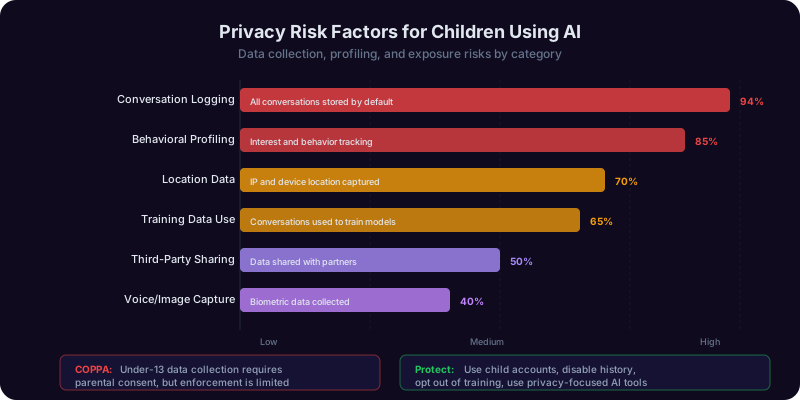
When your child types a question into an AI chatbot, that text is sent to a company's servers, processed, stored, and in many cases used to improve future AI models. For children under 13, the Children's Online Privacy Protection Act (COPPA) requires verifiable parental consent before companies can collect personal information. But the enforcement reality is troubling.
A 2025 Federal Trade Commission (FTC) enforcement sweep found that 38% of AI-powered apps marketed to children either did not obtain proper parental consent or obtained it through mechanisms so perfunctory they did not meet the legal standard. Several major AI providers set a minimum age of 13 in their terms of service but have no meaningful age verification beyond a self-reported birthdate. Children routinely bypass these gates by entering false ages, and the companies have little financial incentive to build more robust verification.
What Data AI Tools Collect from Children
The data exposure is broader than most parents realize. When a child interacts with a generative AI tool, the company typically collects: every prompt and response (including homework assignments, personal questions, creative writing, and emotional disclosures), device identifiers and IP addresses, usage patterns including time of day and session duration, and in some cases voice data if the tool supports speech input. A child who uses an AI chatbot regularly for a year generates a detailed profile of their academic strengths and weaknesses, emotional concerns, creative interests, and social dynamics. This data, even when anonymized, can be re-identified with relative ease.
A Parent's Privacy Checklist
Before allowing your child to use any AI tool, investigate the following:
- Age requirement: Does the tool have a minimum age? How is it enforced?
- Data training: Are user conversations used to train future AI models? Can you opt out?
- Data sharing: Is information shared with advertisers, data brokers, or third parties?
- Data retention: How long is conversation data stored? Can it be deleted on request?
- Parent dashboard: Can you review your child's AI interactions?
- COPPA compliance: Is the company explicitly certified or audited for COPPA compliance?
Practical Protection Strategies
Use a family email address you control rather than your child's personal email when creating AI accounts. Enable any available parental controls and review permissions regularly. Teach children never to share their real name, school name, address, phone number, or photos of themselves with any AI tool. For children under 13, strongly prefer COPPA-compliant educational platforms over general-purpose chatbots. Consider using the Copilotly Parenting Copilot to evaluate the privacy policies of specific tools your child wants to use, as it can help you parse dense terms of service into plain language.
Teaching Kids to Think Critically About AI Outputs
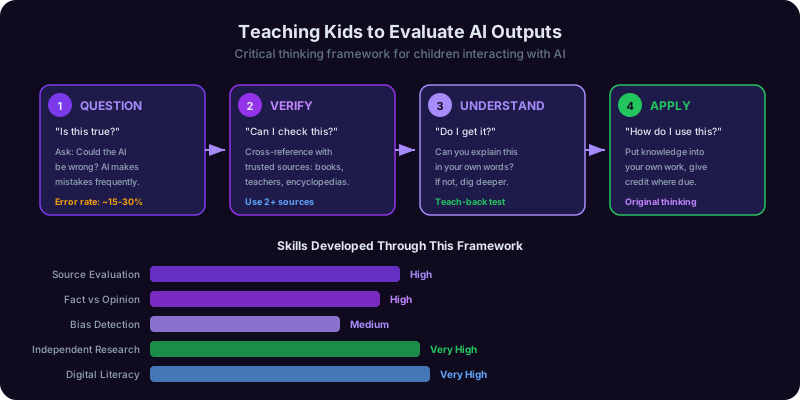
The most valuable skill you can teach your child about AI is not how to use it. It is how to evaluate and question what it produces. Large language models generate text that sounds confident, authoritative, and well-structured regardless of whether the underlying content is accurate. Adults with subject matter expertise struggle to spot AI errors. Children, who are still building their knowledge base, are especially vulnerable to accepting AI output at face value.
Why Kids Are Particularly Susceptible
Research on children's evaluation of digital information shows that younger children rely heavily on surface credibility cues: if something looks professional and reads fluently, they assume it is correct. This is the exact profile of AI output. A 2025 study published in the Journal of Educational Psychology found that students aged 10 to 14 accepted AI-generated explanations as correct 87% of the time, even when researchers had deliberately introduced factual errors. By comparison, the same students accepted textbook explanations at a rate of 91%, meaning AI output was trusted almost as much as vetted educational material.
This is not a technology problem. It is a critical thinking development challenge that AI has made urgent.
The FACT Check Framework for Families
Teach your child a simple evaluation process for any AI output:
- F - Find the claim: What specific factual claim is the AI making?
- A - Ask for sources: Can the AI provide a source? Does that source actually exist and say what the AI claims?
- C - Cross-reference: Does a second, non-AI source confirm the information?
- T - Test with what you know: Does this match what you have learned in class or read in your textbook?
Practical Exercises by Age
Ages 8-10: Play the "AI or Real" game. Give your child a mix of AI-generated facts and real facts about a topic they enjoy (dinosaurs, space, animals). See if they can spot the made-up ones. This builds the habit of questioning rather than accepting.
Ages 11-13: Ask your child to fact-check an AI response about a topic they studied in school. When the AI gets something wrong, discuss why it might have made that error and what it reveals about how AI works.
Ages 14-17: Have your child ask AI about a controversial topic and then identify the perspective, assumptions, and potential biases in the response. Compare how different AI tools respond to the same question. This builds the analytical skills they will need for college and beyond.
The Deeper Lesson
Critical evaluation of AI is really just information literacy applied to a new medium. The underlying skills, questioning sources, cross-referencing claims, recognizing bias, and tolerating uncertainty, are the same skills that matter for evaluating news articles, social media posts, and advertising. AI gives you a compelling reason to teach these skills early, and the AI tutoring guide covers how to extend this approach to academic tools specifically.
Screen Time in the AI Age: Updated Guidelines and Practical Strategies
The screen time debate has always been fraught, but AI has added a new layer of complexity. Parents who spent years limiting gaming and social media now face arguments that screen time spent with AI is educational and therefore exempt from limits. The reality is more nuanced than either "all screen time is harmful" or "AI screen time is fine."
What the Updated Research Shows
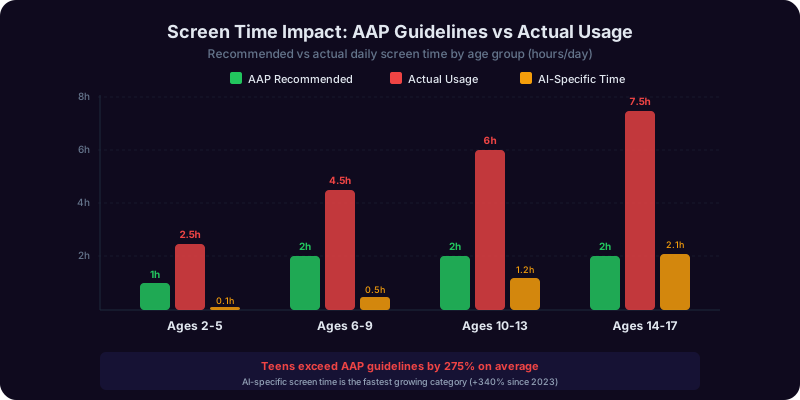
The American Academy of Pediatrics revised its media use guidelines in late 2025 to create a three-tier framework: passive consumption (watching videos, scrolling social media), interactive engagement (educational games, creative tools, AI tutoring), and communicative use (video calls, collaborative projects). Interactive engagement, which includes most AI tutoring, has significantly fewer negative associations than passive consumption. However, the AAP still recommends time limits even for interactive use because extended screen sessions of any type displace physical activity, face-to-face social interaction, and sleep.
A 2026 longitudinal study tracking 4,200 children aged 8 to 14 found that those who spent more than 45 minutes per day on AI-assisted learning tools showed increased difficulty transitioning to offline activities, higher frustration tolerance thresholds (requiring more stimulation for engagement), and measurable sleep disruption when AI use occurred within two hours of bedtime.
Practical Screen Time Strategies
Separate AI time from entertainment time. Create distinct categories in your family's screen time budget. AI tutoring should not eat into recreational screen time or replace outdoor play, and recreational screen time should not masquerade as AI tutoring.
Set session limits, not just daily totals. A 25-minute focused AI tutoring session produces better learning outcomes than a 60-minute session where attention wanders. Use a visible timer and enforce breaks.
Create AI-free zones and times. Bedrooms, meal times, and the hour before bed should be AI-free for all family members, including adults. Modeling matters more than rules.
Watch for displacement effects. If your child is spending less time reading physical books, playing with friends, engaging in unstructured creative play, or being physically active since they started using AI tools, the total technology time needs to come down regardless of how educational the AI use is.
The 3-2-1 rule for school nights: No more than 30 minutes of AI-assisted learning, 20 minutes of recreational screen time, and 10 minutes of screen-free transition before homework without any technology.
For personalized screen time guidance based on your child's age and temperament, the Copilotly Parenting Copilot can help you build a customized family media plan that accounts for AI specifically.
Safe AI Tools for Kids: What to Use and What to Avoid
Not all AI tools are created equal when it comes to child safety. The difference between a purpose-built educational AI and a general-purpose chatbot is comparable to the difference between a children's library and the open internet. Both contain useful information, but only one was designed with children's developmental needs and safety in mind.
What Makes an AI Tool Safe for Children
Evaluate any AI tool across five safety dimensions before allowing your child to use it:
- Content guardrails: Can the tool be prompted to generate violent, sexual, or otherwise age-inappropriate content? Test this yourself before giving access. A Common Sense Media audit found that 44% of AI tools marketed for education could be manipulated into generating inappropriate content through creative prompting.
- Pedagogical design: Does the tool teach through guided inquiry, or does it simply deliver answers? Tools that ask what the student has already tried before providing help build learning. Tools that deliver complete solutions build dependency.
- Data practices: Is the tool COPPA compliant? Does it minimize data collection? Can parents access and delete data?
- Parent visibility: Does the platform provide a parent dashboard where you can review interactions, set time limits, and monitor usage patterns?
- Accuracy and honesty: Does the tool acknowledge its limitations? Does it say "I am not sure" when appropriate, or does it generate confident-sounding answers regardless of accuracy?
Categories of AI Tools for Children
| Category | Safety Level | Examples | Best For |
|---|---|---|---|
| Purpose-Built Educational AI | Highest | Khanmigo, Duolingo Max, Photomath | Structured daily learning, ages 8+ |
| School-Provided AI | High | Google Classroom AI, Canvas AI | Curriculum-aligned work |
| Parental Copilot Tools | High | Copilotly Parenting Copilot | Parent guidance on AI decisions |
| Subject-Specific AI | Moderate | Grammarly, Wolfram Alpha, Quizlet AI | Single-subject practice, ages 12+ |
| General-Purpose AI | Low | ChatGPT, Claude, Gemini | Older teens with clear guidelines |
| Social AI / AI Companions | Lowest | Character.AI, Replika | Not recommended for minors |
Tools to Actively Avoid
AI companion and social chatbots designed for open-ended emotional conversation are the highest-risk category for children. These tools are designed to form parasocial relationships, and multiple incidents in 2025 and 2026 have documented children developing unhealthy emotional dependencies on AI chatbot "friends" or receiving harmful advice from AI characters that lacked appropriate safeguards. The Common Sense Media 2026 AI ratings guide specifically flags these tools as inappropriate for anyone under 16.
For help evaluating any specific AI tool your child wants to use, Copilotly's Parenting Copilot can walk you through the safety evaluation. For academic tool selection specifically, our AI tutoring guide provides detailed platform comparisons.
How to Talk to Your Kids About AI: Conversation Scripts by Age
The single most protective factor in children's safe AI use is not a parental control app or a school policy. It is an open, ongoing conversation between parent and child about what AI is, what it can and cannot do, and how to use it wisely. Research on digital citizenship consistently shows that children who have regular technology conversations with their parents make better decisions than children whose parents rely solely on rules and restrictions.
The Foundation Conversation (All Ages)
Every child using AI needs to understand three foundational concepts: AI is a tool created by people, not a person or a friend. AI can be wrong, even when it sounds very confident. AI does not understand things the way people do; it predicts what words should come next based on patterns in data. Adjust the complexity of these explanations for your child's age, but do not skip them. Even a 6-year-old can grasp that the computer is "guessing" rather than "knowing."
Ages 5-8: "The Smart Guessing Machine"
"You know how you guess what comes next when we read a story together? AI does something similar, but with billions of stories and facts. It is really good at guessing, but sometimes it guesses wrong, just like when you guess a word that rhymes but is not the right word. That is why we always check what the computer says, the same way we check if our puzzle pieces really fit."
Ages 9-12: "The Powerful Tool That Needs a Smart User"
"AI is like the most powerful calculator ever made, except it works with words and ideas, not just numbers. And just like a calculator gives you a wrong answer if you type in the wrong numbers, AI gives you wrong answers if you ask the wrong questions, or sometimes even when you ask the right questions. The difference between a smart AI user and a lazy AI user is not which tool they use. It is whether they check the answer, understand why it is right, and can do it themselves next time."
Ages 13-15: "Your Reputation and Your Brain"
"Let me be straightforward with you. AI can write your essays, solve your math problems, and do your homework. And it is not detectable, so you probably will not get caught. But here is what actually happens: the grade goes on your transcript, but the knowledge does not go in your brain. Every time you let AI do work you should be doing, you are trading a real skill for a fake grade. When you get to college or a job interview or a situation where you need that skill and AI is not available, you will not have it. I would rather see a B you earned than an A that AI earned."
Ages 16-17: "The Ethics You Will Own"
"In college and your career, AI will be everywhere. Nobody will tell you when to use it and when not to. You will have to make those decisions yourself, and the consequences will be real: academic expulsion, professional reputation, or simply not being competent at your job. The habits you build now are the ones you will carry forward. Let us talk about how you are using AI, not because I want to police you, but because I want you to think through these decisions while you still have a safety net."
Keeping the Conversation Going
A single talk is not sufficient. Build AI into your regular family conversations. Ask your child to show you what they used AI for that week. Share your own AI experiences, both positive and negative. When an AI news story breaks, discuss it at dinner. The families that navigate AI most successfully treat it as a recurring dialogue, not a one-time lecture. Our mental health and AI guide covers the emotional dimensions of AI use for parents who are also concerned about their child's wellbeing in the digital age.
Frequently Asked Questions
Recommended Copilots
Recommended Copilots
The Parenting Copilot helps you evaluate AI tools for child safety, build age-appropriate technology agreements, and navigate the evolving digital landscape with confidence.
Try Free →The Mental Health Copilot provides guidance on managing children's emotional wellbeing in the digital age, including screen time anxiety and healthy technology relationships.
Try Free →Related Articles
Get Answers From the Parenting Copilot
Copilotly's Parenting Copilot helps you evaluate AI tools for child safety, build family technology agreements, navigate school AI policies, and set age-appropriate boundaries. Pair it with the Mental Health Copilot for guidance on your child's emotional wellbeing in the digital age.