The 48-Hour Interview Prep Timeline: A Structured System That Leaves Nothing to Chance
Here is the uncomfortable truth about interview preparation: most people do not actually prepare. They glance at the job posting the night before, Google a few common questions, pick out an outfit, and call it done. Then they walk into the interview, get asked something they did not expect, and spend the rest of the day replaying the conversation and wishing they had said something different. Try our AI interview prep tool for step-by-step help.
The candidates who consistently get offers do something fundamentally different. They follow a system. Not because they are obsessive, but because preparation removes anxiety, and the absence of anxiety is what lets your actual competence show through. A 2025 study published in the Journal of Vocational Behavior found that candidates who followed a structured preparation process were 47% more likely to receive an offer than those who prepared ad hoc, even when controlling for qualifications and experience.
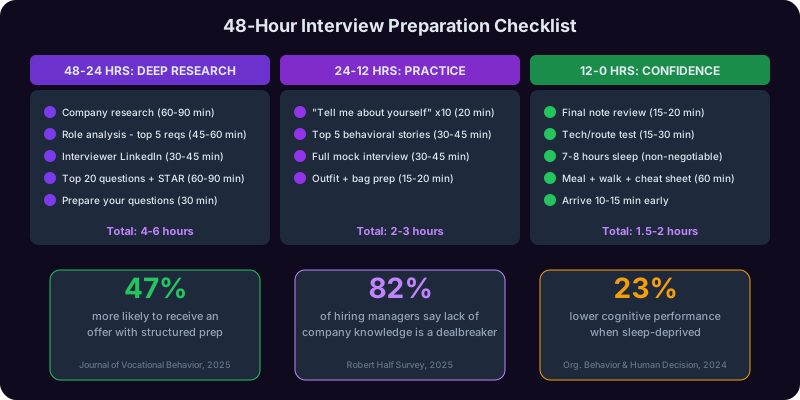
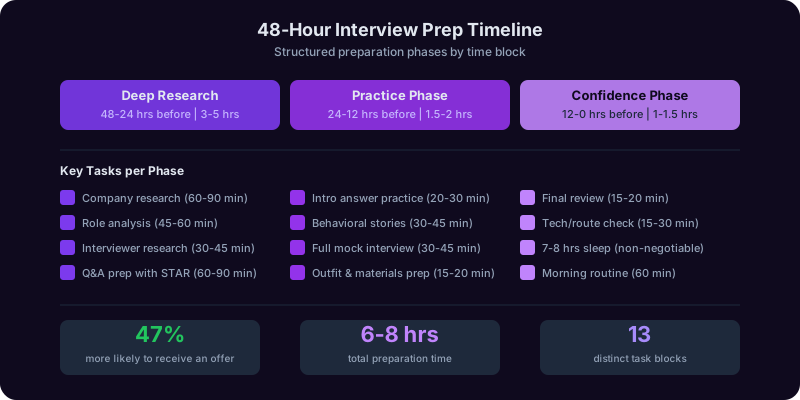
This is your 48-hour preparation timeline. Start it the moment you confirm the interview.
48-24 Hours Before: Deep Research Phase
| Time Block | Task | Duration |
|---|---|---|
| Block 1 | Company research: financials, strategy, culture, recent news (see Section 2) | 60-90 min |
| Block 2 | Role analysis: parse the job description line by line, identify the top 5 requirements, and prepare a specific example for each | 45-60 min |
| Block 3 | Interviewer research: LinkedIn profiles of everyone you are meeting, recent posts, shared connections, mutual interests | 30-45 min |
| Block 4 | Prepare answers for the top 20 common questions using STAR and CAR frameworks (see Section 3) | 60-90 min |
| Block 5 | Prepare your questions for the interviewer, customized by round (see Section 4) | 30 min |
24-12 Hours Before: Practice Phase
| Time Block | Task | Duration |
|---|---|---|
| Block 6 | Practice your "tell me about yourself" answer out loud 5-10 times until it feels natural, not memorized | 20-30 min |
| Block 7 | Run through your top 5 behavioral stories out loud (situation, action, result for each) | 30-45 min |
| Block 8 | Do a full mock interview with a friend, family member, or the Interview Copilot | 30-45 min |
| Block 9 | Select your outfit and prepare your bag: copies of resume, notebook, pen, portfolio if applicable | 15-20 min |
12-0 Hours Before: Confidence Phase
| Time Block | Task | Duration |
|---|---|---|
| Block 10 | Review your notes one final time. Do not cram. Just refresh your memory on key talking points | 15-20 min |
| Block 11 | If virtual: test your technology setup (see Section 6). If in-person: confirm the address, plan your route, and add a 20-minute buffer for unexpected delays | 15-30 min |
| Block 12 | Get 7-8 hours of sleep. This is not optional. A 2024 study in Organizational Behavior and Human Decision Processes found that sleep-deprived candidates scored 23% lower on cognitive performance metrics during interviews, including problem-solving and verbal fluency | N/A |
| Block 13 (morning of) | Eat a real meal. Exercise or take a brisk walk for 15-20 minutes. Review your one-page cheat sheet of key talking points. Arrive 10-15 minutes early, not 30 minutes early | 60 min |
Why This System Works
The 48-hour timeline works because it separates research from practice from confidence. Most candidates try to do all three the night before, which means they do none of them well. By spacing the work across two days, each phase builds on the previous one:
- Research gives you raw material. You cannot practice answering questions if you do not know what the company does, what the role requires, and who you are meeting.
- Practice turns raw material into muscle memory. Knowing the answer in your head and being able to deliver it out loud under pressure are two completely different skills. The practice phase bridges that gap.
- The confidence phase eliminates logistics anxiety. When you know your outfit is ready, your route is planned, your technology works, and your key talking points are fresh in your mind, the only thing left to think about is performing. And that is when you perform your best.
A common mistake is skipping the practice phase because it feels awkward to talk to yourself. Get over it. Every professional athlete warms up before the game. Every musician rehearses before the concert. Your interview is your performance, and the people who practice out loud outperform those who only practice in their heads. The Interview Copilot makes this easier by acting as a realistic practice partner that gives you feedback on content, delivery, and timing without the awkwardness of asking a friend to role-play.
Researching the Company: 10 Things to Look Up and Where to Find Them
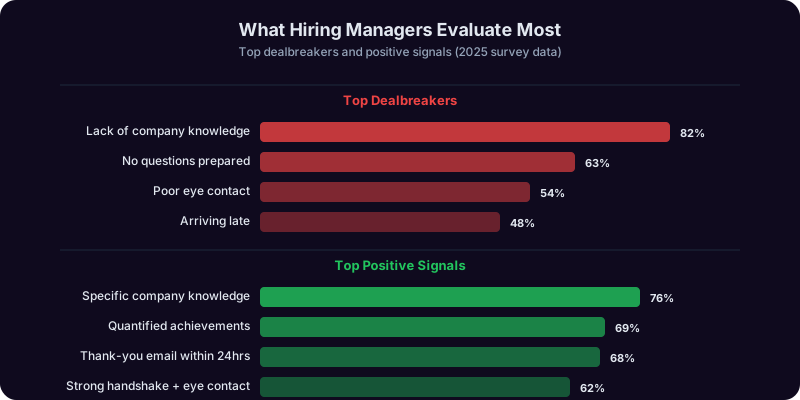
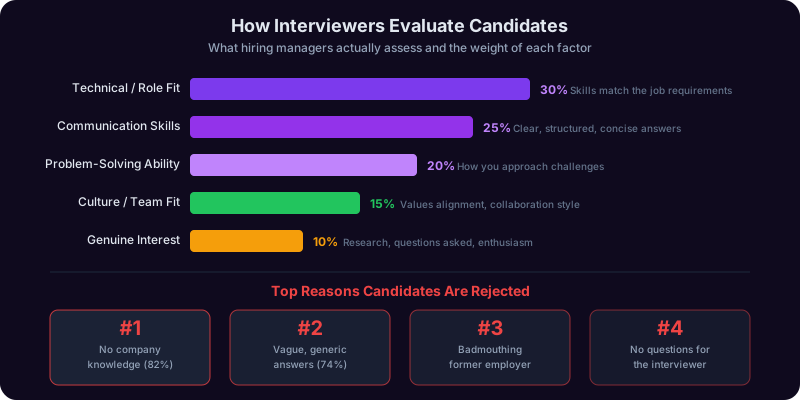
"Have you done any research on our company?" is not a question interviewers ask out of vanity. It is a screening test. Candidates who cannot articulate what the company does, who its customers are, or what challenges it faces signal that they are applying indiscriminately. Candidates who demonstrate genuine knowledge signal that they are intentional, thorough, and actually interested. A 2025 Robert Half survey found that 82% of hiring managers said lack of company knowledge was a dealbreaker, ranking it above poor eye contact and arriving late.
Here are the 10 things you should know before every interview, along with exactly where to find each one.
1. What the Company Does (And for Whom)
This sounds obvious, but you would be surprised how many candidates fumble it. You need to be able to explain the company's core product or service, who their primary customers are, and what problem they solve, in two sentences or fewer. Do not just read the "About Us" page. Go deeper.
Where to find it: Company website (product pages, not just the homepage), Crunchbase, Pitchbook, recent earnings calls or investor presentations for public companies. For startups, check their pitch deck on SlideShare or their Y Combinator profile if applicable.
2. Recent News and Major Announcements
Check what has happened in the last 90 days. New product launches, funding rounds, acquisitions, leadership changes, partnerships, or market expansions. Referencing a recent event in your interview shows you are current, not just prepared.
Where to find it: Google News (search "[Company name]" and filter to past 3 months), the company's press room or blog, TechCrunch, Bloomberg, or industry-specific publications.
3. Financial Health and Growth Trajectory
For public companies, check revenue trends, profitability, and stock performance. For private companies, check funding rounds, valuation trends, and investor quality. You do not need to be a financial analyst, but knowing whether the company is growing, flat, or struggling informs your entire interview strategy.
Where to find it: Public companies: SEC filings (EDGAR), Yahoo Finance, Macrotrends. Private companies: Crunchbase, PitchBook, CB Insights, or recent press coverage of funding rounds.
4. The Competitive Landscape
Know who the company's top 2-3 competitors are and what differentiates this company from them. Being able to say "I know you compete with X and Y, and what stood out to me about your approach is Z" demonstrates market awareness that most candidates lack.
Where to find it: G2 or Capterra (for software), industry analyst reports, the company's own marketing materials (they often position against competitors implicitly), and Google searches like "[Company] vs [Competitor]."
5. Company Culture and Values
Most companies publish their values on their website. Read them, but do not stop there. Look at how the culture actually manifests. Glassdoor reviews (focus on patterns, not individual complaints), LinkedIn posts from current employees, the company's social media presence, and any "day in the life" content they have published.
Where to find it: Glassdoor, LinkedIn (search for current employees and read their posts), the company's careers page, Instagram or TikTok accounts for culture content, and Comparably for culture ratings.
6. The Interviewer's Background
Look up every person you are meeting with on LinkedIn. Read their career history, recent posts, shared connections, and any mutual interests. This is not stalking. It is preparation. Knowing that your interviewer spent 8 years at Google before joining this startup tells you something about the kind of rigor they will expect. Knowing they recently posted about a industry trend gives you a natural conversation topic. Try our AI business plan generator for step-by-step help.
Where to find it: LinkedIn (view their profile, read their activity feed), Twitter/X, personal websites or blogs, conference talks on YouTube, and podcast appearances.
7. The Job Description (Deeply Parsed)
Do not just skim the job posting. Deconstruct it. Identify the top 5 requirements and prepare a specific example from your experience that maps to each one. Highlight any repeated themes (if "cross-functional collaboration" appears three times, that is a major priority). Note the qualifications listed as "required" versus "preferred" and be ready to address any gaps.
Where to find it: The original job posting, but also check if the company has posted different versions on LinkedIn, Indeed, and their own careers page. Sometimes the versions differ, and the differences reveal additional priorities.
8. The Team Structure
Understand where the role sits in the organization. Who does the role report to? What team is it part of? How big is the team? Is this a backfill for someone who left, a new role due to growth, or a restructured position? Each scenario implies different expectations for the person they hire.
Where to find it: LinkedIn (search for people with similar titles at the company), the job posting (sometimes mentions the team), and you can ask the recruiter directly in the phone screen.
9. The Industry Trends Affecting the Company
Every company operates within an industry that has its own trends, regulations, and disruptions. Knowing the 2-3 biggest forces shaping the industry shows that you think beyond the role and understand the business context. For example, if you are interviewing at a healthcare company, know about the shift to value-based care. If it is a fintech, understand the current regulatory landscape.
Where to find it: Industry reports from McKinsey, Deloitte, or PwC (many are free), trade publications, analyst reports, and recent conference keynotes on YouTube.
10. Their Technology Stack (For Technical Roles)
If you are interviewing for a technical role, know what technologies the company uses. This helps you tailor your examples and shows that you have done your homework. Even for non-technical roles, knowing whether the company is cloud-native, uses Salesforce versus HubSpot, or builds on AWS versus Azure can inform your conversation.
Where to find it: StackShare, BuiltWith, job postings (which often list technologies), GitHub (check the company's open-source repositories), and engineering blog posts.
How to Use Your Research in the Interview
The goal is not to dump everything you learned into the conversation. It is to weave in 3-5 specific references naturally. For example:
- "I noticed you recently expanded into the European market, which aligns with my experience managing GDPR compliance at my current company."
- "I read that your engineering team just migrated to microservices. I led a similar migration at [Previous Company], and I would love to talk about the patterns we found most effective."
- "I saw that [Interviewer Name] recently posted about [topic]. That resonated with me because..."
Each of these references signals preparation without being performative. The Career Copilot can help you structure your research into a one-page interview preparation brief, and the Interview Copilot can help you practice weaving your research into natural conversation during mock interviews.
Preparing for Common Questions: Top 20 Questions With Answer Frameworks
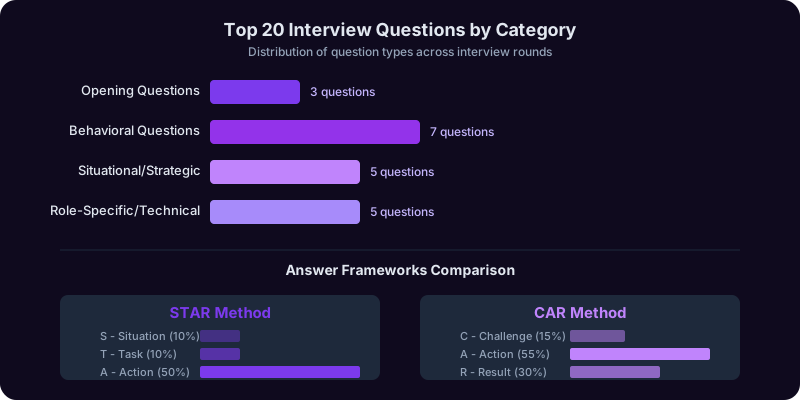
There is no such thing as a surprise interview question. There are only questions you did not prepare for. The vast majority of interviews draw from the same pool of 20-30 questions, and if you have strong answers ready for the top 20, you will be prepared for roughly 90% of what any interviewer throws at you. The key is not memorizing scripts. It is having a reliable framework that lets you construct a strong answer for any behavioral or situational question on the spot.
The STAR Method: Your Primary Framework
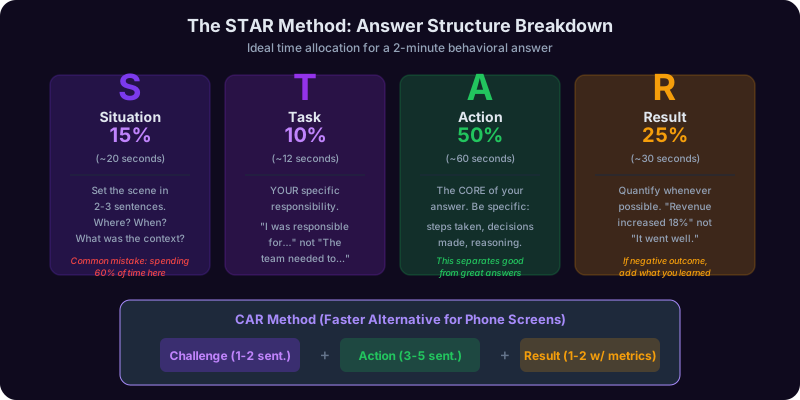
The STAR method is the gold standard for behavioral interview questions (any question that starts with "Tell me about a time..." or "Give me an example of..."). It stands for:
- Situation: Set the scene in 2-3 sentences. Where were you? What was happening? What was the challenge or context? Keep this brief. The biggest mistake people make is spending 60% of their answer on the setup and rushing the result.
- Task: What was your specific responsibility or goal? This clarifies your role in the story. "The team needed to..." is weaker than "I was responsible for..."
- Action: What did you actually do? This is the core of your answer and should take 40-50% of your response time. Be specific about the steps you took, the decisions you made, and the reasoning behind them. Avoid vague phrases like "I worked hard" or "I collaborated with the team." Instead: "I built a stakeholder alignment matrix, identified the three decision-makers who needed to approve the project, and scheduled individual meetings with each to understand their concerns before the group presentation."
- Result: What happened? Quantify whenever possible. "We increased revenue by 18%" is strong. "It went well" is worthless. If the outcome was not entirely positive, explain what you learned and what you would do differently. Interviewers respect self-awareness more than a perfect track record.
The CAR Method: A Faster Alternative
For shorter answers or when the STAR method feels too elaborate, use the CAR method:
- Challenge: What was the problem? (1-2 sentences)
- Action: What did you do? (3-5 sentences)
- Result: What was the outcome? (1-2 sentences with metrics)
CAR is essentially STAR with the Situation and Task combined into a single "Challenge" statement. Use it for phone screens, rapid-fire questions, or when you sense the interviewer wants a concise answer.
The Top 20 Questions and How to Approach Each One
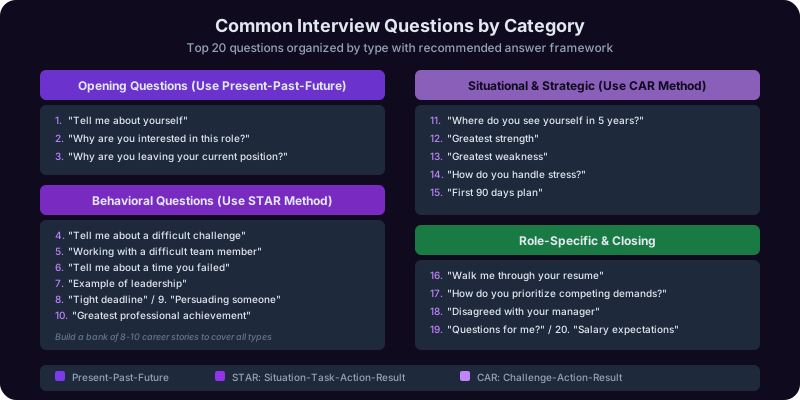
Opening Questions
- "Tell me about yourself." Use the Present-Past-Future framework. We have a full guide on this: How to Answer "Tell Me About Yourself".
- "Why are you interested in this role?" Framework: [Specific thing about the company] + [How it connects to your skills/goals] + [What you will contribute]. Never say "I need a job" or "The salary is good."
- "Why are you leaving your current position?" Framework: Focus on what you are moving toward, never what you are running from. "I am looking for an opportunity to [growth reason] and this role offers exactly that."
Behavioral Questions
- "Tell me about a time you faced a difficult challenge at work." Use STAR. Choose a challenge that is relevant to the role and shows problem-solving ability. The best answers involve a real obstacle, not a humble-brag disguised as a challenge.
- "Describe a time you worked with a difficult team member." Use STAR. Focus on how you managed the relationship, not on how terrible the other person was. The interviewer is assessing your interpersonal skills, not your storytelling ability.
- "Tell me about a time you failed." Use STAR but add a fifth element: the Lesson. The failure itself matters less than what you learned and how you applied that lesson going forward. Choose a real failure, not a fake one like "I worked too hard."
- "Give me an example of when you showed leadership." Use STAR. Leadership does not require a title. Examples of leading a project, mentoring a colleague, or driving a decision when no one else would are all valid.
- "Tell me about a time you had to meet a tight deadline." Use STAR. Emphasize how you prioritized, what you cut, and how you communicated with stakeholders about tradeoffs.
- "Describe a situation where you had to persuade someone." Use STAR. Show that you listened first, then tailored your approach to the other person's concerns. Persuasion through understanding beats persuasion through force.
- "Tell me about your greatest professional achievement." Use STAR. Choose the accomplishment that is most relevant to the role, not necessarily the one you are personally proudest of. Quantify the impact.
Situational and Strategic Questions
- "Where do you see yourself in five years?" Framework: [Growth within this function] + [How this role is the foundation]. Avoid saying you want the interviewer's job. Show ambition within the context of the company's trajectory.
- "What is your greatest strength?" Framework: [Name the strength] + [Provide a specific example of it in action] + [Connect it to the role]. Do not list five strengths. Pick one and go deep.
- "What is your greatest weakness?" Framework: [Name a real weakness] + [What you are actively doing to improve it] + [Evidence of progress]. "I am a perfectionist" is not a real answer. "I tend to over-index on details during the early stages of a project, which can slow me down. I have been working on this by setting explicit timeboxes for research phases and forcing myself to ship a first draft before it feels ready" is a real answer.
- "How do you handle stress and pressure?" Use CAR. Give a specific example of a high-pressure situation and explain your process for managing it. "I prioritize ruthlessly, communicate proactively, and make sure I am sleeping and exercising" is a solid structural answer backed by a concrete story.
- "What would you do in your first 90 days?" Framework: [Listen and learn weeks 1-4] + [Identify quick wins weeks 4-8] + [Propose a strategic plan weeks 8-12]. Every interviewer wants to hear that you will listen before you act.
Role-Specific and Technical Questions
- "Walk me through your resume." Similar to "tell me about yourself" but more detailed. Go chronologically but only spend time on the 2-3 most relevant roles. For each: what you did, why you left, and what you learned.
- "How do you prioritize competing demands?" Use CAR. Describe your actual prioritization framework (urgency vs. importance matrix, stakeholder impact assessment, etc.) and give a specific example.
- "Tell me about a time you disagreed with your manager." Use STAR. Show that you can disagree respectfully, present evidence, and ultimately support the final decision even if it was not yours.
- "What questions do you have for me?" Never say "I think you covered everything." Always have 3-5 prepared questions (see Section 4).
- "What are your salary expectations?" Framework: Defer if possible ("I would like to learn more about the full scope of the role before discussing compensation"), give a researched range if pressed, and never give a single number. For detailed scripts, see our salary negotiation guide.
Building Your Story Bank
The real preparation is not memorizing 20 answers. It is building a bank of 8-10 stories from your career that you can adapt to any question. Each story should cover a different competency: leadership, problem-solving, conflict resolution, innovation, failure, teamwork, communication, and technical skill. With 8-10 strong stories, you can answer virtually any behavioral question by selecting the most relevant one and framing it with STAR or CAR.
The Interview Copilot can run you through all 20 of these questions in a simulated interview format, giving you real-time feedback on whether your answers are specific enough, the right length, and structured for maximum impact.

Get Answers From the Interview Copilot
Stop winging interviews and hoping for the best. The Interview Copilot runs you through realistic mock interviews with real-time feedback on your answers, delivery, and strategy, so you walk in with a system, not just hope.
Questions to Ask the Interviewer: Organized by Round for Maximum Impact
The questions you ask reveal as much about you as the answers you give. When the interviewer says "What questions do you have for me?" and you say "I think you covered everything," you have just told them three things: you are not genuinely curious about the role, you did not prepare, and you are not evaluating whether this company is right for you. That last point matters because the best candidates are always evaluating the company, not just hoping to be chosen.
A 2025 LinkedIn Talent Insights survey found that 63% of hiring managers said the quality of a candidate's questions was a significant factor in their hiring decision. Strong questions demonstrate critical thinking, genuine interest, and the kind of strategic mindset that companies want on their teams.
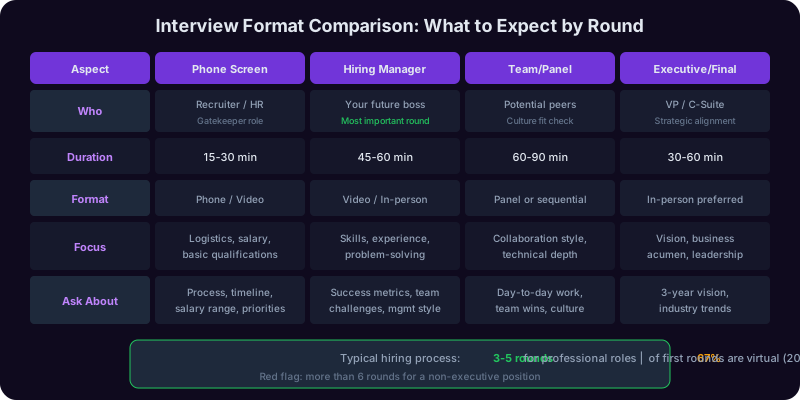
Here are the best questions to ask, organized by interview round, because the right question for a phone screen is wrong for a final-round executive meeting.
Phone Screen Questions (Recruiter or HR)
The phone screen is about logistics and mutual fit. Your questions should be practical and focused on understanding the process and the basics of the role.
- "Can you walk me through the interview process and timeline? How many rounds should I expect, and who will I be meeting with?" This is a logistics question, but it also signals that you are organized and want to prepare properly for each stage.
- "What does a typical day look like for the person in this role?" This gets you practical information that the job posting probably did not include. It also helps you prepare examples that match the actual work.
- "What are the top 2-3 priorities for this role in the first six months?" This tells you what they actually need (which may differ from the job posting) and gives you material to reference in later rounds.
- "Is this a new role or a backfill? If a backfill, can you share why the previous person left?" This tells you a lot. A new role signals growth. A backfill due to promotion signals a healthy team. A backfill due to someone leaving might warrant more investigation.
- "What is the salary range for this role?" In many states and countries, employers are now required to disclose this. Asking early saves everyone time if there is a mismatch.
Hiring Manager Questions (Your Direct Supervisor)
The hiring manager interview is the most important round. This person will be your boss. Your questions should demonstrate strategic thinking and a genuine interest in how you can add value.
- "What would a successful first year look like for the person in this role? What would I need to accomplish for you to feel great about this hire?" This is the single best question you can ask a hiring manager. It tells you exactly what success looks like and gives you a framework for your entire tenure.
- "What is the biggest challenge the team is facing right now, and how would this role help address it?" This shows you are thinking about impact, not just tasks. It also reveals whether the team is in a healthy place or under stress.
- "How do you prefer to give and receive feedback? What is your management style?" This shows maturity and self-awareness. It also gives you critical information about whether you will work well with this person.
- "What does the career progression look like for someone who excels in this role?" This signals ambition without being presumptuous. It tells you whether there is a growth path or whether this role is a dead end.
- "Can you tell me about the team I would be working with? What are their strengths, and where do they need the most support?" This shows you are already thinking about how to contribute and integrate, not just how to get the offer.
Team Interview Questions (Potential Peers and Collaborators)
When you meet the team, the dynamic shifts. These people are evaluating whether they want to work with you every day. Your questions should be collaborative and genuine.
- "What do you enjoy most about working here, and what is one thing you wish were different?" The second part of this question is where the real information lives. If multiple team members mention the same issue, pay attention.
- "How does the team collaborate on a typical project? What tools do you use, and what does the communication flow look like?" This is practical information that tells you how the team actually works, which is more important than the company's stated values.
- "What was the team's biggest win in the last six months, and what made it successful?" This reveals what the team values and how they define success. It also gives you a positive conversation topic.
- "If I were to join, what would be the most helpful thing I could do in my first month?" This shows a service orientation. You are asking how to be useful, not how the job will serve you.
Executive Interview Questions (VP, C-Suite, or Final Round)
Executive interviews are about strategic alignment and cultural fit. Your questions should demonstrate that you think about the business, not just your function.
- "Where do you see the company in three years, and what are the biggest opportunities and risks on the path to getting there?" This is a strategic question that shows you think about the business holistically. It also gives you insight into the company's trajectory.
- "What is the company's approach to [relevant industry trend]? How is that shaping your strategy?" This demonstrates industry knowledge and strategic thinking. Replace the bracket with a real trend you identified in your research.
- "What does the company's culture look like when it is at its best, and what do you do to protect that culture as you grow?" Executives care deeply about culture. This question shows that you do too, and that you understand culture does not maintain itself.
- "What would make you confident that you made the right hire for this role a year from now?" This is the executive version of the hiring manager question. It reveals the executive's expectations and success criteria, which may differ from the hiring manager's.
Questions You Should Never Ask
- "What does your company do?" This tells them you did zero research. Instant disqualification in the interviewer's mind.
- "How soon can I take vacation?" Save this for after you have an offer. Asking it during the interview makes you look disengaged before you have even started.
- "Did I get the job?" This puts the interviewer in an awkward position and signals desperation. If they want to move forward, they will tell you.
- "What are the perks?" Again, save this for the offer stage. Perks questions signal that you care more about benefits than the work itself.
- "How closely do you monitor employees?" Even if you are legitimately concerned about micromanagement, this question raises red flags about your work ethic.
The Interview Copilot can help you tailor your questions to each specific interviewer based on their LinkedIn profile and role, and the Career Copilot can help you evaluate the answers you receive to make an informed decision about the opportunity.
What to Wear to a Job Interview: The Dress Code Decoder by Industry
The question of what to wear to an interview causes more unnecessary anxiety than almost anything else in the preparation process. People overthink it, underthink it, or ask the internet and get contradictory advice. Here is the simple truth: your clothing should make you forgettable. Not in a bad way. In the best way. You want the interviewer to remember what you said, not what you wore. Your outfit should be clean, appropriate, and professional enough that it never becomes a topic of conversation.
A 2024 study in the Journal of Business and Psychology found that candidates who were perceived as "appropriately dressed" for the company's culture were rated 26% higher on organizational fit than those who were over-dressed or under-dressed by the same margin. In other words, wearing a three-piece suit to a startup interview is just as damaging as wearing jeans to a bank interview. The goal is to match the company's dress culture, then move one notch above it.
The One-Notch-Up Rule
Research the company's typical dress code (check their social media, Glassdoor photos, team page photos, or ask the recruiter). Then dress one notch above it:
- If the company is casual (jeans and t-shirts), wear smart casual (chinos and a button-down or blouse)
- If the company is smart casual, wear business casual (slacks, blazer optional, polished shoes)
- If the company is business casual, wear business professional (suit or equivalent)
- If the company is business professional, wear your sharpest business professional
Industry-Specific Dress Codes
| Industry | Expected Interview Attire | What to Wear | What to Avoid |
|---|---|---|---|
| Banking / Finance / Law | Business Professional | Dark suit (navy, charcoal, or black), conservative tie or scarf, polished leather shoes, minimal jewelry, classic watch | Bright colors, flashy accessories, visible tattoos if possible, casual shoes |
| Consulting / Corporate | Business Professional | Well-fitted suit, crisp shirt or blouse, leather belt and shoes that match, portfolio or structured bag | Athletic watches, statement pieces, overly trendy cuts |
| Tech (Large Companies) | Smart Casual to Business Casual | Chinos or dark jeans (no rips), collared shirt or clean sweater, clean sneakers or loafers, no tie needed | Suits (you will look out of touch), flip-flops, graphic tees, shorts |
| Startups | Smart Casual | Dark jeans or chinos, a clean button-down or quality t-shirt with a blazer, white sneakers or loafers | Suits, ties, anything that reads "corporate." But do not go too casual either |
| Healthcare / Pharma | Business Casual to Professional | Slacks or a skirt, blouse or button-down, closed-toe shoes, lab coat if visiting clinical areas | Open-toed shoes (safety issue in clinical settings), strong perfume/cologne, excessive jewelry |
| Education | Business Casual | Slacks or a modest skirt, blouse or collared shirt, comfortable but professional shoes | Anything too formal (it can create distance), clothing with visible logos or slogans |
| Creative (Advertising, Design, Media) | Smart Casual with Personality | This is the one industry where personal style is an asset. Well-curated outfit that shows you have taste: interesting textures, thoughtful accessories, clean silhouette | Being sloppy. There is a difference between creative and messy. Wrinkled clothes, stained items, and unkempt appearance still fail |
| Government / Nonprofit | Business Casual to Professional | Conservative slacks or skirt, button-down or blouse, closed-toe shoes, minimal accessories | Anything that could be perceived as flashy or expensive (optics matter in these sectors) |
Universal Rules That Apply to Every Industry
- Fit is more important than brand. A $50 shirt that fits perfectly looks better than a $500 shirt that is too loose or too tight. Get your clothes tailored if they do not fit off the rack. A $15 trip to a tailor transforms an average outfit into a sharp one.
- Iron or steam everything. Wrinkled clothing is the single most common interview dress mistake, and it is the easiest to fix. If you do not own an iron, invest in a handheld steamer. They cost under $30 and take 5 minutes.
- Shoes matter more than you think. A 2024 study from the University of Kansas found that people accurately judge a stranger's personality based on their shoes alone with 90% accuracy on traits like income and agreeableness. Clean, polished shoes that match your outfit are non-negotiable.
- Grooming is part of your outfit. Clean, styled hair. Trimmed nails. Minimal or no cologne/perfume (many offices are scent-free, and strong scent in an interview room is distracting). Fresh breath (carry mints, not gum).
- Prepare the night before. Lay out your complete outfit the night before the interview, including shoes, accessories, and bag. Check for stains, loose buttons, or scuffed shoes. Do not leave this to the morning of the interview when you are already stressed about other things.
Virtual Interview Attire
For video interviews, everything above the waist matters even more because it fills the entire screen. Wear a solid-color top that contrasts with your background (avoid busy patterns that create visual noise on camera). Yes, you should wear professional bottoms too, even though the camera will not see them. There are too many horror stories of candidates who stood up during a virtual interview and were caught in pajama pants. Beyond the risk, wearing a complete outfit puts you in a professional mindset.
When in Doubt, Ask
If you genuinely cannot figure out the dress code, ask the recruiter. "I want to make sure I am dressed appropriately. Can you tell me what the typical dress code is in the office?" This is a perfectly normal question that shows thoughtfulness, not insecurity. Most recruiters will give you a direct answer. The Career Copilot can help you research company culture, including dress norms, as part of your overall interview preparation strategy.
Virtual Interview Setup: Tech Check, Camera, Background, and Lighting
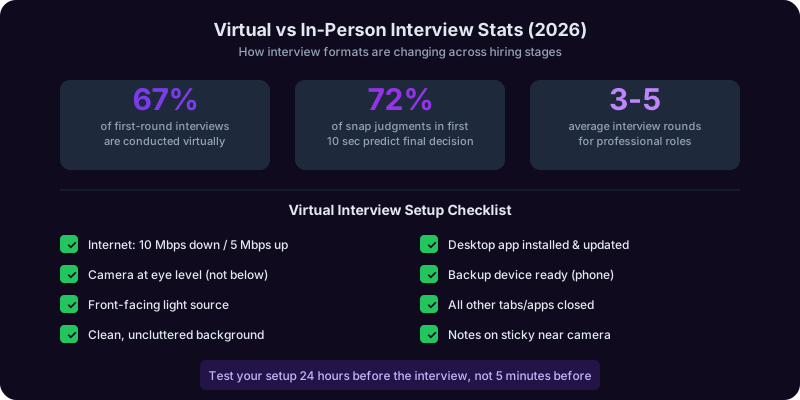
Virtual interviews are no longer a pandemic-era novelty. As of 2026, 67% of first-round interviews are conducted virtually, according to a Gartner HR survey, and even later-round interviews increasingly include a remote component. The candidates who treat virtual interviews with the same professionalism as in-person interviews have a significant advantage, because most people do not. They log in from their kitchen with a pile of dishes visible behind them, their camera angled up their nose, and their face half-lit by a window on one side. That is your competition. Beat them by controlling the variables.
Technology Checklist (Test 24 Hours Before)
Technical failures are the number one source of virtual interview anxiety, and they are the easiest to prevent. Run through this checklist 24 hours before your interview, not 5 minutes before.
- Internet connection: Run a speed test at speedtest.net. You need at least 10 Mbps download and 5 Mbps upload for stable video. If your Wi-Fi is unreliable, plug in with an ethernet cable. If that is not possible, sit as close to your router as you can.
- Platform: Download and install the video platform (Zoom, Teams, Google Meet, etc.) in advance. Do not rely on the browser version. The desktop app is almost always more stable. Log in to make sure your account works and update the app if prompted.
- Camera: Test your camera in the platform's settings. If you are using a laptop's built-in camera, make sure nothing is blocking it (privacy covers, sticky notes). If the quality is poor, a $50-80 external webcam (like the Logitech C920 or C930) is a worthwhile investment. It is reusable for years of remote meetings.
- Microphone: Test your microphone in the platform's settings. Built-in laptop microphones are often acceptable, but they pick up more ambient noise than an external mic or headset. If you have wired earbuds with a microphone, those work well and look professional. Avoid AirPods or wireless earbuds if you have had connectivity issues with them before. If using Bluetooth, make sure they are charged and paired before the interview.
- Backup plan: Have your phone ready as a backup device. Download the video app on your phone and have it logged in. If your computer fails mid-interview, you can switch to your phone in under 30 seconds. Also, ask the recruiter for a phone number you can call in case of a complete technology meltdown. Having a backup plan eliminates 90% of tech anxiety.
Camera Angle and Framing
Your camera position affects how the interviewer perceives you, and most people get it wrong.
- Eye level: Your camera should be at eye level, not below. A camera below your face (the typical laptop-on-desk angle) makes you look like you are looking down at the interviewer, which subconsciously communicates condescension or disinterest. Stack your laptop on books, boxes, or a laptop stand until the camera is at your eye line.
- Distance: Frame yourself from mid-chest to the top of your head. Too close (just your face) feels intense and uncomfortable. Too far (full torso and lots of space above your head) makes you look small and disconnected.
- Centering: Position yourself in the center of the frame, not off to one side. This follows basic composition principles and looks polished.
- Stability: Make sure your camera is stable. A wobbly laptop on a stack of books is distracting. If needed, put something heavy on top of the books to stabilize the setup.
Background
Your background tells a story, whether you want it to or not. The interviewer will notice what is behind you, and it influences their perception of your professionalism.
- Best option: A clean, uncluttered wall or a neatly organized bookshelf. A few books, a plant, and minimal decor communicate "professional and put together" without being sterile.
- Acceptable option: A virtual background, but only if your computer can render it smoothly. If the edges of your silhouette flicker, glitch, or cut off your hands when you gesture, turn it off. A glitchy virtual background is worse than a mediocre real one.
- Avoid: Beds (signals you are not taking this seriously), cluttered rooms (signals disorganization), windows behind you (creates a silhouette effect where your face is dark), and anything distracting or inappropriate (posters, laundry, other people walking through).
- Pro tip: Before the interview, take a screenshot of your camera view and send it to a friend. Ask them: "Does this look professional?" You are too used to your own environment to judge it objectively.
Lighting
Lighting is the single biggest factor in video quality, more important than camera quality. Bad lighting makes even an expensive camera look terrible, and good lighting makes even a laptop webcam look professional.
- Primary light in front of you: Position your main light source in front of your face, slightly above eye level. This can be a desk lamp, a ring light ($20-40 on Amazon), or a window. The key is that the light illuminates your face evenly without harsh shadows.
- No light behind you: A window or bright light behind you creates a silhouette effect where your face appears dark. If your desk faces a window, close the blinds and use artificial light instead, or turn your desk around.
- Avoid overhead-only lighting: A single ceiling light creates harsh shadows under your eyes, nose, and chin, which looks unflattering and slightly ominous. Add a front-facing light to counteract the overhead shadows.
- Test at the same time of day: Natural light changes throughout the day. If your interview is at 2 PM, test your setup at 2 PM the day before to see how the light looks at that time.
During the Interview: Virtual-Specific Tips
- Look at the camera, not the screen. This is the hardest habit to build and the most important. When you look at the interviewer's face on your screen, you appear to be looking slightly down or to the side. When you look at the camera, you appear to be making direct eye contact. Stick a small note or arrow next to your camera as a reminder.
- Mute when not speaking. If there is any ambient noise in your environment, mute yourself when the interviewer is talking and unmute when you respond. This prevents background noise from interrupting their flow.
- Close everything else. Close all other browser tabs, applications, and notifications. A Slack notification popping up during your interview is distracting for both you and the interviewer. Put your phone on silent and face-down.
- Have notes nearby, but do not read them. One of the advantages of a virtual interview is that you can have your key talking points, company research, and questions written on a sticky note next to your camera. Glancing at a note is fine. Reading from a script is obvious and kills your credibility.
- Nod and react visibly. On video, your reactions need to be slightly more expressive than in person because the camera flattens your expressions. Nod when the interviewer is speaking, smile when appropriate, and lean slightly forward to show engagement.
For a comprehensive technology check and virtual interview rehearsal, the Interview Copilot can simulate a full virtual interview experience so you can practice your setup, delivery, and on-camera presence before the real thing.
Body Language and First Impressions: The Science of Nonverbal Communication
Your body speaks before you do. Research from Albert Mehrabian's foundational communication studies, validated and refined by subsequent research through 2025, consistently shows that when verbal and nonverbal signals conflict, people trust the nonverbal signal. If your words say "I am confident and excited about this opportunity" but your body says "I am terrified and want to disappear," the interviewer believes your body. This is not about faking confidence. It is about ensuring your physical presence matches the competence you actually have.
The First 7 Seconds
A widely cited Princeton University study by Alexander Todorov found that people form judgments about trustworthiness, competence, and likability within 100 milliseconds of seeing a face. In a practical interview context, the first 7 seconds, from when you walk through the door to when you sit down, are when the interviewer forms their initial impression. A 2025 study in Personnel Psychology confirmed that first impressions formed in the first 10 seconds of an interview predicted hiring outcomes with 72% accuracy.
Here is what happens in those 7 seconds and how to make each one count:
- Seconds 1-2: Entry. Walk in with purpose. Not rushed, not hesitant. Shoulders back, head up, natural stride. If you shuffle in looking at the floor, the interviewer's first impression is "uncertain."
- Seconds 3-4: Eye contact and smile. Make eye contact with the interviewer immediately. A genuine smile (one that reaches your eyes, not a forced grimace) triggers a mirror response. The interviewer smiles back, and the interaction starts on a positive note.
- Seconds 5-6: The handshake. In in-person interviews, the handshake is still the universal professional greeting. Research from the University of Alabama found that handshake quality was a stronger predictor of interview outcomes than physical appearance or clothing. The ideal handshake is firm (not crushing), dry (wipe your hands before entering if they tend to sweat), full-palm (not just fingertips), and accompanied by eye contact. Two to three pumps, then release.
- Second 7: Sit down with control. Do not collapse into the chair. Do not perch on the edge like you are ready to flee. Sit back enough to be comfortable but forward enough to show engagement. Plant your feet flat on the floor.
Power Poses: The Pre-Interview Ritual
Amy Cuddy's research on power posing, originally published in 2010 and revisited with additional evidence through 2024, suggests that adopting expansive postures before a stressful event can reduce cortisol (the stress hormone) and increase testosterone (associated with confidence). While the effect sizes in the original study have been debated, a 2024 meta-analysis in Psychological Bulletin confirmed a small but statistically significant effect on self-reported confidence and risk tolerance.
The practical application is simple: two minutes before your interview, find a private space (a bathroom stall, your car, an empty hallway) and stand in an expansive posture. Feet wide, hands on hips, chin up. Or raise both arms in a V shape above your head. Hold it for two full minutes. You will feel slightly ridiculous. You will also walk into the interview with measurably lower stress and higher confidence. This is not about tricking your body. It is about priming your nervous system for performance rather than fear.
Eye Contact: The 60/70 Rule
Eye contact is the single most powerful nonverbal tool in an interview, and most people get it wrong in one of two ways: too little (which signals nervousness, dishonesty, or disinterest) or too much (which feels intense, aggressive, or unsettling).
The research-backed guideline is the 60/70 rule:
- Maintain eye contact 60% of the time when you are speaking. It is natural to look away briefly when recalling information or formulating a thought. Breaking eye contact to think is normal. Breaking eye contact because you are staring at the desk is not.
- Maintain eye contact 70% of the time when the interviewer is speaking. This shows active listening. You can break occasionally to nod, take a note, or glance at your hands, but the majority of the time, your eyes should be on the interviewer's face.
In panel interviews, direct your answer primarily to the person who asked the question, but periodically include the other interviewers with brief eye contact (2-3 seconds each). This makes everyone feel included without creating a tennis-match effect where your eyes are darting around the room.
Posture and Positioning
- Sit at a slight forward lean. Leaning slightly forward (about 10-15 degrees) communicates engagement and interest. Leaning back communicates casualness at best and disinterest at worst. Do not lean so far forward that you are hovering over the table.
- Keep your hands visible. Hands hidden under a table or in your lap can subconsciously signal that you are hiding something. Rest your hands on the table or arm of the chair. Use natural hand gestures when speaking, which research shows increases the perceived credibility and clarity of your message.
- Avoid self-soothing gestures. Touching your face, playing with your hair, fidgeting with a pen, or rubbing your hands together are self-soothing behaviors that signal anxiety. If you tend to fidget, hold a pen lightly in one hand to give your hands something to do, but do not click it, spin it, or tap it.
- Mirror the interviewer's energy. Mirroring is a well-documented rapport-building technique. If the interviewer is energetic and animated, match that energy. If they are calm and measured, tone down your intensity. This creates an unconscious sense of similarity and connection. Do not mimic specific gestures (that is obvious and creepy). Match the overall energy level.
Voice and Pacing
Your voice is part of your body language, and it carries more information than most people realize.
- Pace: Speak at a natural conversational pace, approximately 130-150 words per minute. Most people speed up when nervous, which makes them sound anxious and makes their content harder to follow. If you tend to talk fast, consciously slow down by 10-15%. Use pauses between major points.
- Volume: Speak loudly enough to be heard clearly without shouting. In a quiet interview room, your natural speaking voice is usually fine. In a noisy environment, project more. If you are unsure, ask: "Can you hear me alright?"
- Pitch: Nervous voices tend to rise in pitch. If you notice your voice getting higher as the interview progresses, take a breath and consciously lower your pitch. A calm, steady vocal tone communicates confidence.
- Avoid uptalk: Ending declarative statements with a rising intonation (making everything sound like a question) undermines your authority. "I led a team of twelve people?" sounds uncertain. "I led a team of twelve people." sounds definitive. Record yourself practicing and listen for uptalk patterns.
The Departure: How You Leave Matters
The recency effect in psychology means that the last thing someone experiences disproportionately influences their overall impression. Your departure is the last thing the interviewer sees. Stand up with the same energy you entered with. Make eye contact, offer another firm handshake, thank them by name ("Thank you, Sarah, I really enjoyed this conversation"), and walk out with purpose. Do not rush. Do not linger. Leave them with the image of a composed, confident professional.
For practicing these nonverbal skills on camera, the Interview Copilot provides a virtual interview environment where you can see yourself on screen and get feedback on your on-camera presence, which translates directly to in-person presence as well.
Post-Interview Follow-Up: Thank You Emails, Timelines, and Handling Silence
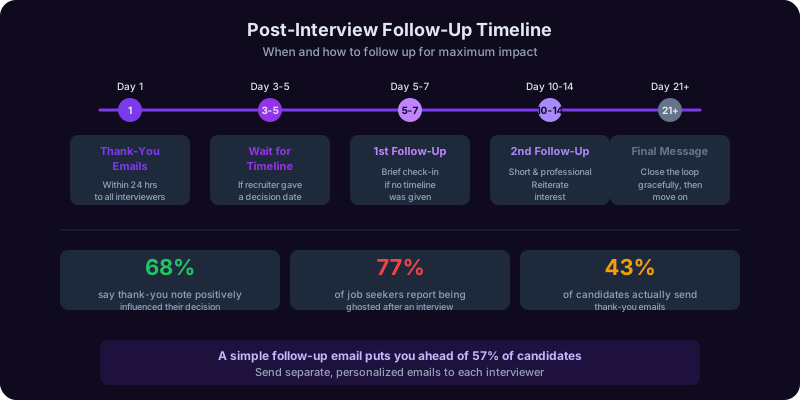
The interview does not end when you walk out the door. What you do in the 24-48 hours after the interview can be the difference between getting the offer and being the runner-up. A 2025 CareerBuilder survey found that 68% of hiring managers said a thank-you note positively influenced their decision, and 22% said they were less likely to hire a candidate who did not send one. Yet only 43% of candidates actually send thank-you emails. This means that a simple follow-up puts you ahead of more than half your competition.
The Thank-You Email: Send Within 24 Hours
Your thank-you email should go out within 24 hours of the interview. Ideally, send it the same evening or the following morning. Waiting longer than 24 hours diminishes the impact because the interviewer's memory of you has started to fade and their impressions have started to solidify.
Here is the template:
Subject: Thank you for our conversation today, [Interviewer First Name]
Hi [First Name],
Thank you for taking the time to speak with me today about the [Role Title] position. I enjoyed learning about [specific topic from the conversation, e.g., "the team's approach to launching in the European market" or "the challenges with scaling the customer success function"].
Our conversation reinforced my excitement about this opportunity. In particular, when you mentioned [specific challenge or goal the interviewer discussed], it reminded me of my experience [brief reference to a relevant accomplishment you discussed or one you wish you had mentioned, e.g., "leading a similar market expansion at my current company, where we grew the European revenue from $0 to $8M in 18 months"].
I am confident I can bring [specific value] to your team, and I would welcome the chance to continue this conversation. Please do not hesitate to reach out if you need any additional information from me.
Best regards,
[Your Name]
[Phone Number]
[LinkedIn Profile URL]
Key Elements of an Effective Thank-You Email
- Specificity: Reference something specific from the conversation. "Thank you for the great interview" is generic and forgettable. "I was fascinated by your point about integrating AI into the customer onboarding process" is specific and memorable. This proves you were listening and engaged.
- Added value: Use the email to add something you did not get to say in the interview. Maybe you thought of a better example after you left, or there was a question you wish you had answered differently. The thank-you email is your chance to supplement your interview performance.
- Brevity: Keep it to 150-200 words. The interviewer is busy. A long email will not be read in full. A concise, specific email will be read in 30 seconds and leave a positive impression.
- No typos: Proofread carefully. A typo in a thank-you email is especially damaging because it suggests carelessness in a low-pressure situation. If you rush it at low stakes, what will you do under real pressure? Use the Writing Copilot to catch errors and polish the tone before you hit send.
If You Interviewed With Multiple People
Send a separate, personalized thank-you email to each person you met. Do not copy-paste the same email to everyone, because people compare notes and identical emails signal laziness. Reference a different specific moment from each conversation. If you spoke with four people, you need four distinct emails. This takes 15-20 extra minutes and it is absolutely worth it.
The Follow-Up Timeline: What to Do When
| Timeframe | Action | Notes |
|---|---|---|
| Within 24 hours | Send thank-you emails to all interviewers | Same day or next morning is ideal. Do not wait until day 2. |
| Day 3-5 | If the recruiter mentioned a decision timeline, wait until that date passes before following up | Do not follow up before the timeline they gave you. It signals that you were not listening or that you are impatient. |
| Day 5-7 (if no timeline was given) | Send a brief follow-up email to the recruiter or hiring manager | "I wanted to check in on the status of the [Role Title] position. I remain very interested and am happy to provide any additional information that would be helpful." |
| Day 10-14 | Second follow-up if you have heard nothing | Keep it short and professional. No guilt-tripping. "I understand these decisions take time. I want to reiterate my strong interest in the role and am happy to discuss any remaining questions." |
| Day 21+ | Final follow-up, then move on | If you have followed up twice with no response, send one final email. Then stop. You do not want to be the candidate who sends 6 follow-up emails. It crosses the line from persistent to desperate. |
Handling Ghosting: When Companies Stop Responding
Let us address the uncomfortable reality: companies ghost candidates. Frequently. A 2025 Indeed survey found that 77% of job seekers reported being ghosted by an employer after an interview. This is not your fault. It reflects poorly on the company, not on you. But you still need a strategy for dealing with it.
- Do not take it personally. Ghosting almost always reflects internal dysfunction (slow decision-making, budget freezes, role changes, or simply poor recruiter communication), not a judgment of your candidacy. You may have been the top candidate and the role got put on hold.
- Follow up three times, then stop. The timeline above gives you three touchpoints. After the third follow-up with no response, close the loop in your mind and redirect your energy to other opportunities.
- Send a professional closing email. After 3-4 weeks of silence, consider sending a final email: "I have not heard back regarding the [Role Title] position and understand you may have moved forward with another candidate. I wanted to let you know that I greatly appreciated the opportunity to learn about [Company] and would welcome the chance to be considered for future openings. I wish you and the team all the best." This is classy, closes the loop, and leaves the door open.
- Keep interviewing. The single best antidote to ghosting anxiety is having multiple active opportunities. Never stop your job search because one interview went well. Keep the pipeline moving until you have a signed offer letter in hand.
If You Get a Rejection
A rejection is actually better than ghosting because it gives you closure and an opportunity. Respond graciously:
"Thank you for letting me know, and I appreciate the time you and the team invested in the process. I genuinely enjoyed learning about [Company] and the work the team is doing. If any similar opportunities come up in the future, I would love to be considered. I wish you all the best with the hire."
Then ask for feedback: "If you are open to it, I would welcome any feedback on my interview performance. I am always looking to improve, and candid input from someone with your perspective would be invaluable." Not every interviewer will respond, but those who do will give you specific insights that improve your next interview. And occasionally, your gracious response to a rejection leads to a future opportunity when a different role opens up.
Negotiating the Offer
If the follow-up process leads to an offer, congratulations. But do not accept immediately. Take at least 24-48 hours to review the full compensation package. For detailed scripts on how to negotiate salary, benefits, and start date, see our complete salary negotiation guide. And if your current employer has a non-compete or restrictive covenant, make sure you understand your obligations before signing anything new.
The Writing Copilot can help you draft polished thank-you emails, follow-up messages, and negotiation responses, while the Career Copilot can help you evaluate the full offer, including salary, equity, benefits, and growth potential, so you make a decision you will not regret. You can also explore our LinkedIn Copilot to keep your professional presence sharp throughout the process, and browse additional career scenarios at /domains/career.
Frequently Asked Questions
Recommended Copilots
Recommended Copilots
Run full mock interviews with AI-powered feedback on your answers, body language, pacing, and question-handling across every round
Try Free →Build a complete interview preparation strategy including company research, story banking, and offer evaluation
Try Free →Ensure your resume aligns with your interview narrative so your written and spoken stories match perfectly
Try Free →Polish your LinkedIn profile before the interview since hiring managers and interviewers will check it
Try Free →Draft polished thank-you emails, follow-up messages, and negotiation responses that leave the right impression
Try Free →Related Articles
Get Answers From the Interview Copilot
Stop winging interviews and hoping for the best. The Interview Copilot runs you through realistic mock interviews with real-time feedback on your answers, delivery, and strategy, so you walk in with a system, not just hope.