How Modern ATS Actually Works in 2026: Semantic Matching, AI Scoring, and Why Keywords Alone No Longer Cut It
If your ATS strategy begins and ends with stuffing keywords into your resume, you are fighting last decade's battle. The applicant tracking systems that companies use in 2026 are fundamentally different from the keyword-matching filters of 2015. Understanding how they actually work is the foundation of every optimization strategy in this guide.
The Scale of the Problem
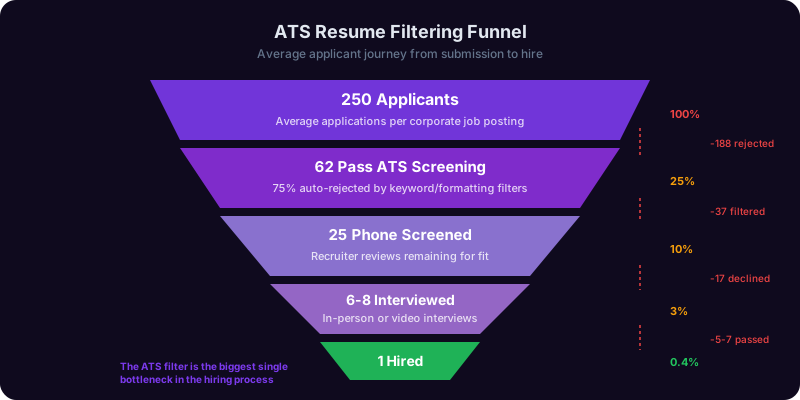
According to a 2025 Jobscan analysis, 97% of Fortune 500 companies and 75% of mid-sized employers use some form of ATS to screen resumes before a human reviews them. That means the vast majority of your job applications pass through automated screening. And the results are stark: 75% of resumes are filtered out before a recruiter ever sees them, according to a 2025 study by TopResume. Three out of four applicants are rejected by software, not people.
But the important question is not whether ATS exists. It is how the technology has changed. The ATS platforms dominating the market in 2026, including Greenhouse, Lever, Workday, iCIMS, SmartRecruiters, and Ashby, have moved far beyond simple keyword matching.
From Keywords to Semantic Understanding
First-generation ATS platforms worked like a search engine from 2005. They scanned your resume for exact keyword matches against the job description. If the job said "project management" and your resume said "managed projects," you might not match. That era is over.
Modern ATS platforms use semantic matching, which means they understand meaning, not just words. They use natural language processing (NLP) models trained on millions of resumes and job descriptions to understand that "managed projects" and "project management" refer to the same competency. They understand that "P&L ownership" relates to "budget management" and "financial accountability." They recognize that "led a cross-functional team" is semantically connected to "collaboration" and "leadership."
This is a double-edged sword. On one hand, you no longer need to match every keyword exactly. On the other hand, the systems are smarter at detecting keyword stuffing, white-text tricks, and other manipulation tactics. Resumes that try to game the system with invisible keywords or irrelevant skill dumps are increasingly flagged and penalized.
How AI Scoring Works
The biggest shift in ATS technology is the move from pass/fail filtering to AI-powered scoring. Instead of simply accepting or rejecting resumes based on keyword thresholds, modern systems assign each resume a score, typically from 0 to 100, based on multiple factors:
- Skills match: How well do your listed skills align with the job requirements? The system checks both hard skills (Python, Salesforce, financial modeling) and increasingly, soft skills (leadership, communication, stakeholder management).
- Experience relevance: Do your job titles, industries, and responsibilities align with the role? A software engineer applying for a software engineering role scores higher than a teacher applying for the same position, even if both resumes contain the same keywords.
- Career progression: Does your career trajectory suggest readiness for this role? The system evaluates title progression, scope increases, and tenure patterns.
- Education and certifications: Do your credentials match the stated requirements?
- Recency: Are your relevant skills and experiences recent, or are they buried in a job from 12 years ago? Recent experience is weighted more heavily.
Recruiters typically see a ranked list of candidates sorted by this score. The top 10-20% get reviewed first. If a recruiter has 200 applications and only time to review 30, the AI score determines which 30 they see. Your goal is not just to pass the filter. It is to score high enough to land in the top tier.
Skill Taxonomies and Ontologies
Advanced ATS platforms now use skill taxonomies, structured databases that map relationships between skills. For example, the system knows that React, Angular, and Vue.js are all JavaScript frontend frameworks. It knows that Scrum and Kanban are both Agile methodologies. It understands that "machine learning" is a subset of "artificial intelligence" and that "TensorFlow" is a tool used for machine learning.
This means your resume is not evaluated in isolation. It is compared against a structured understanding of how skills relate to each other. If a job requires "frontend development experience" and your resume lists "React, TypeScript, and Next.js," the system maps those specific tools to the broader competency and registers a strong match, even though the words "frontend development" never appear in your resume.
The practical takeaway: you should still include both specific tools and broader competency categories. Write "frontend development" and list your specific frameworks. This gives you credit at both levels of the taxonomy. The Career Copilot can analyze job descriptions and identify the full skill taxonomy you should be addressing in your resume, including related skills you might have overlooked.
ATS Formatting Rules: What to Use, What to Avoid, and Why Your Beautiful Resume Might Be Getting Rejected
You could have the perfect experience for a role and still get filtered out because your resume uses a two-column layout, a creative header, or a table-based design that the ATS cannot parse. Formatting is the silent killer of job applications. Here is exactly what works and what breaks.
The Golden Rules of ATS-Compatible Formatting
These are not suggestions. They are requirements if you want your resume to be read correctly by automated systems.
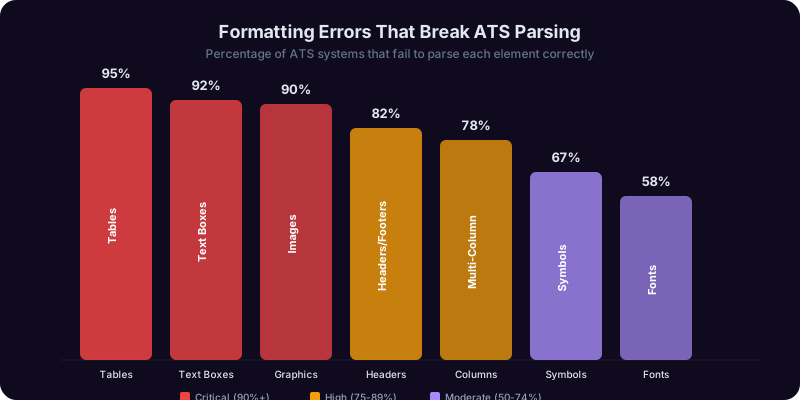
1. Use a single-column layout. Two-column and sidebar layouts look visually appealing but cause parsing chaos. ATS platforms read left to right, top to bottom, in a single flow. When your resume has two columns, the system often interleaves text from both columns, creating nonsensical output. Your skills section gets merged with your work history. Your job titles get mixed with your contact information. The recruiter sees garbled text and moves on.
2. No tables, text boxes, or frames. Tables are the most common formatting killer. Many people use invisible tables to align dates with job titles or to create clean section layouts. The ATS strips the table structure and dumps all the cell contents in a linear sequence, often in the wrong order. A neatly formatted job entry like "Senior Marketing Manager | Acme Corp | 2022-2025" becomes "Senior Marketing Manager 2022-2025 Acme Corp" or worse, three disconnected text fragments.
3. No headers or footers. Many ATS platforms cannot read content placed in the header or footer sections of a Word document. If your name and contact information are in the document header, the system may parse your entire resume without knowing who you are. Put all content in the main document body.
4. No images, graphics, logos, or icons. Your headshot, your personal logo, those skill-level bar charts showing "Python: 90%," and the icons next to your contact information are all invisible to ATS. The system cannot read images. Worse, images can cause parsing errors that corrupt the surrounding text. Every piece of information must be represented as plain text.
5. Use standard section headings. ATS platforms are trained to recognize conventional resume sections. Use these exact headings and do not get creative:
- "Professional Experience" or "Work Experience" (not "Where I Have Made an Impact")
- "Education" (not "Academic Journey")
- "Skills" or "Technical Skills" (not "My Toolkit")
- "Certifications" (not "Credentials and Achievements")
- "Summary" or "Professional Summary" (not "About Me" or "My Story")
Creative headings confuse the parser. The ATS looks for known section labels to categorize your content. When it cannot identify a section, it may dump the content into an "other" category or skip it entirely.
6. Standard fonts only. Use Arial, Calibri, Times New Roman, Garamond, or Georgia in 10-12 point. Custom fonts, decorative typefaces, and anything that requires a special font file can render as garbled characters or missing text in ATS parsing.
7. File format matters. Submit as .docx when the application accepts it. While most modern ATS platforms handle PDFs well, some older systems still struggle with PDF text extraction, especially if the PDF was created from a design tool like Canva or Figma rather than exported from Word. If the job posting does not specify a format, .docx is the safest bet. Never submit as .pages, .odt, or image-based formats.
The Formatting Checklist
| Element | ATS-Safe | ATS-Risky |
|---|---|---|
| Layout | Single column, top to bottom | Two columns, sidebars, infographic style |
| Section headers | Standard labels in bold text | Creative names, icon-based headers |
| Dates | Plain text: "Jan 2022 - Present" | Inside tables, text boxes, or right-aligned columns |
| Bullet points | Standard round bullets | Custom symbols, arrows, checkmarks |
| Contact info | In document body, first lines | In header/footer, inside graphics |
| Skills | Comma-separated list or simple bullets | Bar charts, star ratings, percentage fills |
| Font | Arial, Calibri, Times New Roman 10-12pt | Custom, decorative, or script fonts |
What About Design Resumes for Creative Roles?
If you are a graphic designer, UX designer, or creative professional, you face a genuine tension: your resume is a design artifact that represents your skills, but ATS cannot appreciate design. The solution is to maintain two versions. Create a visually designed resume for situations where you know a human will see it first, such as portfolio submissions, networking events, and direct emails to hiring managers. Create a separate ATS-optimized version for online application portals. The content is the same. The formatting is different. This is not cheating. It is strategic.
The Career Copilot can help you determine whether a specific application is likely to go through ATS screening or be reviewed directly by a human, so you know which version to send. The Writing Copilot can review your ATS version to ensure nothing critical is lost in the stripped-down format.
Keyword Optimization Strategies That Actually Work: Beyond Stuffing, Toward Semantic Relevance
Keywords still matter in ATS optimization, but the game has evolved. In 2026, effective keyword strategy is about semantic coverage, natural integration, and strategic placement, not brute-force repetition. Here is how to optimize intelligently.
Step 1: Extract the Right Keywords from the Job Description
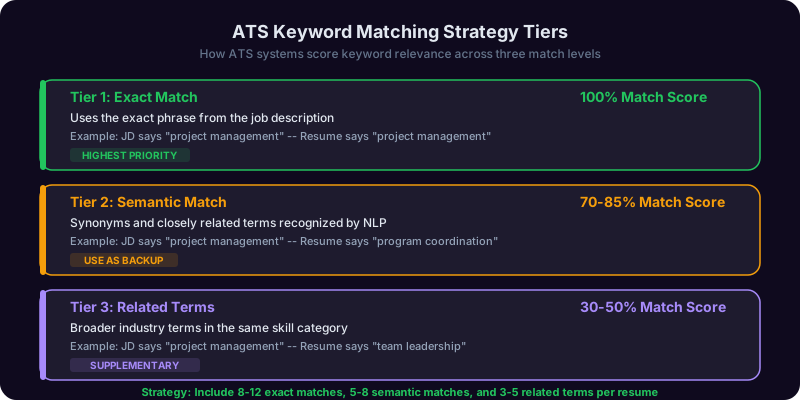
Before you touch your resume, you need to decode the job description systematically. Every job posting contains three tiers of keywords:
Tier 1: Non-negotiable requirements. These are the skills and qualifications that appear in the "Required" section or are mentioned multiple times throughout the posting. If the job description mentions "Salesforce" three times, that is a Tier 1 keyword. If it says "5+ years of B2B SaaS experience" in the first bullet point under requirements, that is Tier 1.
Tier 2: Preferred qualifications. These appear in the "Nice to have" or "Preferred" section. They are differentiators. Including them gives you a scoring advantage over candidates who only match Tier 1.
Tier 3: Implied skills. These are skills that the job description assumes you have but does not explicitly list. A posting for a "Senior Data Scientist" that mentions "build production ML models" implies knowledge of Python, SQL, version control, and deployment tools, even if those words never appear in the posting. Modern ATS skill taxonomies will expect these adjacent skills.
Step 2: Map Keywords to Your Experience
Create a simple spreadsheet or document with three columns: the keyword from the job description, where it appears in your existing resume (if at all), and a specific accomplishment from your career that demonstrates that skill. This mapping exercise takes 15-20 minutes and is the most valuable prep work you can do before tailoring your resume.
For example, if the job description says "experience with cross-functional stakeholder management" and your resume currently says "worked with different teams," you have a keyword gap. Your mapping would look like: Keyword: cross-functional stakeholder management. Current resume: not present. Evidence: Led quarterly business reviews with engineering, sales, and customer success, aligning three departments on product roadmap priorities.
Step 3: Integrate Keywords Naturally
Here is where most people go wrong. They create a massive "Skills" section with 40 keywords and call it done. That approach fails for two reasons. First, modern ATS platforms evaluate keyword context, not just keyword presence. A keyword that appears in a bullet point describing a specific accomplishment scores higher than the same keyword dumped in a skills list. Second, even if the ATS does not penalize a bloated skills section, the recruiter who reads your resume next will. A skills section with 40 items tells the recruiter nothing about your actual competency level in any of them.
The right approach:
- Include each critical keyword at least twice. Once in your skills section and once in a work experience bullet point that provides context and evidence.
- Use the exact phrasing from the job description for Tier 1 keywords. If they say "stakeholder management," write "stakeholder management," not "managing stakeholders" or "stakeholder relations." Semantic matching will catch variations, but exact matches still score highest.
- Use variations and synonyms for secondary keywords. If you say "project management" in your skills section, you can say "managed a portfolio of 12 concurrent projects" in your experience section. This demonstrates both keyword awareness and natural communication.
- Place high-priority keywords early in your resume. Your professional summary and the bullet points for your most recent role should contain the highest-concentration of Tier 1 keywords. Some ATS platforms weight early-appearing keywords more heavily.
Step 4: The Skills Section Strategy
Your skills section should be a curated list of 12-18 skills, not a dump of everything you have ever touched. Structure it in categories:
Technical Skills: Python, SQL, Tableau, Salesforce, Google Analytics, HubSpot
Methodologies: Agile, Scrum, A/B Testing, OKR Planning
Domain Expertise: B2B SaaS, PLG Growth, Revenue Operations, Customer Lifecycle
This structure helps both the ATS (which can map categorized skills to its taxonomy more accurately) and the recruiter (who can quickly assess your competency areas). The Career Copilot can analyze a job description and generate a prioritized keyword list mapped to your experience, ensuring you cover all three tiers without over-stuffing.
What Not to Do: Keyword Tricks That Backfire
The internet is full of ATS "hacks" that either do not work or actively hurt your application:
- White text keyword stuffing. Some guides suggest copying the entire job description in white text at the bottom of your resume. Modern ATS platforms detect hidden text and flag it as manipulation. Even if the system does not catch it, recruiters who copy your resume text into another document will see it instantly. This is a disqualifying move.
- Keyword clouds in the margin. Placing a column of keywords in a sidebar or margin area often gets parsed incorrectly. The keywords end up interleaved with your work experience, creating incoherent text.
- Listing skills you do not have. If you list "machine learning" as a skill and get called for an interview, the first technical question will expose you. And some companies run skills assessments before the interview. Misrepresenting your skills wastes everyone's time and damages your reputation.
- Exact copy-paste from the job description. Copying entire sentences from the job posting into your resume is detectable and looks lazy. Use the keywords, but integrate them into your own accomplishment statements.
For a deeper look at crafting the accomplishment statements that house your keywords, see our guide on writing cover letters that complement your ATS-optimized resume.

Get Answers From the Career Copilot
Stop sending resumes into the ATS void. The Career Copilot analyzes job descriptions, identifies keyword gaps, and helps you tailor your resume for maximum ATS scores, while the Writing Copilot transforms responsibility-based bullets into compelling X-Y-Z impact statements that impress both algorithms and hiring managers.
The X-Y-Z Impact Format: How to Write Resume Bullets That Score High With Both ATS and Humans
The single most important skill in resume writing is the ability to turn job responsibilities into impact statements. ATS platforms increasingly evaluate the quality and specificity of your bullet points, not just their keyword content. And the recruiters who read your resume after the ATS ranks it are trained to look for evidence of impact, not lists of duties. The X-Y-Z format is the most effective structure for accomplishing both goals.
What Is the X-Y-Z Format?
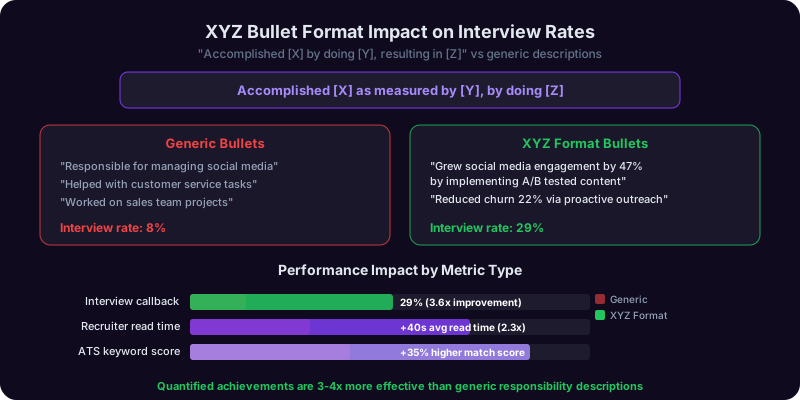
The X-Y-Z format, originally popularized by Google's hiring team, structures each bullet point as: Accomplished [X] as measured by [Y], by doing [Z]. The formula ensures every bullet point contains a result, a metric, and a method. Here is how it works:
- X = The accomplishment. What did you achieve? Start with an action verb.
- Y = The measurement. How was success quantified? Revenue, percentage, time, volume, cost savings, customer count, error reduction, speed improvement.
- Z = The method. How did you achieve it? What specific actions, strategies, or tools did you use?
X-Y-Z in Practice: Before and After
Here is what generic resume bullets look like compared to X-Y-Z formatted bullets:
Before (responsibility-based):
- Responsible for managing social media accounts
- Handled customer complaints and resolved issues
- Participated in quarterly business reviews
- Managed a team of software engineers
After (X-Y-Z impact format):
- Grew Instagram following from 12,000 to 85,000 (608% increase) in 14 months by implementing a data-driven content calendar and influencer collaboration strategy
- Reduced average customer complaint resolution time from 72 hours to 18 hours by building an automated triage system and creating a self-service knowledge base that deflected 40% of inbound tickets
- Led quarterly business reviews for 45 enterprise accounts ($12M ARR), resulting in a 94% renewal rate and $2.1M in upsell revenue over two fiscal years
- Managed a team of 8 engineers, delivering 3 major product releases on schedule while reducing sprint-over-sprint bug count by 35% through implementation of automated testing protocols
Why X-Y-Z Works for ATS Scoring
Modern ATS platforms do not just check for keywords. They evaluate context. A bullet point that says "Python" inside a meaningful accomplishment statement scores higher than "Python" sitting in a skills list with no context. The X-Y-Z format naturally creates keyword-rich, contextually meaningful content because it requires you to name the tools (Z), the domain (X), and the outcome (Y).
For example, "Reduced data pipeline processing time by 65% by migrating ETL workflows from legacy Bash scripts to Apache Airflow with Python-based transformations" contains the keywords Python, ETL, Apache Airflow, data pipeline, and processing time, all embedded in a meaningful context that the ATS can map to its skill taxonomy.
How to Quantify When You Think You Cannot
The most common objection to X-Y-Z formatting is "my work is not quantifiable." Almost every role produces measurable outcomes if you look closely enough. Here are strategies for roles that feel hard to quantify:
For administrative and support roles:
- Volume: How many requests, tickets, or tasks did you handle per day/week/month?
- Speed: How much faster did you complete processes compared to previous methods?
- Accuracy: What was your error rate? Did you reduce it?
- Scope: How many people, departments, or executives did you support?
For creative roles:
- Engagement: Views, clicks, shares, open rates, conversion rates
- Output: Number of campaigns launched, pieces published, designs delivered
- Awards or recognition: Industry awards, internal recognition, client testimonials
- Revenue attribution: Campaign-attributed revenue, lead generation numbers
For education and nonprofit roles:
- Student outcomes: Test score improvements, graduation rates, program completion rates
- Fundraising: Dollars raised, donor acquisition, grant success rates
- Reach: Number of students served, communities impacted, programs launched
- Efficiency: Budget management, cost per student, resource optimization
When you truly cannot find a number, use concrete outcomes instead: "Designed and launched the company's first employee onboarding program, which was adopted company-wide across 4 offices and 200+ employees within the first quarter." The number of offices and employees provides scale even though there is no percentage or dollar figure.
Action Verbs That Score High
Start every bullet point with a strong action verb. Avoid weak, passive constructions like "responsible for," "helped with," "participated in," or "assisted." These verbs signal that you were present, not that you drove results. Use verbs that demonstrate ownership and impact:
For leadership: Directed, Spearheaded, Orchestrated, Championed, Established
For growth: Accelerated, Expanded, Scaled, Launched, Pioneered
For efficiency: Streamlined, Automated, Consolidated, Optimized, Reduced
For analysis: Quantified, Modeled, Forecasted, Diagnosed, Evaluated
For creation: Designed, Engineered, Developed, Architected, Built
The Writing Copilot can transform your responsibility-based bullet points into X-Y-Z impact statements, ensuring each one contains a result, a metric, and a method. Try our AI resume builder for step-by-step help structuring your entire resume around this format.
Tailoring Your Resume to Every Job Description: The 20-Minute System That Doubles Your Interview Rate
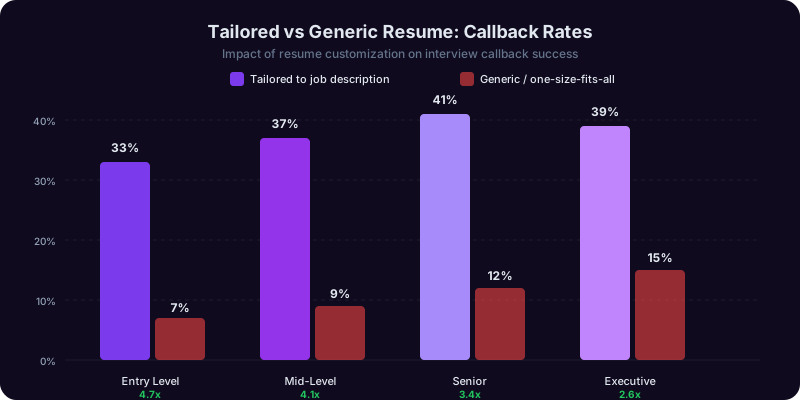
Sending the same resume to every job application is the single biggest mistake job seekers make. A 2025 study by TopResume found that candidates who tailored their resume to each job description were 2.3 times more likely to get an interview than those who used a generic version. The reason is simple: both ATS algorithms and human recruiters evaluate fit. A generic resume is a mediocre fit for every job. A tailored resume is a strong fit for the specific job you are applying to.
But tailoring does not mean rewriting your resume from scratch for every application. That is unsustainable. Here is a 20-minute system that produces a tailored resume for each application without burning out.
The 20-Minute Tailoring System
Minutes 1-5: Analyze the job description. Read the posting carefully and highlight three things in different colors (or create a quick list):
- Red: Non-negotiable requirements. Skills, experience levels, and qualifications listed as "required."
- Yellow: Preferred qualifications. Skills and experiences listed as "nice to have" or "preferred."
- Green: Culture and values signals. Words that describe how the company works: "fast-paced," "data-driven," "collaborative," "autonomous."
Minutes 5-10: Adjust your professional summary. Your summary is the first thing both the ATS and the recruiter see. It should be 2-3 sentences that directly mirror the top requirements of the role. Rewrite it for each application. This is the highest-ROI customization you can make.
Generic summary: "Experienced marketing professional with expertise in digital strategy, team leadership, and campaign management."
Tailored summary for a B2B SaaS demand generation role: "B2B SaaS marketing leader with 7 years of experience building demand generation engines that consistently deliver $10M+ in annual pipeline. Expertise in ABM strategy, marketing automation (HubSpot, Marketo), and cross-functional alignment between marketing and sales teams."
The tailored version includes specific keywords from the job description (B2B SaaS, demand generation, ABM, HubSpot, Marketo) and speaks directly to what this particular role requires.
Minutes 10-15: Reorder and adjust your bullet points. You do not need to rewrite every bullet point. Instead, do two things:
- Reorder your bullets so the most relevant ones come first. If the job emphasizes leadership and your third bullet is about team management, move it to the first position. Recruiters spend an average of 7 seconds on initial resume scanning. The first two bullet points under each role are the most likely to be read.
- Adjust 2-3 bullet points to mirror the job description language. If the job says "stakeholder management" and your bullet says "worked with executives," change it to "Managed stakeholder relationships across C-suite and VP-level executives, presenting quarterly performance reviews and securing budget approvals for three major initiatives."
Minutes 15-20: Update your skills section. Add any Tier 1 or Tier 2 keywords from the job description that are genuinely part of your skillset but not currently listed. Remove skills that are irrelevant to this specific role. A data engineering role does not need to see your Photoshop skills. A marketing role does not need your OSHA certification. Keep the skills section focused and relevant to the target role.
The Master Resume Approach
The most efficient way to tailor is to maintain a "master resume" that is 3-4 pages long and contains every bullet point, skill, and accomplishment from your career. This is not a document you send to anyone. It is your source material. When you tailor for a specific role, you pull the most relevant content from your master resume into a 1-2 page tailored version.
This approach saves time because you never write new content during the tailoring process. You select, reorder, and adjust. The creative work of writing strong bullet points happens once, in the master resume. The strategic work of selecting the right ones happens during tailoring.
How Many Versions Should You Have?
If you are applying to multiple types of roles (for example, product management and project management), create 2-3 base versions of your resume, each optimized for a different role type. Then make minor adjustments within each base version for specific applications. This is more efficient than tailoring from scratch every time and ensures you are not accidentally leaving project management keywords in a product management resume.
The Career Copilot can compare your resume against a specific job description and identify exactly which adjustments to make, from missing keywords to bullet points that should be reordered. For writing the tailored summary and adjusted bullet points, the Writing Copilot ensures your customizations sound natural rather than forced. And once your tailored resume lands you an interview, our guide on preparing for job interviews will help you carry the same targeted messaging into your conversation.
12 Common Resume Mistakes That Get You Filtered Out by ATS (and How to Fix Each One)
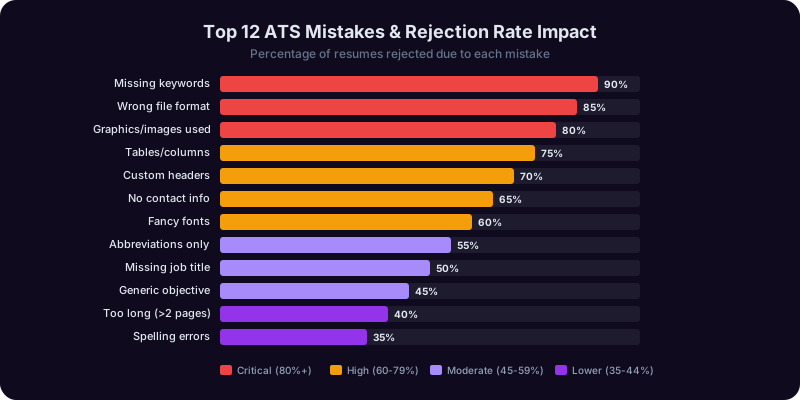
Even strong candidates get filtered out by ATS systems because of avoidable mistakes. These are the 12 most common errors that cause qualified resumes to be rejected before a human ever sees them, along with the fix for each one.
Mistake 1: Using a Creative or Infographic Resume Format
Canva templates, infographic resumes, and visually designed layouts are the number one ATS killer. They look beautiful on screen and parse as incomprehensible garbage in an ATS. The fix: use a clean, single-column Word document with standard formatting for every online application. Save the designed version for networking and direct outreach.
Mistake 2: Abbreviations Without Spelled-Out Versions
If your resume says "PM" but the job description says "project management," the ATS may not connect them. Some systems recognize common abbreviations, but many do not. The fix: include both the abbreviation and the spelled-out version at least once. Write "Project Management Professional (PMP)" rather than just "PMP." Write "Search Engine Optimization (SEO)" rather than just "SEO."
Mistake 3: Missing Dates or Inconsistent Date Formats
ATS platforms use dates to calculate your years of experience. If your dates are missing, inconsistent, or in an unusual format, the system cannot determine whether you meet the experience requirement. The fix: use a consistent format throughout. "Jan 2022 - Present" or "January 2022 - Present" both work. Pick one and stick with it. Never use just years ("2022 - 2025") for your most recent roles, as it obscures whether you have 2 years of experience or 3.
Mistake 4: Putting Contact Information in the Header
As covered in the formatting section, many ATS platforms skip document headers and footers. If your name, email, and phone are in the header, the system may not capture them. The fix: put all contact information in the first few lines of the document body.
Mistake 5: Skill-Level Bar Charts and Star Ratings
Those visual skill-level indicators ("Python: 4 out of 5 stars" or a progress bar showing 80% proficiency) are invisible to ATS. The system sees nothing, or worse, it sees random characters. The fix: list skills as plain text. If you want to indicate proficiency levels, use descriptive words: "Proficient: Python, SQL, Tableau. Working knowledge: R, Scala."
Mistake 6: Job Titles That Do Not Match Industry Standards
Many companies use creative internal titles. If your official title was "Growth Ninja" or "Customer Happiness Hero" or "Chief Amazement Officer," the ATS has no idea what you actually do. The fix: use your real title followed by the industry-standard equivalent in parentheses. "Growth Ninja (Digital Marketing Manager)" lets the ATS match the standard title while maintaining honesty about your actual position.
Mistake 7: No Professional Summary
Some resume guides recommend skipping the summary. For ATS optimization, this is bad advice. The professional summary is prime real estate for keywords, and it gives the ATS a concentrated signal about your professional identity. The fix: include a 2-3 sentence summary that contains your target role title, years of experience, top skills, and a signature accomplishment.
Mistake 8: Submitting the Wrong File Format
Submitting a .pages file, a Google Docs link, or an image-based PDF can cause the ATS to reject or mangle your resume. The fix: submit as .docx whenever possible. If the system requires PDF, export from Word rather than from a design tool. Test your PDF by selecting all text (Ctrl+A) and pasting it into a plain text editor. If the text comes out garbled or in the wrong order, the ATS will see the same garbled output.
Mistake 9: Listing Every Job You Have Ever Had
A resume that goes back 25 years with every role listed dilutes your relevance signal. The ATS is evaluating your fit for this specific role, and a cashier job from 1998 is not helping. The fix: include the last 10-15 years of relevant experience. For earlier roles, include only positions that are directly relevant to your target role. Your resume should be 1-2 pages, not 4.
Mistake 10: Using Pronouns and Articles
Resume bullet points should not read like sentences with "I" and "the" and "a." This wastes space and weakens the impact. The fix: start every bullet point with an action verb. Not "I managed a team of 12 engineers" but "Managed a team of 12 engineers, delivering 4 major releases on schedule and reducing bug count by 35%." Drop first-person pronouns entirely.
Mistake 11: Including "References Available Upon Request"
This is a relic from a different era. Employers know they can ask for references. This line wastes valuable space and signals that your resume conventions are outdated. The fix: delete it. Use that line for another accomplishment bullet point instead.
Mistake 12: Not Tailoring at All
A LinkedIn survey of 1,500 recruiters found that 63% can immediately tell when a resume has not been tailored to the specific role. If the recruiter can tell, the ATS can tell. The system compares your resume against the job description and calculates a relevance score. A generic resume produces a mediocre score. The fix: follow the 20-minute tailoring system outlined in the previous section. Twenty minutes of customization can be the difference between getting filtered out and getting an interview.
The Career Copilot can audit your resume for all 12 of these mistakes and provide specific fix recommendations before you submit. For a comprehensive approach to your job search, pair this guide with our article on answering "tell me about yourself" and our salary negotiation scripts to prepare for every stage of the hiring process.
AI-Powered Resume Tools Compared: What Works, What Wastes Money, and Where Copilotly Fits
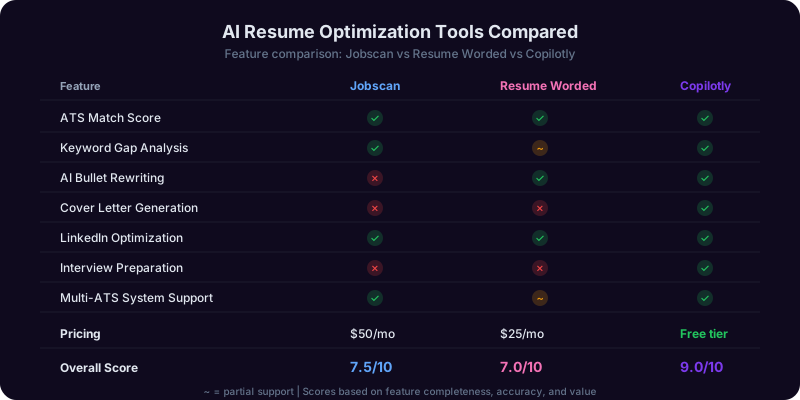
The market for AI resume tools has exploded. There are now dozens of platforms claiming to help you optimize your resume for ATS, and the quality varies enormously. Some are genuinely useful. Others produce generic output that hurts more than it helps. Here is an honest comparison of what is available in 2026 and how to choose the right tool for your situation.
Category 1: ATS Resume Scanners
Tools like Jobscan and Resume Worded scan your resume against a specific job description and provide a match score along with keyword recommendations. They show you which keywords are missing, which are present, and how your formatting compares to ATS requirements.
What they do well: They provide a clear, quantified view of how your resume maps to a specific job posting. The keyword gap analysis is genuinely useful for identifying terms you may have overlooked. Some also flag formatting issues that could cause parsing errors.
Limitations: They focus heavily on keyword matching, which is only one component of modern ATS scoring. A high Jobscan score does not guarantee you pass ATS screening, because the score measures keyword overlap, not semantic relevance, career trajectory fit, or the quality of your accomplishment statements. They also do not write or rewrite content for you. They tell you what is missing, but you still need to figure out how to integrate it naturally.
Category 2: AI Resume Writers
Platforms like Teal, Rezi, and Kickresume use AI to generate resume content, including professional summaries, bullet points, and skills sections. You input your job title and experience, and the AI produces formatted content.
What they do well: They are fast. If you are starting from scratch or have a poorly written resume, they can produce a serviceable first draft in minutes. They also apply formatting templates that are generally ATS-compatible.
Limitations: The output tends to be generic. AI-generated bullet points often read like job descriptions rather than accomplishment statements. "Managed cross-functional teams to deliver projects on time and within budget" could appear on ten thousand resumes. These tools struggle to capture your unique contributions because they do not know your specific numbers, context, or impact. You still need to heavily edit the output to make it authentic and competitive. There is also a growing risk that recruiters recognize AI-generated resume language, much like they recognize ChatGPT-written cover letters.
Category 3: Career Coaching AI
This category includes tools that go beyond resume writing to provide strategic career guidance. They help you identify target roles, map transferable skills, prepare for interviews, and develop a holistic job search strategy. The Copilotly Career Copilot falls into this category.
What they do well: They treat the resume as one piece of a larger job search strategy rather than an isolated document. They can help you decode job descriptions, identify which roles match your background, and build a narrative that connects your past experience to your target role. They also provide ongoing support throughout the job search, from application to negotiation.
Limitations: They require more engagement from you. You cannot just upload a resume and get a magic score. You need to have a conversation about your goals, your experience, and your target roles. For people who want a quick fix, this can feel like more work. But for people who want a better outcome, the strategic approach produces significantly stronger results.
How to Choose the Right Tool
| Your Situation | Best Tool Type | Why |
|---|---|---|
| You have a strong resume and want to check ATS compatibility | ATS Scanner (Jobscan, Resume Worded) | Quick keyword gap analysis without rewriting |
| You are starting from scratch with no resume | AI Resume Writer + Manual editing | Fast first draft, but you must customize extensively |
| You are targeting specific roles and want a tailored strategy | Career Coaching AI (Copilotly) | Strategic guidance on positioning, keywords, and narrative |
| You are making a career change | Career Coaching AI (Copilotly) | Helps map transferable skills and build a bridge narrative |
| You are applying to many roles quickly | ATS Scanner + Career AI combination | Scanner for quick checks, AI for strategic tailoring |
Where Copilotly Fits In
The Career Copilot combines the analytical capabilities of an ATS scanner with the strategic depth of a career coach. It can analyze job descriptions, identify keyword gaps, and score your resume's relevance. But it goes further by helping you rewrite bullet points in the X-Y-Z impact format, tailor your professional summary to specific roles, and build a consistent narrative across your resume, cover letter, and LinkedIn profile.
The Writing Copilot complements this by ensuring your resume language is compelling, concise, and authentically yours rather than generically AI-generated. Together, they address the full spectrum of ATS optimization: keyword coverage, semantic relevance, formatting compliance, and human readability.
The most effective approach for most job seekers is a combination: use a free ATS scanner for a quick compatibility check, then use Copilotly for the strategic tailoring and content optimization that actually moves you from the filtered pile to the interview pile. No tool replaces your knowledge of your own career. The best tools amplify it.
Putting It All Together: Your Complete ATS Optimization Checklist and How to Start Today
You now understand how modern ATS works, what formatting rules to follow, how to optimize keywords strategically, how to write X-Y-Z impact bullets, how to tailor for each application, which mistakes to avoid, and which tools can help. Here is your complete checklist for creating an ATS-optimized resume that also impresses the humans who read it.
The ATS Optimization Checklist
Formatting (5 minutes):
- Single-column layout with no tables, text boxes, or frames
- Standard fonts (Arial, Calibri, Times New Roman) at 10-12pt
- Contact information in the document body, not in headers or footers
- No images, graphics, logos, skill-level bars, or icons
- Standard section headings: Professional Summary, Work Experience, Education, Skills, Certifications
- File saved as .docx for online applications
- File named: FirstName-LastName-Resume-TargetCompany.docx
Content Optimization (20 minutes per application):
- Professional summary tailored to the specific role with Tier 1 keywords
- Bullet points use the X-Y-Z impact format: Accomplished X, measured by Y, by doing Z
- Each bullet starts with a strong action verb (no "responsible for" or "helped with")
- Tier 1 keywords appear at least twice: once in skills, once in experience
- Both full terms and abbreviations included: "Search Engine Optimization (SEO)"
- Skills section contains 12-18 curated, relevant skills organized by category
- Bullet points reordered so the most relevant accomplishments appear first
- No white-text keyword stuffing or other manipulation tactics
Quality Control (5 minutes):
- Resume is 1-2 pages maximum (1 page for less than 10 years of experience)
- No spelling or grammar errors (ATS does not catch these, but recruiters do)
- Dates are consistent and complete throughout
- No "References available upon request"
- No first-person pronouns (I, me, my)
- Job titles include industry-standard equivalents if your company used creative titles
The Testing Step Most People Skip
Before you submit your tailored resume, test it. Copy all the text from your document and paste it into a plain text editor like Notepad or TextEdit. Read through the plain text version. This is approximately what the ATS sees. If the text is garbled, out of order, or missing sections, your formatting has a problem. Fix it before you submit.
You can also run your resume through a free ATS scanner to get a keyword match score. Aim for 70% or higher keyword match against the job description. Below 70%, you are likely to be filtered out. Above 80% is ideal, but only if you have integrated the keywords naturally rather than artificially inflating the score.
The Bigger Picture: ATS Is a Gate, Not the Goal
It is easy to become so focused on ATS optimization that you forget the ultimate goal: impressing a human being enough to get an interview. ATS optimization and human readability are not in conflict. The strategies in this guide, including clear formatting, specific impact statements, relevant keywords in context, and tailored content, make your resume better for both audiences.
A resume that passes ATS but reads like a keyword dump will not impress the recruiter who reviews it. A resume that reads beautifully but uses a two-column Canva template will never reach the recruiter. The goal is to satisfy both filters, and the techniques in this guide are designed to do exactly that.
Your Next Steps
Here is the order of operations for optimizing your resume, starting today:
- Audit your current resume format against the formatting checklist above. Fix any ATS-breaking issues first. This is the highest priority because no amount of content optimization matters if your resume cannot be parsed.
- Build your master resume. Write X-Y-Z impact bullets for every significant accomplishment in your career. This is a one-time investment that pays dividends across every application.
- Select a target job posting and run through the 20-minute tailoring system. Adjust your summary, reorder your bullets, and update your skills section.
- Test the result by pasting into a plain text editor and running through an ATS scanner.
- Submit and track. Keep a spreadsheet of which version of your resume you sent to each company, your keyword match score, and the outcome. Over time, this data helps you refine your approach.
How Copilotly Supports Every Step
The Career Copilot can guide you through each step of this process. It analyzes job descriptions to identify the keyword tiers. It reviews your bullet points and suggests X-Y-Z rewrites. It scores your resume against specific postings and recommends tailoring adjustments. And it helps you build the consistent career narrative that connects your resume to your cover letter and interview answers.
The Writing Copilot ensures every sentence on your resume is concise, compelling, and free of the generic AI-generated language that recruiters are learning to spot. Together, they give you the strategic advantage of a professional resume writer and career coach, available anytime you need to tailor for the next application.
Your resume is not just a document. It is an argument for why you should be interviewed. Make that argument as strong, specific, and strategically targeted as the data-driven professional you are. The algorithms will notice, and more importantly, so will the humans behind them.
Frequently Asked Questions
Recommended Copilots
Recommended Copilots
Analyze job descriptions, identify keyword gaps, score your resume relevance, and get strategic guidance on positioning for specific roles
Try Free →Transform generic bullet points into compelling X-Y-Z impact statements and ensure your resume language is concise and authentically yours
Try Free →Continue Exploring
Related Scenarios
For You
Related Articles
Get Answers From the Career Copilot
Stop sending resumes into the ATS void. The Career Copilot analyzes job descriptions, identifies keyword gaps, and helps you tailor your resume for maximum ATS scores, while the Writing Copilot transforms responsibility-based bullets into compelling X-Y-Z impact statements that impress both algorithms and hiring managers.