What Is an IRS CP2000 Notice (And Why It Is Not an Audit)
If you just opened your mailbox to find an envelope from the IRS marked CP2000, take a deep breath. A CP2000 notice is one of the most common letters the IRS sends, and it is not an audit. It is a proposed adjustment generated by the IRS Automated Underreporter (AUR) program, which cross-references the income you reported on your Form 1040 with the W-2s, 1099s, and other information returns that employers, banks, and platforms filed with the IRS on your behalf.
When those two sets of numbers do not match, a computer (not a human auditor) prints a CP2000. The notice proposes additional tax, interest, and sometimes a 20% accuracy-related penalty. Critically, it is a proposal, not a final bill. You have the legal right to disagree, partially agree, or fully agree, and your response directly determines what you ultimately owe. Many recipients panic and simply pay the proposed amount, often handing the IRS thousands of dollars they did not actually owe.
According to IRS.gov, the Automated Underreporter program issues several million CP2000 notices each year, and a significant portion contain errors or are based on incomplete information. That is why responding correctly, rather than just paying, can save you thousands.
Key distinctions:
- CP2000 vs. audit: An audit (Letter 2205 or 566) involves a human examiner reviewing your records. A CP2000 is a computer-generated proposal based solely on third-party data.
- CP2000 vs. CP3219A: If you ignore a CP2000, the IRS escalates to a Statutory Notice of Deficiency (CP3219A or Letter 3219), which is your last chance before assessment.
- CP2000 vs. bill: The notice is not a balance due. It becomes a balance due only after the response window closes or you agree.
- CP2000 vs. CP2501: A CP2501 is an earlier inquiry letter asking you to clarify before a CP2000 is issued. Same workflow, less urgency.
Related reading: 2026 Tax Changes Under OBBBA Explained and The IRS AI Audit Defense Guide.
Disclaimer: This article is informational and does not constitute tax advice. For complex situations, consult a licensed CPA or enrolled agent.
Why You Got a CP2000: The Most Common Triggers in 2026
CP2000 notices are triggered by mismatches, but the underlying causes follow predictable patterns. Understanding why your notice was issued is the first step to responding accurately. In 2026, the most common triggers reflect both long-standing reporting gaps and newer issues tied to the gig economy, crypto, and the lowered 1099-K threshold.
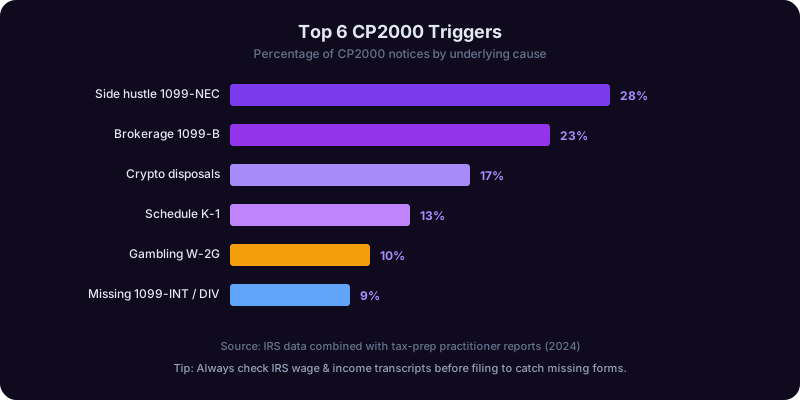
1. Missing 1099 income. A freelance gig, a brokerage account, a side hustle through PayPal or Venmo, or a one-off consulting check that slipped your mind. The payer filed a 1099-NEC, 1099-K, or 1099-MISC with the IRS, but you did not report it. See our freelancer deductions guide for context on what should have been reported.
2. Brokerage and crypto mismatches. Form 1099-B reports gross proceeds, not gain. If you reported only your net gain (or nothing because you had a loss), the IRS sees the gross proceeds and assumes the entire amount is taxable. Crypto exchanges now issue Form 1099-DA in 2026, and basis tracking errors are a top cause of CP2000s.
3. Retirement distributions. A 1099-R from a 401(k) rollover or IRA distribution that you correctly treated as nontaxable but did not report on the right line of Form 1040.
4. Cancellation of debt (1099-C). A settled credit card or forgiven loan generates a 1099-C. Many taxpayers do not know this counts as income unless an exclusion applies (insolvency, bankruptcy).
5. Gambling winnings (W-2G). Casinos and sportsbooks report wins over thresholds, and you cannot offset them by simply netting losses without itemizing.
6. Side hustle and 1099-K thresholds. The 2026 1099-K reporting threshold continues to capture small-volume sellers and gig workers. Read our side hustle taxes guide for a full breakdown.
7. Spouse income or duplicate reporting. On joint returns, a spouse's 1099 can be missed. Conversely, the IRS sometimes receives duplicate filings from payers, and you are being charged twice for the same income.
8. K-1 partnership and S-corp items. Schedule K-1 income from partnerships or S-corps often arrives late and is missed on the original return. The IRS receives a copy directly from the entity, so mismatches are almost guaranteed if you skip it.
The takeaway: never assume the IRS is right. The mismatch is real, but the cause determines whether you actually owe more, owe nothing, or are even due a refund.
Anatomy of the CP2000: How to Read It Line by Line
The CP2000 is typically 6 to 8 pages and intimidating at first glance. But every notice has the same structure, and once you know what to look for, you can decode yours in 15 minutes.
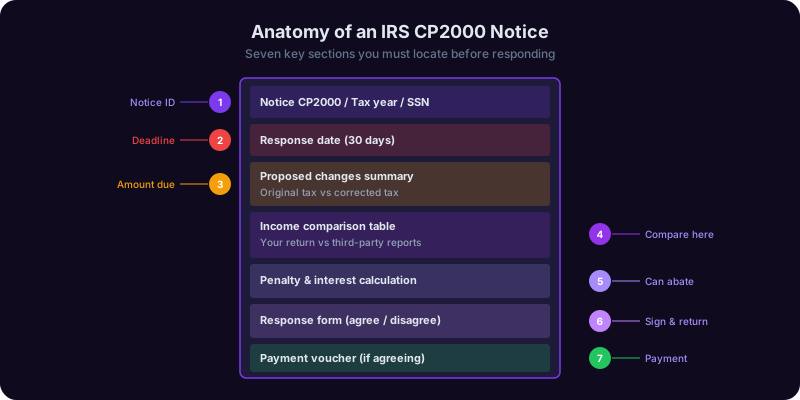
Page 1 - Summary page. This shows the tax year in question, the proposed amount due (or refund), and the response deadline. The deadline is exactly 30 days from the notice date, not from the date you received it. Mark this on your calendar immediately. Also note the contact phone number and the unique notice number, both of which you will reference throughout your response.
Page 2 - Response form. This is the page you sign and return. It has three checkboxes: I agree, I do not agree, and I partially agree. Do not check anything yet.
Page 3-4 - Explanation of changes. A table showing each line item the IRS believes you misreported. Columns include: amount you reported, amount reported to IRS, difference, and proposed tax change. Read every row carefully.
Page 5-6 - Recalculated tax. A side-by-side comparison of your original return vs. the IRS's proposed corrected return, including changes to tax, penalties (typically the 20% accuracy-related penalty under IRC 6662), and interest.
Page 7-8 - Payment voucher and envelope. A pre-printed voucher (Form 9465 may be included) and a return envelope.
What to verify first:
- Tax year. Confirm the year matches a return you actually filed.
- Payer names and EINs. Does each 1099 or W-2 listed actually belong to you? Identity theft and mistaken-identity CP2000s are increasingly common.
- Amounts. Pull your original return and compare line by line. Did you actually omit the income, or did you report it on a different line?
- Basis and offsets. For brokerage and crypto items, the IRS often shows gross proceeds with zero basis. You almost always have basis to subtract.
- Penalties. A 20% penalty is not automatic. You can request abatement if you have reasonable cause or qualify for first-time penalty relief.
Pro tip: photocopy or scan the entire notice before doing anything else. You will reference it repeatedly, and you want a clean original for your records. Then build a one-page summary spreadsheet listing each disputed item, your initial assessment (agree/disagree), and the documents you need to gather.

Get Answers From the Tax Copilot
Upload your IRS CP2000 notice and Copilotly's Tax Copilot decodes every line, compares it to your original return, drafts a personalized disagreement letter, builds your exhibit checklist, and tracks the 30-day deadline. Respond confidently without paying more than you owe.
The Three Response Paths: Agree, Disagree, or Partially Agree
Once you have decoded the notice and pulled your original return, you fall into one of three response paths. Choosing the right path is the single most important decision in the CP2000 process.
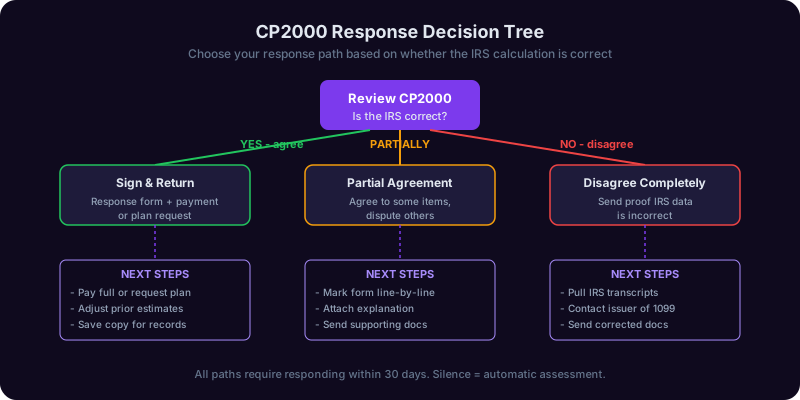
Path 1: Fully agree. If after review you confirm you genuinely forgot the income and the IRS calculation is correct, check the I agree box, sign the response form, and either pay in full or request an installment agreement (more on that below). Signing extends your statute of limitations, so be certain before agreeing. If you agree only because you do not understand the dispute, stop and get help first - signing now forecloses your options later.
Path 2: Fully disagree. If the proposed change is wrong (the income was reported on a different line, it belonged to someone else, you have basis to offset, an exclusion applies, etc.), check I do not agree and submit a written explanation with supporting documents. This is the most common path among taxpayers who do their homework, and it is where the biggest savings come from.
Path 3: Partially agree. Sometimes the IRS is partly right. Maybe you missed one 1099 but the brokerage proceeds shown have basis you can document. Check I partially agree, agree to the portion you actually owe, and dispute the rest with a written explanation. Be explicit about which dollars you accept and which you contest, line by line.
The cardinal rule: do not file an amended return (Form 1040-X) in response to a CP2000. The AUR program processes CP2000 responses through its own workflow. Filing a 1040-X creates a separate, parallel proceeding that confuses the system and often makes things worse. Respond only using the CP2000 response form and supporting letter.
What if you need more time? Call the phone number on the notice and request a 30-day extension. The IRS routinely grants one extension. Do not let the deadline pass without either responding or requesting an extension - silence is treated as agreement and the proposed assessment becomes final.
If you cannot resolve it: contact the Taxpayer Advocate Service, an independent organization within the IRS that helps taxpayers experiencing hardship or unable to resolve issues through normal channels.
Writing the Disagreement Letter (Free Template Included)
If you are disagreeing in full or in part, the heart of your response is a clear, professional letter that explains exactly why the IRS proposal is wrong. The letter should be concise (one to two pages), factual, and accompanied by documentation. Avoid emotional language, accusations, or long narratives. AUR examiners process thousands of responses and reward clarity.
Structure of an effective disagreement letter:
- Header with your name, SSN, tax year, and the CP2000 notice number
- One-sentence statement of position ("I disagree with the proposed changes for the following reasons")
- Numbered list addressing each disputed item, with the line of the notice referenced
- Reference to attached exhibits
- Polite closing requesting that the notice be closed with no change (or with the partial change you accept)
Free template you can adapt:
[Your Name]
[Your Address]
[Your SSN: XXX-XX-XXXX]
[Date]

Internal Revenue Service
[Address from CP2000 notice]

Re: CP2000 Notice dated [date]
Tax Year: [year]
Notice Number: [from upper right corner]

Dear IRS Automated Underreporter Unit,

I am writing in response to the CP2000 notice referenced above. I respectfully disagree with the proposed changes for the reasons set forth below.

1. Item: [Description, e.g., 1099-B from Broker XYZ, $24,500 gross proceeds]
   The notice proposes treating the full $24,500 as taxable income. However, this represents gross proceeds from securities sales, not gain. My adjusted cost basis in these securities was $22,800, as shown on the attached Form 8949 (Exhibit A) and broker confirmations (Exhibit B). The correct taxable gain is $1,700, which was reported on Schedule D, line 7 of my original return.

2. Item: [Next disputed item with the same structure]

Based on the above, the proposed assessment of $[amount] should be reduced to $[corrected amount, or zero]. I have enclosed:
   - Exhibit A: Form 8949 detail
   - Exhibit B: Broker confirmations
   - Exhibit C: [Other supporting docs]

I also respectfully request abatement of the accuracy-related penalty under IRC 6664(c) for reasonable cause, as I made a good-faith effort to report this transaction accurately.

Please close this notice with no change (or with the partial adjustment described above). If you require additional information, I can be reached at [phone] or [email].

Sincerely,
[Signature]
[Printed Name]
Tips that work:
- Number every exhibit and reference it explicitly
- Quote the exact line of your original return where you reported the item (if applicable)
- Cite the relevant Internal Revenue Code section sparingly - only when it materially supports your position
- Always send via certified mail with return receipt - this is your proof of timely response
- Keep a complete copy of everything you send
Supporting Documentation: What to Send (and What to Hold Back)
A disagreement letter is only as strong as the documents that back it up. Send too little and the IRS rejects your dispute. Send too much (the entire shoebox) and your examiner gets overwhelmed and may default to the original proposal. The goal is targeted, organized evidence that maps directly to each disputed item in your letter.
For missing or misreported 1099 income:
- Copy of the actual 1099 if you have it
- The page of your original return showing where you reported the income
- Bank statements showing the deposit (if relevant to timing or amount)
- Corrected 1099 from the payer (if applicable)
For brokerage and crypto basis disputes:
- Form 8949 detail showing acquisition date, basis, sale date, proceeds, and gain/loss
- Broker year-end statements (Form 1099-B with basis detail)
- For crypto: exchange CSV exports, wallet transaction history, basis tracking software reports
- Trade confirmations for any high-value transactions
For identity theft or wrong-taxpayer issues:
- Form 14039 (Identity Theft Affidavit) - find it at IRS.gov forms
- Police report or FTC identity theft report
- Any correspondence with the payer disputing the 1099
For 1099-C cancellation of debt:
- Form 982 if claiming the insolvency exclusion
- Insolvency worksheet showing liabilities exceeded assets immediately before discharge
- Bankruptcy discharge papers if applicable
For penalty abatement:
- Written statement of reasonable cause (illness, natural disaster, reliance on tax professional)
- Supporting documentation for the cause (medical records, FEMA declaration, CPA correspondence)
- Prior compliance history (the IRS has this, but referencing it helps)
What to hold back: sensitive items that are not directly relevant. Do not send your entire bank statement when only one transaction matters - redact or excerpt the relevant line. Do not volunteer information about other tax years unless the notice asks. Do not send originals - always copies.
Organization tips: use tabbed exhibits, include a one-page cover index listing each exhibit, and print one-sided. AUR examiners scan documents, and one-sided originals process more cleanly.
Payment Options If You Actually Owe (And Penalty Relief)
If after honest review you do owe additional tax, the next question is how to pay. The IRS offers more flexibility than most taxpayers realize, and choosing the right payment path can save you penalties and interest over time.
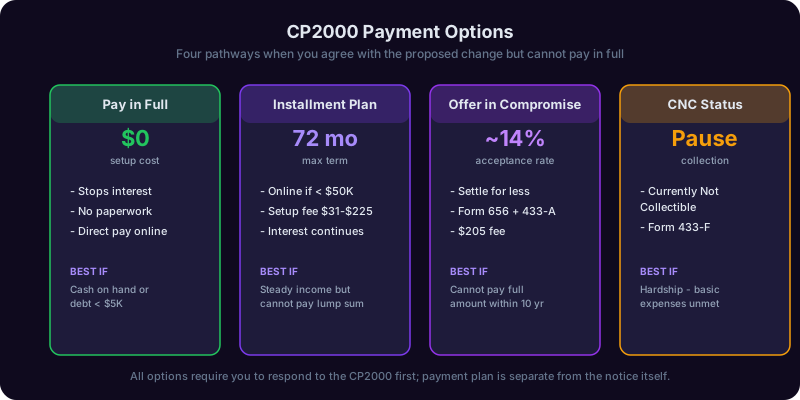
Option 1: Pay in full. If you can afford it, pay in full by the response deadline. This stops interest accrual and avoids setup fees. Pay online at IRS.gov Direct Pay using bank account (free) or debit/credit card (small fee).
Option 2: Short-term payment plan (180 days or less). Free to set up online if you owe less than $100,000 combined tax, penalties, and interest. Interest and the failure-to-pay penalty continue, but no setup fee.
Option 3: Long-term installment agreement. For balances under $50,000, you can apply online for an installment agreement of up to 72 months. Setup fees range from $31 (direct debit, online) to $225 (paper, non-direct-debit). The failure-to-pay penalty is cut in half (from 0.5% to 0.25% per month) while a streamlined agreement is in place.
Option 4: Offer in Compromise (OIC). If paying in full would create financial hardship, you may qualify for an OIC, settling for less than you owe. Acceptance rates hover around 30-40%, and the process takes 6-12 months. Form 656 and Form 433-A are required.
Option 5: Currently Not Collectible (CNC) status. If you cannot pay anything without falling behind on basic living expenses, the IRS may place your account in CNC. Collection pauses, but interest continues.
Penalty abatement. The accuracy-related penalty (20%) and failure-to-pay penalty can often be reduced or eliminated:
- First-Time Abate (FTA): If you have a clean compliance history for the prior three years, you can request FTA for one tax year. This is the single most underused relief option.
- Reasonable cause: Illness, natural disaster, death in family, reliance on a tax professional. Document everything.
- Statutory exception: Erroneous written advice from the IRS, certain disaster declarations.
Interest is rarely waived. Interest is set by statute and the IRS has very limited authority to abate it (only when caused by IRS error or delay). Plan to pay it as the cost of resolution and focus your energy on reducing the underlying tax and penalties instead.
For more on managing tax debt, see our debt payoff strategy guide.
What Happens If You Ignore It (And How Copilotly Helps You Respond Fast)
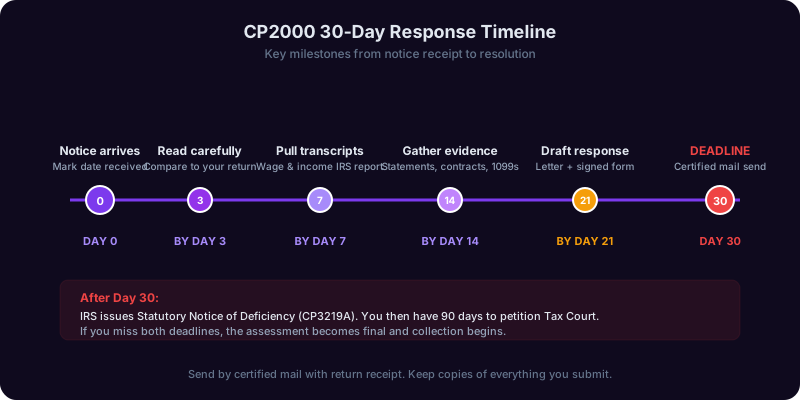
Ignoring a CP2000 is the single most expensive mistake you can make. The 30-day clock is real, and the consequences escalate quickly.
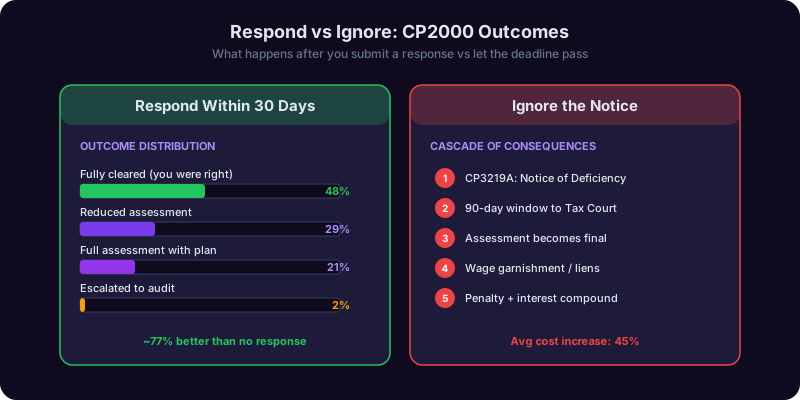
Day 31: Default assessment begins. The IRS treats non-response as agreement and begins finalizing the proposed assessment.
~90 days later: CP3219A Statutory Notice of Deficiency. Also called a "90-day letter," this is your last opportunity to contest the assessment without paying first. You have 90 days to petition the U.S. Tax Court. After that, the assessment becomes final.
After 90-day letter expires: The IRS assesses the tax, adds penalties and interest, and begins collection. Wage garnishments, bank levies, and federal tax liens follow. Your credit and your peace of mind take a serious hit.
Real outcomes: Taxpayers who respond to CP2000s with proper documentation see proposed assessments reduced or eliminated in a substantial percentage of cases. Taxpayers who ignore the notice almost always end up paying the full proposed amount - plus additional penalties and interest accrued during the delay.
How Copilotly's Tax Copilot helps you respond confidently:
- Decode your notice in plain English. Upload your CP2000 and Tax Copilot identifies every disputed item, the IRS's source, and what documentation you need.
- Compare line by line against your return. Copilot cross-references your original 1040 to spot where you reported (or should have reported) each item.
- Draft your disagreement letter. Copilot generates a personalized response letter using the template structure above, populated with your specific facts.
- Organize exhibits. A checklist of supporting documents based on the type of dispute, with reminders for items most taxpayers forget.
- Penalty abatement screening. Copilot evaluates whether you qualify for First-Time Abate or reasonable cause relief and drafts the request.
- Deadline tracking. Automated reminders so the 30-day window never sneaks up on you.
When to call a human. If your CP2000 involves more than $25,000, a business return, suspected identity theft, or you have already received a 90-day letter, hire a CPA or enrolled agent. Copilotly is a powerful first line of defense, but complex cases benefit from professional representation. The Form 2848 Power of Attorney lets you authorize a professional to handle the IRS on your behalf.
Final reminder: this article is informational and not tax advice. Consult a CPA or enrolled agent for complex situations.
Frequently Asked Questions
Recommended Copilots
Related Articles
Get Answers From the Tax Copilot
Upload your IRS CP2000 notice and Copilotly's Tax Copilot decodes every line, compares it to your original return, drafts a personalized disagreement letter, builds your exhibit checklist, and tracks the 30-day deadline. Respond confidently without paying more than you owe.