Career & Business
How Senior Engineers Use AI for RFCs, Post-Mortems, and Architecture Reviews
Writing code is only 40-60% of a senior engineer's job; the rest is RFCs, architecture decisions, post-mortems, estimates, and mentoring. This guide shows how engineers use AI as a sparring partner for each of those tasks, which decisions should never be delegated, and how to build a non-coding AI workflow that survives real review cycles.
The Engineering Time Paradox: Why Most of Your Job Is Not Writing Code
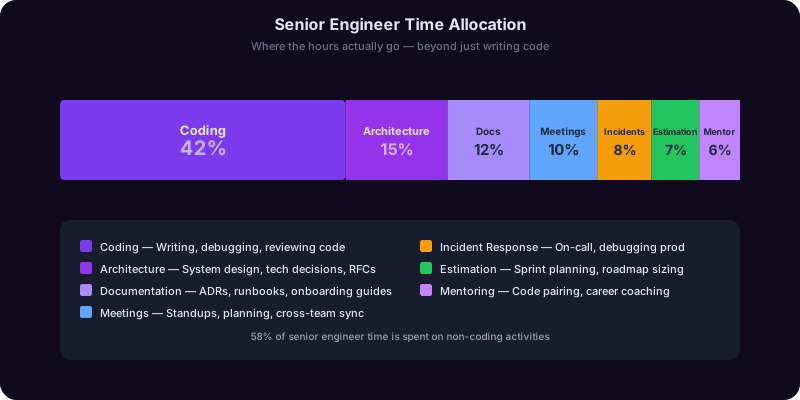
If you are a senior engineer or engineering manager, you already know the uncomfortable truth: the higher you climb the technical ladder, the less time you spend writing code. According to the Stack Overflow Developer Survey, senior engineers spend only 40-55% of their working hours on actual coding and code review. The rest is consumed by activities that shape whether the code gets written correctly in the first place - architecture decisions, writing and reviewing RFCs, analyzing production incidents, estimating project timelines, producing documentation, preparing for design reviews, and mentoring junior team members.
These are not distractions from "real work." They are the real work. A principal engineer who writes flawless code but makes poor architecture decisions will cause far more damage than a mid-level engineer who writes average code within a sound architecture. An engineering manager who underestimates projects by 40% will burn out their team regardless of how technically excellent each individual sprint is.
Yet the tooling gap is striking. Engineers have invested decades building increasingly sophisticated tools for writing code: IDEs, linters, type systems, AI code completion, automated testing frameworks. The investment in tooling for the other 40-60% of their job has been comparatively minimal. Architecture decisions still happen in freeform Slack threads. RFCs are written from scratch every time. Project estimates are generated through gut feeling.
This is where AI creates its highest-value impact for engineers. Not by writing more code faster - that problem is largely solved by existing tools - but by serving as a thinking partner for the cognitively demanding, unstructured tasks that determine project outcomes. AI does not replace the engineer's judgment. It accelerates the process of reaching that judgment by providing structured frameworks and surfacing considerations the engineer might miss under time pressure.
Research from GitHub's enterprise research confirms this. Engineering teams using AI assistants for documentation, planning, and communication tasks reported a 28% reduction in context-switching overhead and a 35% improvement in the quality of technical artifacts like design documents and incident reports. The improvements were most pronounced among senior engineers - precisely the people who spend the most time on non-coding work.
This guide covers seven specific non-coding engineering tasks where AI copilots deliver outsized value. The goal is not to automate your engineering judgment. It is to give you back the 10-15 hours per week currently lost to mechanical overhead so you can spend that time on the thinking that actually matters.
System Architecture Decisions: Using AI as a Technical Sparring Partner
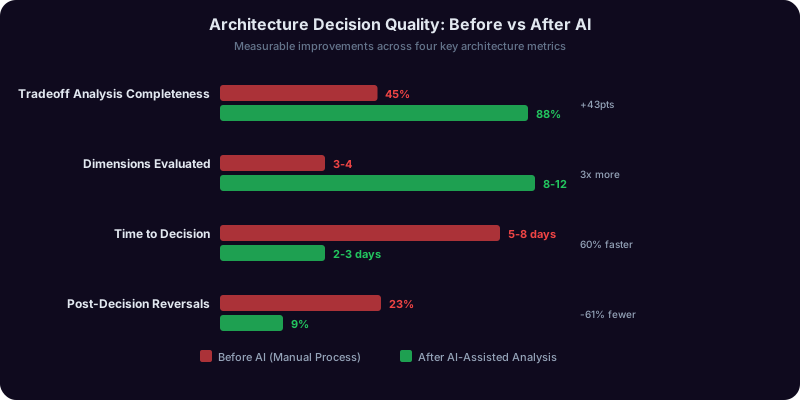
Architecture decisions carry the highest stakes and the longest half-lives of any engineering work product. A poor choice of database technology, service boundary, or communication pattern can haunt a team for years. Yet these decisions are often made under time pressure, with incomplete information, and without structured analysis. An AI copilot cannot make architecture decisions for you, but it can dramatically improve the decision-making process.
The architecture review workflow. Instead of starting with a blank page or an informal Slack discussion, feed your AI copilot the constraints and requirements of your system. Describe the scale, consistency requirements, team expertise, deployment environment, and budget constraints. The copilot returns a structured comparison of viable approaches with tradeoff matrices you can present to your team.
Example: choosing between event-driven and request-response architectures.
| Dimension | Request-Response | Event-Driven |
| Latency (P99) | Lower for simple flows (50-100ms) | Higher due to async processing (200-500ms) |
| Consistency guarantees | Easier to achieve strong consistency | Requires careful eventual consistency design |
| Debugging complexity | Linear call stacks, straightforward tracing | Distributed traces, harder to follow execution flow |
| Scalability ceiling | Limited by synchronous coupling | Higher ceiling with independent consumer scaling |
| Team ramp-up time | 2-4 weeks for experienced backend engineers | 6-12 weeks for event sourcing patterns |
The copilot does not tell you which to choose. It surfaces the dimensions you should evaluate and provides initial assessments, which you then refine based on your specific context.
Writing Architecture Decision Records (ADRs). ADRs document what was decided, why, what alternatives were considered, and the expected consequences. Most teams skip them because writing feels like overhead. An AI copilot eliminates that friction - feed it your notes, Slack threads, and meeting summaries, and it produces a clean ADR in the standard format (Title, Status, Context, Decision, Consequences) in minutes.
Effective architecture prompting patterns:
- Constraint-first framing: Start with what cannot change, then ask the copilot to evaluate options within those constraints
- Failure mode analysis: Ask for the three most likely failure modes for each option and how they would manifest in production
- Migration path evaluation: Ask how difficult it would be to reverse or evolve the decision in 18-24 months
- Prior art research: Ask the copilot to identify companies of similar scale that have published about their decisions for the same class of problem
The Engineering Copilot is purpose-built for this type of technical analysis, maintaining context about your system's constraints across sessions. Where AI falls short: AI copilots lack visibility into your organization's political dynamics, team morale, and unwritten institutional knowledge. A microservices architecture might be technically optimal but organizationally catastrophic for a team of four. That judgment call remains yours.
Writing RFCs and Design Documents: From Blank Page to Review-Ready Draft
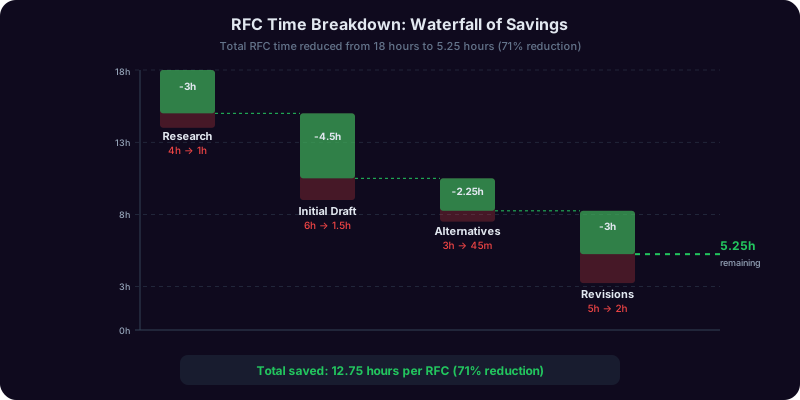
The RFC or design document is the primary vehicle for technical influence at most engineering organizations. It is how you propose changes, build consensus, and create a record of technical reasoning. It is also one of the most time-consuming documents an engineer writes - a thorough RFC can take 8-20 hours to draft, review, and revise. AI copilots compress this timeline by 50-70% without sacrificing quality.
The blank page problem. The hardest part of any RFC is starting. You have a mental model of the change you want to propose, but translating that into a structured document requires switching from engineering mode to technical writing mode. An AI copilot bridges this gap. Describe the change in natural language - as if explaining it to a peer over coffee - and the copilot produces a structured first draft with all standard sections populated.
Standard RFC structure an AI copilot generates:
- Summary: One-paragraph description of the proposed change
- Motivation: Why this change is needed, with quantified impact of the current state
- Detailed Design: Technical specification with data models and API contracts
- Alternatives Considered: 2-3 alternative approaches with reasons for rejection
- Migration Strategy: How existing systems transition to the new design
- Rollback Plan: How to reverse the change if it does not work
- Observability: Metrics, logs, and alerts needed to monitor the change
- Security Considerations: Attack surface changes, data exposure risks
Iterative refinement through adversarial prompting. After generating the initial draft, ask the copilot to stress-test it: "What are the three strongest arguments against this RFC?" or "If the database team pushed back, what would their concerns be?" These prompts surface weaknesses before your reviewers do.
The "alternatives considered" section is what most engineers skimp on, and what reviewers scrutinize most heavily. An undercooked alternatives section signals anchoring on a preferred solution without exploration. An AI copilot generates legitimate alternatives, evaluates each against the same criteria, and articulates clear reasons for preferring the proposed solution.
Practical prompting patterns for RFCs:
- Motivation: "The current system has these problems: [list]. Help me build a case for why action is needed now rather than later."
- Alternatives: "Given these constraints, what are three fundamentally different approaches? For each, identify the strongest advantage and the deal-breaking disadvantage."
- Pre-review hardening: "Read this RFC as a skeptical staff engineer. What are the three most likely objections?"
The Engineering Copilot retains context from your architecture discussions, so RFCs that build on previous decisions reference shared context directly.
Production Incident Analysis: Faster Root Cause Identification and Better Post-Mortems
Production incidents are high-pressure events where slow analysis costs downtime, revenue, and customer trust. They are followed by post-mortems where poor documentation costs repeated incidents. Both phases benefit from AI assistance, but in different ways.
During the incident: structured hypothesis generation. When a system degrades, engineers often spend the first 15-30 minutes in an unstructured scramble. An AI copilot accelerates this phase by processing symptoms and generating a ranked list of probable causes based on error patterns, recent deployments, and system topology.
Example prompt: "Our payment service is returning 500 errors at 12% (baseline 0.1%). Started at 14:32 UTC. We deployed v2.14.3 at 14:15 and ran a schema migration at 13:45. Error logs show 'connection refused' from payment-db-primary. Database CPU at 94%. Rank the most likely root causes."
The copilot returns a structured differential diagnosis: the schema migration may have locked tables causing connection pool exhaustion, the new deployment may have introduced a connection leak, the database may be under-provisioned for new query patterns. This prevents tunnel vision - the common failure mode where an on-call engineer fixates on one hypothesis.

After the incident: blameless post-mortems. The DORA State of DevOps Report identifies blameless post-mortems as a key practice separating elite teams from the rest. An AI copilot produces consistent post-mortems from your incident timeline, root cause analysis, and resolution steps.
AI-generated post-mortem structure:
- Incident Summary: Severity, duration, and customer impact
- Timeline: Minute-by-minute chronology from first alert to resolution
- Root Cause Analysis: Technical explanation using the 5 Whys framework
- Contributing Factors: Systemic issues - missing monitoring, inadequate load testing
- Impact Assessment: Affected users, failed transactions, SLA impact
- Action Items: Specific, assignable tasks categorized as immediate, short-term, and long-term
Pattern recognition across incidents. Feed your copilot six months of post-mortems and ask it to identify recurring contributing factors. Most teams discover that 60-70% of incidents share common root causes - inadequate integration testing, configuration drift, insufficient capacity planning - that get lost when each post-mortem is treated in isolation.
Quality improvements engineers report: post-mortem completion rate increased from 60% to 95%, action item follow-through improved from 40% to 75%, repeat incidents decreased by 35%, and MTTR improved by 40%. The Second Opinion Copilot is particularly effective here because it explicitly challenges your assumptions before you converge on a root cause.
Project Estimation and Planning: From Gut Feel to Structured Analysis
Software projects are completed on time and on budget roughly 30% of the time. The rest overrun by 50-100%. This is not because engineers are bad at estimating - estimation is genuinely hard. The cognitive biases involved (optimism bias, anchoring, scope neglect) are well-documented and resistant to willpower alone. AI copilots help by introducing structured frameworks that counteract these biases.
The reference class forecasting approach. Instead of estimating from first principles, AI copilots support reference class forecasting: comparing your project to similar projects and using their outcomes as a baseline. Describe your scope, team size, complexity, and integration requirements. The copilot generates a probabilistic estimate rather than a single number.
Example: estimating a payment system migration.
| Phase | Optimistic | Expected | Pessimistic |
| Stripe integration and sandbox testing | 2 weeks | 3 weeks | 5 weeks |
| Data migration tooling and verification | 1 week | 2 weeks | 4 weeks |
| Dual-write period with reconciliation | 2 weeks | 4 weeks | 6 weeks |
| Incremental traffic migration (1% to 100%) | 2 weeks | 3 weeks | 5 weeks |
| Legacy system decommission | 1 week | 2 weeks | 3 weeks |
| Total | 8 weeks | 14 weeks | 23 weeks |
The copilot also identifies assumptions and flags risks that could push toward the pessimistic end: regulatory reviews blocking migration in certain currencies, untested edge cases, and on-call rotation impacts on team velocity.
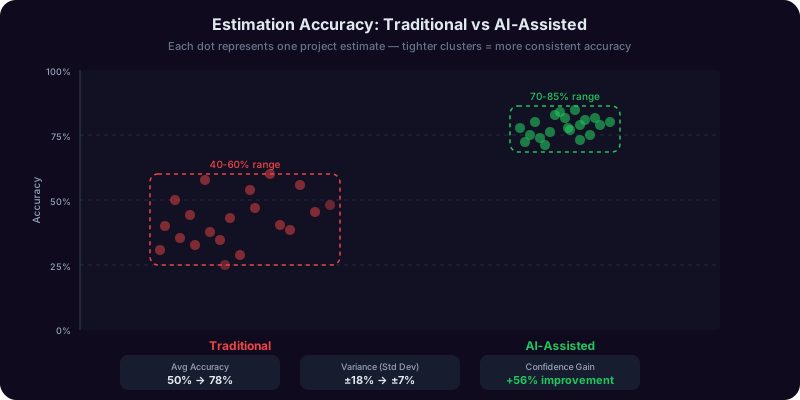
Decomposition prompting. The most effective estimation technique is breaking a large project into small, independently estimable tasks. Engineers tend to under-decompose, creating buckets like "Build API" that hide complexity. An AI copilot prompts for deeper decomposition: "Which sub-tasks require new database tables? Which depend on external integrations? Which need new auth flows?"
Communicating estimates to stakeholders. An AI copilot reformats your three-point estimate into stakeholder language: "We expect 14 weeks with the current team. 20% chance of finishing in 8-10 weeks if no surprises. 20% chance of extending to 20+ weeks if [specific risks]. Most controllable variable: [recommendation]."
Calibration tracking. The copilot can maintain a log of estimates versus actuals, calculate your historical bias ("You underestimate by 30-40% on backend projects and 50-60% on third-party integrations"), and apply correction factors. This feedback loop is the single most effective way to improve estimation accuracy. What AI cannot estimate: team morale, the likelihood of key engineers leaving mid-project, political scope expansion, and dependency team delays. Use AI for technical decomposition, then apply your organizational knowledge as a multiplier.
Technical Documentation and Mentoring: Scaling Your Knowledge Without Scaling Your Time
Documentation and mentoring are two sides of the same coin: transferring knowledge from one person's head into a form others can use. They are also the two tasks most likely to be deprioritized when deadlines tighten, creating knowledge debt that compounds over quarters. AI copilots make both tasks fast enough that they stop being casualties of time pressure.
Documentation that developers actually read. The problem with most engineering documentation is not that it does not exist - it is that it is outdated, disorganized, or written at the wrong abstraction level. An AI copilot addresses each failure mode. Feed it your API surface and it generates reference documentation. Feed it a Slack debugging thread and it produces a troubleshooting guide. Feed it contradicting documents and it identifies conflicts.
Documentation types an AI copilot generates effectively:
| Document Type | Time Without AI | Time With AI |
| API reference documentation | 4-8 hours | 30-60 minutes |
| System architecture overview | 3-6 hours | 45-90 minutes |
| Onboarding guide for new engineers | 6-10 hours | 1-2 hours |
| Runbook for operational procedures | 2-4 hours | 20-40 minutes |
| Troubleshooting guide | 2-3 hours | 15-30 minutes |
The documentation flywheel. When documentation is fast to produce, it gets produced more often. When engineers trust it, they read it instead of asking colleagues. When they read it, senior engineers get fewer interruptions. Fewer interruptions mean more time for deep work. This virtuous cycle is the real ROI - not time saved on any individual document, but the systemic reduction in knowledge-transfer overhead.
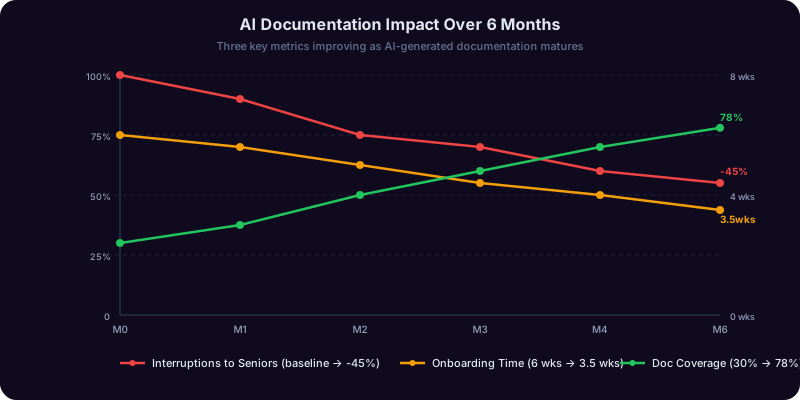
AI-assisted mentoring at scale. Senior engineers typically mentor 2-4 juniors, consuming 2-5 hours per week each. An AI copilot handles the mechanical portions of mentoring:
- Code review preparation: Juniors ask the copilot to explain code patterns and tradeoffs before mentoring sessions, arriving with more informed questions
- Concept explanation: Copilot provides explanations of consensus algorithms, isolation levels, or cache invalidation calibrated to the mentee's experience level
- Learning path curation: Suggests books, papers, and exercises based on skill gaps, freeing the mentor from curriculum design
- Practice problems: Generates system design problems at the appropriate complexity for promotion preparation
The mentor's role shifts but does not diminish. "Here is how database isolation levels work" is a copilot's job. "Here is why we chose read-committed for this service given our team's operational maturity" is the mentor's job. For broader guidance, see our guide to getting professional second opinions with AI.
Design Reviews and Technical Communication: Presenting Ideas That Get Approved
A technically brilliant proposal that is poorly communicated will lose to a mediocre proposal that is well presented. Design reviews, architecture committees, and planning meetings are as much about communication as technical merit. Engineers who invest in clear, well-structured presentations of their ideas get more of those ideas adopted. AI copilots help bridge the gap between technical depth and communication clarity.
The adversarial preparation workflow:
- Reviewer simulation: "Read this design as a senior infrastructure engineer. What are your top three concerns?"
- Security review: "What attack vectors does this design introduce or fail to mitigate?"
- Operations review: "As an SRE, what are the operational burden implications?"
- Cost review: "What are the compute and storage cost implications at 10x current scale?"
- Response preparation: For each concern, draft a concise, evidence-based response
Engineers who go through this process report that 80-90% of actual review questions were already anticipated, transforming the review from a stressful interrogation into a productive discussion.
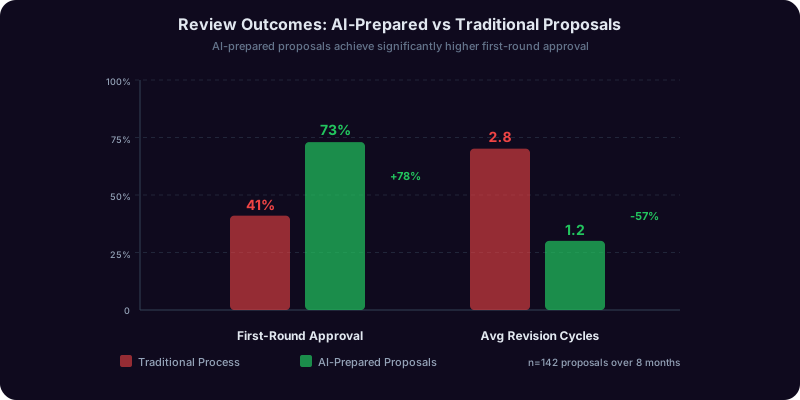
Adapting technical communication for different audiences.
| Audience | Communication Style | AI Copilot Adaptation |
| Engineering peers | Technical detail, specific metrics | Preserves depth, adds structure |
| Engineering leadership | Impact-focused, risk-framed | Elevates from implementation to impact level |
| Product management | User-impact focused, timeline-oriented | Translates technical constraints to product decisions |
| Executive stakeholders | Business outcome focused, 3-5 sentences | Distills to key decision points and business impact |
Managing up and across. An AI copilot structures weekly status updates that proactively address VP-level questions: What shipped this week? What is blocked? What decisions need escalation? This consistency builds confidence and reduces the surprise factor that triggers micromanagement.
Cross-team negotiations. The copilot reframes one-sided asks as mutual benefits: "We need your team to prioritize the search API v2" becomes "The search API v2 would unblock both our recommendation feature (Q3 revenue target) and your team's v1 deprecation (reducing on-call burden by 30%)." The Engineering Copilot maintains awareness of your projects and communication history, so drafts are consistent with previous messages. For engineers who find technical communication to be their weakest skill, this is often the highest-ROI application of AI - reducing the activation energy of communication tasks that otherwise get delayed.
Building Your Engineering AI Workflow: A Practical Implementation Guide
Adopting AI for non-coding work requires deliberate workflow integration and a clear understanding of where AI amplifies your judgment versus where it can mislead you. Here is a phased approach based on teams that have successfully integrated AI into senior engineering workflows.
Phase 1 (Weeks 1-2): Start with documentation and post-mortems. These are the lowest-risk, highest-value applications. Take your next post-mortem and draft it with AI assistance. Generate documentation for a system that has none. The value is immediately visible, the risk is minimal, and you build prompting intuition.
Phase 2 (Weeks 3-4): Add RFC support. Try the blank-page-to-draft workflow for your next RFC. You will likely finish 40-60% faster. More importantly, the alternatives section will be more thorough.
Phase 3 (Month 2): Architecture analysis and estimation. Start by using the copilot as a second opinion - run your analysis independently, then compare. When alignment reaches 80%+, begin using it as a starting point. Maintain an estimate-versus-actuals log for calibration.
Phase 4 (Month 3+): Full integration. Architecture decisions begin with structured tradeoff analysis. RFCs start from generated drafts. Incidents produce structured post-mortems within hours. This is AI fluency, not AI dependency.

Patterns for effective usage:
- Context loading is critical. Spend 5 minutes setting context to save 30 minutes of refining generic output
- Use adversarial prompting liberally. "What is wrong with this approach?" surfaces blind spots that collegial prompting misses
- Treat output as a first draft. The copilot's analysis might miss organization-specific constraints. Refine, do not accept
- Build institutional prompt libraries. When a prompting pattern produces consistently good results, document it and share it with your team
Common pitfalls:
- Over-reliance on generated alternatives. AI generates plausible-sounding options that may not be viable in your context. Always validate.
- Skipping refinement. An unrefined AI-generated RFC reads like one. Reviewers will notice.
- Using AI to avoid thinking. If you accept recommendations without understanding the reasoning, you are using the tool incorrectly.
The ROI case for leadership. A senior engineer earning $200,000-$350,000 who spends 45% of their time on non-coding tasks allocates $90,000-$157,500 to those tasks. A 40% efficiency gain recovers $36,000-$63,000 per engineer per year. For 10 senior engineers, that is $360,000-$630,000 in recovered capacity - equivalent to hiring 2-3 additional engineers. This aligns with the McKinsey State of AI report, which found 15-25% productivity gains for teams using AI for planning and communication. For a broader view of how different professions leverage AI beyond their core skills, see our guide on the best AI tools for every profession.
Frequently asked questions
How much of a senior engineer's time is actually spent on non-coding tasks?
Can AI really help with architecture decisions, or is that too context-dependent?
How does AI-assisted project estimation compare to traditional estimation methods?
Will using AI for post-mortems make them feel generic or formulaic?
Is there a risk of engineers becoming dependent on AI for thinking tasks?
How should engineering managers introduce AI tools for non-coding work to their teams?
What types of engineering decisions should NOT be delegated to AI?
How do DORA metrics relate to AI-assisted engineering workflows?
Spend Less Time on Engineering Overhead, More Time on Engineering Judgment
From architecture analysis to post-mortem writing, Copilotly gives senior engineers and engineering managers a structured thinking partner for the non-coding tasks that determine project outcomes.
- Engineering & Tech CopilotPurpose-built for technical architecture analysis, RFC drafting, system design tradeoffs, and structured engineering decision-making
- Career & Professional CopilotHelps engineers navigate career progression, prepare for promotion panels, and develop leadership skills beyond technical execution
Free plan, no card. Pro from $4.99/week for every copilot across all 20 domains - about what one hour with any single professional costs per year.