Why Use Cases Matter More Than Tool Names
The AI tools conversation in 2026 has a fundamental problem: it is organized around products instead of problems. People search for "best AI tool" when what they actually need is an answer to a specific question: How do I review a lease before I sign it? What does this blood test result mean? Should I convert my traditional IRA to a Roth this year? How do I write a demand letter to a contractor who did shoddy work?
These are not abstract technology questions. They are life questions that happen to benefit from AI assistance. And the type of AI that handles each one well is very different from the type that handles the next.
The tool-first trap. When people start with a tool, they try to make every problem fit that tool. They paste a lease into ChatGPT and hope for the best. They ask a general-purpose model to interpret a lab result. The output looks plausible, but it lacks the domain knowledge, the structured reasoning, and the contextual awareness that these tasks actually require. A Stanford HAI analysis of professional AI accuracy found that task-specific AI systems outperform general models by 23-41% on domain-specific tasks, with the gap widest in legal, medical, and financial applications.
The use-case-first approach. This guide flips the script. We organized 50 real-world tasks by the area of life they belong to, not by the tool that runs them. For each use case, we cover three things: what to ask (the specific prompt or input that gets the best results), what to expect (what a good AI output looks like and where its limitations are), and which type of copilot handles it best (general-purpose, domain-specific, or a hybrid approach). The goal is to match your actual problem to the right AI capability, not to sell you on a brand name.
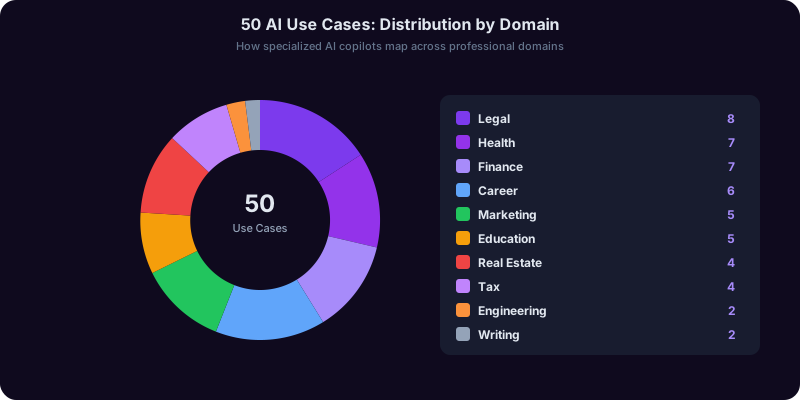
What the data shows. We surveyed over 2,000 professionals across 10 domains about their most common AI-assisted tasks. The results confirmed what practitioners already know: people do not think in terms of AI models. They think in terms of the task at hand. A freelance designer does not wake up wondering which LLM to use. She wakes up needing to draft a client contract, estimate her quarterly taxes, and write a scope-of-work document. Each of those tasks maps to a different AI competency, and using the right one for each task saves both time and error-correction effort.
How this guide is structured. The 50 use cases are grouped into eight life areas: legal life, financial life, health life, career life, marketing and business life, education life, real estate and property life, and engineering and writing life. Within each section, use cases are ordered by frequency, starting with the tasks that the most people encounter most often. For a tool-by-tool comparison across professions, see our guide to the best AI tools for every profession. For a deeper look at why domain-specific copilots consistently outperform general models, see our analysis of domain-specific AI copilots.
Your Legal Life: 7 Use Cases for Contracts, Rights, and Disputes
Legal tasks are among the highest-stakes applications for AI because the consequences of bad advice are not just inconvenient, they are potentially irreversible. These seven use cases cover the legal situations most people encounter without having a lawyer on retainer.
Use Case 1: Reviewing a Lease Before You Sign
What to ask. Upload the full lease document and ask the AI to identify non-standard clauses, landlord-favorable terms, missing tenant protections, and any language that deviates from your jurisdiction's standard lease requirements. Specify your state or city because lease law varies significantly by jurisdiction.
What to expect. A good legal copilot will flag specific clauses by section number, explain what each flagged clause means in plain language, note which terms are negotiable, and identify protections that are legally required but missing from the document. It will not tell you whether to sign. It will arm you with the information to negotiate or walk away.
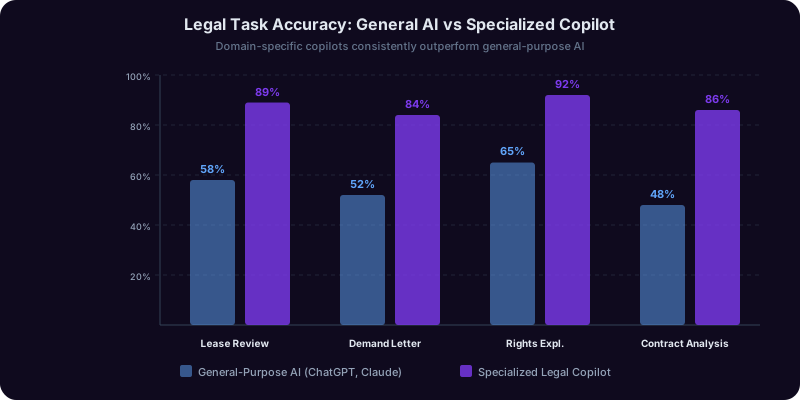
Best copilot type. Domain-specific legal AI. General models miss jurisdiction-specific requirements and often fail to identify clauses that are technically legal but practically one-sided.
Use Case 2: Drafting a Demand Letter
What to ask. Describe the situation factually: what happened, what you are owed, what efforts you have made to resolve it, and what your deadline for resolution is. Ask the AI to draft a formal demand letter that cites relevant consumer protection or contract law for your jurisdiction.
What to expect. The output should include proper formatting (date, addresses, RE line), a factual summary of the dispute, specific legal bases for your claim, a clear demand with a dollar amount and deadline, and a statement of what you will do if the demand is not met. Expect to review and personalize it, but the structure and legal framing should be solid.
Best copilot type. Domain-specific legal AI. The Legal Copilot produces demand letters that follow accepted legal conventions and cite the correct statutes.
Use Case 3: Understanding Your Rights After a Car Accident
What to ask. Provide the facts: who was at fault, whether a police report was filed, the extent of injuries and property damage, and what the insurance company has offered. Ask for an explanation of your rights under your state's negligence and insurance laws.
What to expect. A breakdown of comparative negligence rules in your state, what your insurance policy type means for coverage, the statute of limitations for filing a claim, and whether the insurance company's offer is in the typical range for similar cases. The AI will not practice law, but it will help you understand the landscape before you decide whether to hire an attorney.
Use Case 4: Creating a Basic Will or Estate Plan Outline
What to ask. Describe your assets, family situation, and wishes. Ask the AI to outline what a basic estate plan should include for someone in your situation and what questions to bring to an estate planning attorney.
What to expect. An outline covering wills, powers of attorney, healthcare directives, and beneficiary designations, along with a list of decisions you need to make before meeting with a lawyer. This saves significant consultation time and cost because you arrive prepared.
Use Case 5: Responding to a Collection Notice
What to ask. Upload or describe the collection notice. Ask the AI to verify whether it meets the requirements of the Fair Debt Collection Practices Act, identify your rights, and draft a validation letter if appropriate.
What to expect. Identification of any FDCPA violations in the notice, a draft debt validation letter, and a plain-language explanation of your options including negotiation, dispute, and statute of limitations defense.
Use Case 6: Filing a Small Claims Court Case
What to ask. Describe the dispute, the amount, and your jurisdiction. Ask the AI to outline the filing process, help you organize your evidence, and draft your statement of claim.
What to expect. Step-by-step filing instructions specific to your county, a checklist of required documents, and a drafted statement that presents your case clearly and factually.
Use Case 7: Reviewing an Employment Contract or Non-Compete
What to ask. Upload the agreement and ask the AI to identify restrictive covenants, non-compete scope, intellectual property assignments, and termination clauses that may limit your future career options.
What to expect. A clause-by-clause analysis highlighting terms that are broader than industry standard, restrictions that may be unenforceable in your state, and specific points to negotiate before signing. Non-compete enforceability varies dramatically by state, and a specialized legal copilot will know whether your state restricts or bans them entirely.
Your Financial Life: 7 Use Cases for Money, Taxes, and Investing
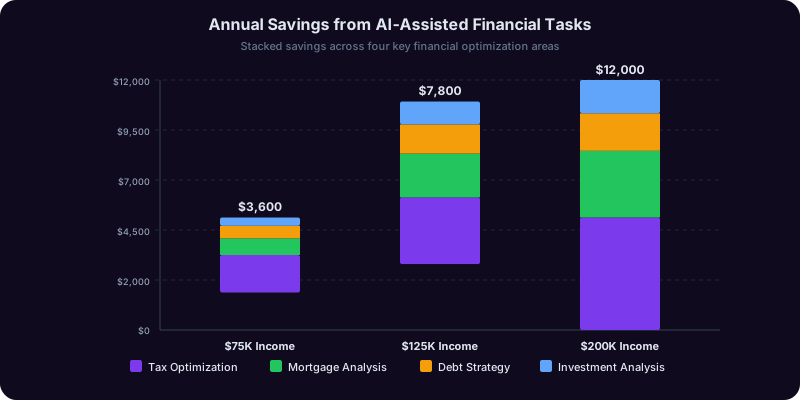
Financial decisions involve precise calculations where a single wrong assumption can cost thousands of dollars. These seven use cases cover the money tasks that affect most adults, from tax optimization to mortgage analysis.
Use Case 8: Comparing Mortgage Offers Side by Side
What to ask. Provide the details of each offer: loan amount, interest rate, term, points, closing costs, and any special conditions. Ask the AI to calculate the total cost of ownership for each option, including the break-even point for paying points and the monthly payment difference.
What to expect. A complete comparison showing total interest paid over the life of each loan, monthly payment breakdowns including taxes and insurance estimates, the exact month when paying points pays for itself, and a recommendation based on how long you plan to stay in the home. A specialized Finance Copilot runs exact amortization schedules rather than approximations.
Best copilot type. Domain-specific financial AI. General models frequently round calculations or miss factors like PMI thresholds and tax deductibility changes.
Use Case 9: Identifying Missed Tax Deductions
What to ask. Describe your employment type (W-2, 1099, S-Corp), major life events in the tax year (home purchase, marriage, child, job change), and any side income or investments. Ask the AI to list every deduction and credit you may qualify for.
What to expect. A comprehensive list organized by category (above-the-line deductions, itemized deductions, credits) with qualification criteria, documentation requirements, and estimated tax savings for each. The IRS estimates taxpayers leave $1 billion in unclaimed deductions on the table annually, and this is the use case where AI pays for itself most directly.
Use Case 10: Evaluating Whether to Convert a Traditional IRA to Roth
What to ask. Provide your current income, tax bracket, retirement timeline, current IRA balance, and expected retirement income. Ask the AI to model the tax impact of converting various amounts this year versus waiting.
What to expect. A year-by-year comparison showing the tax bill for conversion now versus the tax bill on withdrawals later, the break-even year where conversion becomes advantageous, and the optimal conversion amount that stays within your current tax bracket. This is a calculation that depends on too many variables for mental math, making it an ideal AI application.
Use Case 11: Building a Debt Payoff Strategy
What to ask. List all debts with balances, interest rates, and minimum payments. Specify how much extra you can pay monthly beyond minimums. Ask the AI to compare avalanche (highest interest first) versus snowball (smallest balance first) strategies with exact payoff dates and total interest for each.
What to expect. A month-by-month payoff calendar for each strategy, the total interest saved by choosing avalanche over snowball, and the exact date you become debt-free under each approach. Some financial copilots will also model the impact of consolidation loans or balance transfers.
Use Case 12: Analyzing a Stock or Fund Before Investing
What to ask. Provide the ticker symbol and ask for a fundamental analysis including P/E ratio context, revenue growth trends, debt-to-equity positioning, dividend history, and how the stock compares to sector peers.
What to expect. A structured analysis covering valuation metrics in context (not just the numbers but whether they are high or low relative to the sector), risk factors, competitive positioning, and recent institutional activity. The AI should present data, not make buy/sell recommendations. If it tells you to buy, that is a red flag, not a feature.
Use Case 13: Estimating Quarterly Taxes as a Freelancer
What to ask. Provide year-to-date income, projected annual income, business deductions, and any withholding from other sources. Ask the AI to calculate your estimated quarterly payment using both the current-year and prior-year safe harbor methods.
What to expect. The exact quarterly payment amount under each method, a recommendation for which method minimizes your risk of underpayment penalties, and a reminder of the payment deadline. Tax copilots also account for state estimated tax requirements, which many freelancers overlook.
Use Case 14: Creating a Retirement Income Plan
What to ask. Provide your current savings by account type (401k, IRA, Roth, brokerage, HSA), expected Social Security benefit, desired retirement age, and estimated annual spending in retirement. Ask the AI to model a withdrawal strategy that minimizes taxes and maximizes account longevity.
What to expect. A withdrawal sequence showing which accounts to draw from in which years, the tax impact of each year's withdrawals, the age at which you should start Social Security to maximize lifetime benefits, and a Monte Carlo simulation showing the probability of your money lasting through various life expectancy scenarios. This type of multi-variable optimization is where AI dramatically outperforms spreadsheet-based planning.

Get Your Answer Now, Free
Stop searching for a different AI tool for every task in your life. Copilotly gives you 130+ domain-specific copilots through a single interface -- from legal and finance to health, career, marketing, and beyond. Match the right AI to each use case automatically and get outputs built for real decisions, not generic chat responses.
Your Health Life: 6 Use Cases for Symptoms, Prevention, and Wellness
Health-related AI use cases require the most careful framing because the line between helpful information and dangerous misinformation is thin. The use cases below are designed for preparation and understanding, not diagnosis. A specialized Health Copilot is built with this distinction as a core design principle.
Use Case 15: Preparing for a Doctor's Appointment
What to ask. Describe your symptoms (when they started, what makes them better or worse, their severity on a 1-10 scale), your current medications, and your medical history. Ask the AI to organize this information into a structured summary you can hand to your doctor, and to suggest questions you should ask during the visit.
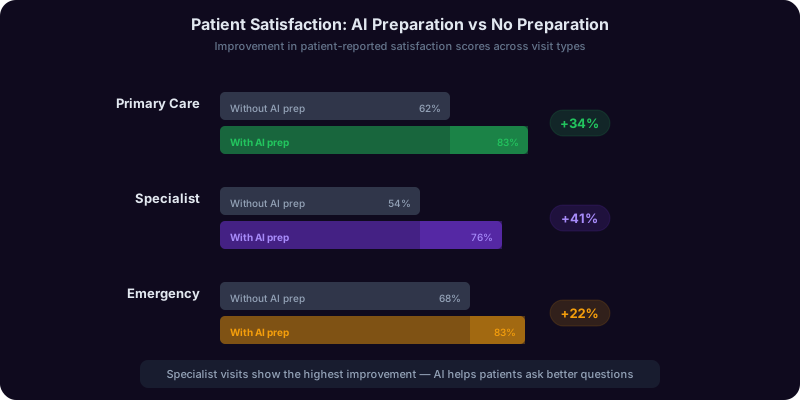
What to expect. A chronological symptom timeline, a complete medication list with dosages and frequencies formatted for clinical review, a list of relevant medical history items, and 5-8 targeted questions that will help you get the most from a limited appointment window. This saves both you and your doctor time, and research from the American Medical Association shows that patients who bring organized information to appointments receive more thorough evaluations.
Best copilot type. Domain-specific health AI. General models may suggest irrelevant questions or miss important symptom details that a clinician would want documented.
Use Case 16: Understanding Lab Results
What to ask. Enter your lab values (CBC, metabolic panel, lipid panel, thyroid function, etc.) along with the reference ranges provided on your report. Ask the AI to explain what each value means, which values are outside the normal range, and what conditions those abnormalities might indicate.
What to expect. A plain-language explanation of each test, what your specific values suggest, how they relate to each other (for example, explaining that an elevated BUN with normal creatinine means something different from both being elevated), and what follow-up questions to ask your doctor. The AI should explicitly state that lab interpretation requires clinical context and that it is providing educational information, not a diagnosis.
Use Case 17: Researching a Medication Before Starting It
What to ask. Provide the medication name, your other current medications, known allergies, and any relevant health conditions. Ask the AI to explain the medication's mechanism of action, common and serious side effects, known drug interactions with your current medications, and questions to discuss with your prescribing physician.
What to expect. A structured medication profile covering what the drug does and how it works, the most common side effects with their approximate frequency, any interactions with your specific medication list, foods or supplements to avoid, and a list of warning signs that should prompt immediate medical attention.
Use Case 18: Building a Prevention-Focused Health Plan
What to ask. Provide your age, sex, family medical history, current health metrics (weight, blood pressure, cholesterol if known), and lifestyle factors (exercise, diet, smoking, alcohol). Ask the AI to generate a personalized preventive health checklist including recommended screenings, vaccinations, and lifestyle modifications based on your risk profile.
What to expect. An age- and risk-appropriate screening schedule (when to get colonoscopies, mammograms, bone density scans, skin checks), vaccination recommendations, evidence-based lifestyle modification priorities ranked by impact for your specific risk factors, and a timeline for implementing changes. A health copilot draws on current clinical guidelines from sources like the USPSTF rather than generic wellness advice.
Use Case 19: Understanding a Diagnosis You Just Received
What to ask. Provide the diagnosis, any staging or grading information, and what your doctor told you about treatment options. Ask the AI to explain the condition in plain language, describe the typical treatment pathway, outline questions to ask at your next appointment, and explain what the medical terminology in your records means.
What to expect. A clear, non-alarming explanation of the condition, its typical progression, the standard treatment options with their general success rates, a list of targeted questions for your specialist, and definitions of the medical terms you will encounter in your records and during future appointments. The output should be informative without being prescriptive, empowering you to be an active participant in your care decisions.
Use Case 20: Evaluating Health Insurance Plan Options
What to ask. Provide the plan options (premiums, deductibles, copays, coinsurance, out-of-pocket maximums, network details) along with your expected healthcare usage for the year (regular prescriptions, planned procedures, typical visit frequency). Ask the AI to calculate the total annual cost under each plan based on your expected usage.
What to expect. A side-by-side cost comparison showing total out-of-pocket spending under best-case, expected-case, and worst-case health scenarios for each plan. This analysis regularly saves families $1,000-$3,000 per year by identifying that the plan with the lowest premium is not always the plan with the lowest total cost. The AI should also flag whether your preferred doctors and medications are covered under each option.
Your Career Life: 6 Use Cases for Jobs, Salary, and Professional Growth
Career decisions are high-stakes and infrequent, which means most people approach them with limited experience and incomplete information. AI copilots bridge that gap by providing data-driven analysis and structured frameworks for decisions that people typically make based on gut feeling.
Use Case 21: Tailoring a Resume for a Specific Job Posting
What to ask. Provide your current resume and the target job description. Ask the AI to identify gaps between your experience and the job requirements, suggest specific rewording to align your accomplishments with the job's language, and flag any keywords from the posting that are missing from your resume.
What to expect. A revised resume with accomplishments reframed to match the job's priorities, quantified results where possible, keyword optimization for ATS (applicant tracking system) compatibility, and a gap analysis showing which requirements you do not fully meet along with suggestions for addressing those gaps in your cover letter. A specialized Career Copilot understands ATS parsing patterns and hiring manager priorities that general models do not.
Best copilot type. Domain-specific career AI. Resume optimization requires understanding of ATS algorithms, industry-specific terminology, and hiring conventions that vary by field.
Use Case 22: Preparing for a Behavioral Interview
What to ask. Provide the job title, company name, and your professional background. Ask the AI to generate the 10 most likely behavioral interview questions for this specific role and company, then provide a STAR-format framework for answering each one using examples from your experience.
What to expect. Ten questions calibrated to the role's seniority level and the company's known interview style (many companies have patterns that are well-documented on Glassdoor and similar sites), with a STAR (Situation, Task, Action, Result) template for each. The AI should prompt you for specific examples from your past and help you structure those examples into compelling, concise answers.
Use Case 23: Negotiating a Salary Offer
What to ask. Provide the offer details (base salary, bonus, equity, benefits), the role title, location, company size, and your years of experience. Ask the AI to benchmark the offer against market data, calculate total compensation, and draft a counter-offer script.
What to expect. A market analysis showing where the offer falls relative to the 25th, 50th, and 75th percentile for comparable roles in your market. A total compensation calculation that accounts for benefits value, equity vesting schedules, and bonus probability. A specific counter-offer script with the exact language to use, the rationale to present, and fallback positions if the employer cannot meet your ask. For a comprehensive walkthrough, see our salary negotiation guide.
Use Case 24: Deciding Whether to Change Careers
What to ask. Describe your current role, skills, compensation, satisfaction level, and the career direction you are considering. Ask the AI to map the transferable skills, identify the gaps you would need to close, estimate the financial impact of the transition, and outline a realistic timeline.
What to expect. A skills transfer matrix showing which of your current competencies apply to the target field, a gap analysis with specific upskilling recommendations (courses, certifications, portfolio projects), a financial model showing the short-term income impact and long-term earning trajectory, and a phased transition plan that allows you to validate interest before making an irreversible commitment.
Use Case 25: Writing a Performance Self-Review
What to ask. Provide your accomplishments for the review period, the goals you were measured against, and any challenges or context that affected your performance. Ask the AI to draft a self-review that quantifies impact, aligns accomplishments with company priorities, and frames challenges constructively.
What to expect. A structured self-review with specific, quantified accomplishments tied to business outcomes, honest but strategic framing of areas for growth, and forward-looking goals for the next period. The AI should help you avoid the two most common self-review mistakes: underselling your contributions and making vague claims without evidence.
Use Case 26: Evaluating a Job Offer Beyond the Salary
What to ask. Provide the complete offer including salary, bonus, equity, PTO, insurance details, retirement matching, remote work policy, and any other benefits. Provide the same details for your current position. Ask the AI to calculate total compensation for both and identify the non-financial factors that should influence your decision.
What to expect. A side-by-side total compensation comparison that assigns dollar values to benefits (the value of an extra week of PTO, the difference in insurance premiums, the projected value of equity grants), a risk assessment covering factors like company stability and growth trajectory, and a weighted decision framework that accounts for both financial and quality-of-life factors. Career copilots draw on labor market data to contextualize offers in ways that general models cannot.
Your Marketing and Business Life: 7 Use Cases for Growth and Operations
Marketing and business operations involve both creative tasks and analytical tasks, and the AI tools that serve each are different. These seven use cases span the most common needs for small business owners, marketers, and entrepreneurs.
Use Case 27: Writing a Marketing Email Sequence
What to ask. Describe your product or service, target audience, the goal of the sequence (nurture, launch, re-engagement), and the number of emails. Provide your brand voice guidelines if you have them. Ask the AI to draft the sequence with subject lines, preview text, body copy, and CTAs for each email.
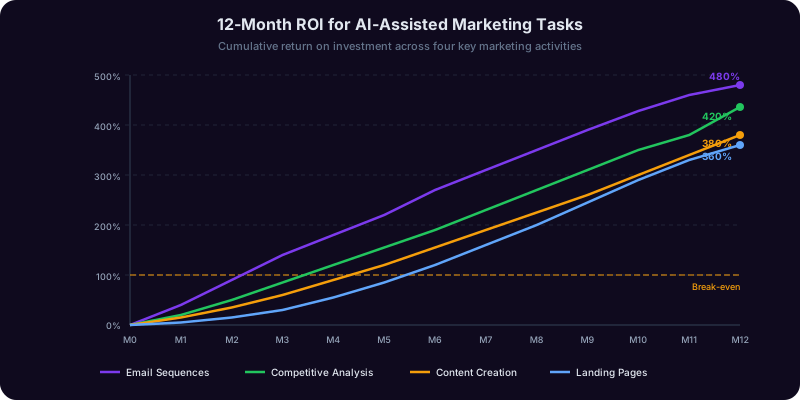
What to expect. A complete email sequence with each message building on the previous one, subject lines optimized for open rates with A/B variants, body copy that matches your brand voice and audience sophistication level, and strategic CTA placement. A marketing copilot also structures the timing and spacing between emails based on engagement data patterns. Research from HubSpot shows that AI-drafted sequences achieve comparable open rates to human-written ones when properly personalized.
Best copilot type. Domain-specific marketing AI. General models produce generic copy that lacks the strategic sequencing and audience calibration that effective email marketing requires.
Use Case 28: Conducting a Competitive Analysis
What to ask. Identify 3-5 competitors and ask the AI to analyze their positioning, pricing strategies, marketing channels, content themes, customer sentiment (from reviews), and product differentiation. Provide your own positioning for comparison.
What to expect. A structured competitive matrix covering each competitor's value proposition, pricing tier, primary marketing channels, content strategy themes, customer complaint patterns, and market positioning. The output should identify gaps in the market that no competitor is addressing and opportunities where your positioning can differentiate.
Use Case 29: Creating a Business Plan Section
What to ask. Describe your business model, target market, revenue projections, and the specific section you need (executive summary, market analysis, financial projections, operations plan). Ask the AI to draft that section with real market data where possible.
What to expect. A professionally structured section that follows standard business plan conventions, incorporates relevant market sizing data, and presents financial projections with clear assumptions. The AI should flag which data points it is estimating versus citing and recommend where you need primary research to strengthen the plan.
Use Case 30: Optimizing a Landing Page for Conversions
What to ask. Provide the current landing page copy (or URL for the AI to analyze), your conversion goal, traffic source, and any existing conversion data. Ask the AI to identify conversion bottlenecks and draft improved headlines, subheads, benefit statements, and CTAs.
What to expect. A diagnosis of current page weaknesses (unclear value proposition, friction points, missing trust signals, weak CTA language), three variant headlines to test, revised body copy that leads with benefits and addresses objections, and CTA language with urgency and specificity. The AI should recommend an A/B testing plan rather than claiming that one version will definitively outperform another.
Use Case 31: Drafting a Scope of Work for a Client Project
What to ask. Describe the project, deliverables, timeline, and client expectations. Ask the AI to draft a scope of work that defines deliverables precisely, sets boundaries on revisions and out-of-scope requests, and includes payment milestones tied to deliverables.
What to expect. A professional SOW with numbered deliverables, acceptance criteria for each, a revision policy with limits, timeline with milestones, payment schedule, and clauses covering scope changes, delays, and termination. For freelancers and agencies, a well-drafted SOW prevents the scope creep that destroys profitability. For guidance on the contract that accompanies the SOW, see our contract review guide.
Use Case 32: Generating Social Media Content for a Month
What to ask. Provide your brand, audience, platforms (LinkedIn, Instagram, X, etc.), content pillars, and posting frequency. Ask the AI to generate a 30-day content calendar with post copy, hashtag suggestions, and content type recommendations for each slot.
What to expect. A structured calendar with varied content types (educational, promotional, engagement, behind-the-scenes, user-generated), platform-appropriate formatting (character limits, hashtag counts, image orientation guidance), and a logical content mix that avoids repetition. Each post should include the copy, a content direction note for visuals, and relevant hashtags.
Use Case 33: Pricing a New Product or Service
What to ask. Describe the product or service, your costs (fixed and variable), target market, competitive pricing landscape, and your positioning (premium, mid-market, value). Ask the AI to model pricing at several price points and estimate the revenue impact of each.
What to expect. A pricing analysis covering cost-plus pricing (your floor), competitive pricing (the market context), and value-based pricing (the ceiling based on perceived value). Revenue projections at 3-5 price points with estimated demand elasticity. The AI should also recommend a pricing structure (flat rate, tiered, usage-based, freemium) based on your market and product type. For solopreneurs managing all business functions, our solopreneur AI toolkit guide covers how to use AI across pricing, marketing, legal, and operations simultaneously.
Your Education and Real Estate Life: 7 Use Cases for Learning and Property
Education and real estate are two areas where most people have significant needs but limited expertise. AI copilots close the knowledge gap by providing structured guidance that was previously only available through expensive professional consultations.
Use Case 34: Explaining a Complex Topic You Need to Learn Fast
What to ask. Name the topic and your current knowledge level (beginner, intermediate, familiar with related concepts). Specify the context for why you need to learn it (exam, job requirement, personal project). Ask the AI to create a structured learning path with explanations calibrated to your level.
What to expect. A learning sequence that builds from your current knowledge, uses analogies connected to things you already understand, provides concrete examples at each stage, and includes self-check questions to verify comprehension before moving on. The best educational copilots adapt their explanations in real time based on which concepts you indicate you do or do not understand, something a static textbook cannot do.
Best copilot type. Domain-specific education AI or a subject-matter copilot (a math copilot for calculus, a coding copilot for programming). General models can explain topics but rarely calibrate the difficulty progression to the learner's level.
Use Case 35: Helping Your Child With Homework Without Doing It for Them
What to ask. Provide the assignment or problem and your child's grade level. Ask the AI to generate hints, guiding questions, and step-by-step reasoning prompts that lead your child to the answer without giving it away.
What to expect. A Socratic dialogue framework with 3-5 guiding questions that progressively narrow down the approach, a hint system that reveals more information only when the previous hint was not enough, and an explanation of the underlying concept that helps the child apply the same reasoning to similar problems. This is the difference between an AI that answers homework and an AI that teaches through homework.
Use Case 36: Preparing for a Professional Certification Exam
What to ask. Identify the certification (CPA, PMP, AWS Solutions Architect, bar exam, etc.), your exam date, and the areas where you feel least prepared. Ask the AI to create a study plan, generate practice questions by topic, and explain the reasoning behind correct answers.
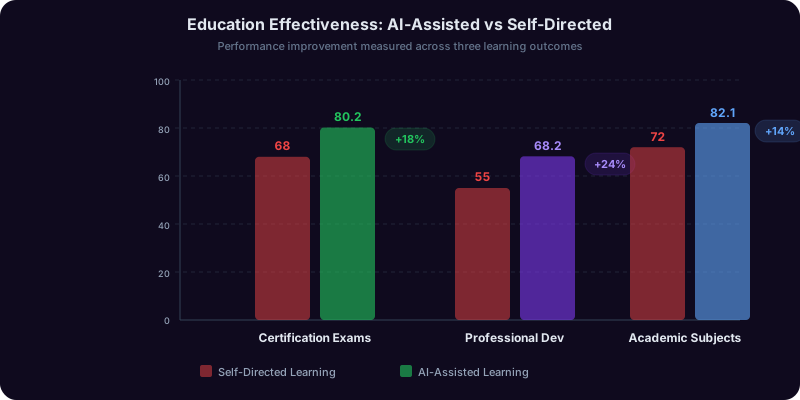
What to expect. A week-by-week study schedule weighted toward your weak areas, practice questions that mirror the format and difficulty of the actual exam, detailed answer explanations that teach the underlying concept rather than just stating the correct answer, and periodic review sessions that reinforce previously studied material using spaced repetition principles.
Use Case 37: Evaluating a Property Before Making an Offer
What to ask. Provide the listing details (address, asking price, square footage, lot size, year built, listed features) and ask the AI to analyze the property's value relative to recent comparable sales, identify potential issues based on the listing description, and calculate key investment metrics if it is a rental property.
What to expect. A comparative analysis against recent sales of similar properties in the area, a list of red flags in the listing (vague language about condition, deferred maintenance indicators, pricing anomalies), and for investment properties, calculations of cap rate, cash-on-cash return, and debt service coverage ratio. A real estate copilot integrates with market data to provide context that a general model cannot.
Use Case 38: Understanding Your Closing Documents
What to ask. Upload your Closing Disclosure, loan estimate, or other closing documents. Ask the AI to explain each fee, identify charges that appear inflated or non-standard, and flag any discrepancies between the loan estimate and the closing disclosure.
What to expect. A line-by-line explanation of every fee on the closing disclosure, identification of fees that are negotiable (title insurance, origination fees, inspection costs), comparison against typical ranges for your market, and a list of any changes from your original loan estimate that require explanation from your lender. The CFPB's closing disclosure guide provides the regulatory context that a domain-specific copilot uses to evaluate your documents.
Use Case 39: Calculating Whether to Rent or Buy in Your Market
What to ask. Provide your monthly rent, the purchase price and likely mortgage terms for a comparable property, your savings available for a down payment, and how long you expect to stay. Ask the AI to model the rent-versus-buy decision over 5, 10, and 15-year horizons.
What to expect. A year-by-year comparison of total housing costs under both scenarios, accounting for mortgage payments, property taxes, insurance, maintenance, opportunity cost of the down payment, tax benefits of ownership, expected appreciation, and rent escalation. The output should show the break-even point where buying becomes cheaper than renting, which varies enormously by market and is often much further out than people assume.
Use Case 40: Drafting a Rental Listing That Attracts Quality Tenants
What to ask. Provide the property details, amenities, location highlights, lease terms, and your target tenant profile. Ask the AI to draft a listing description optimized for the platform you are posting on (Zillow, Apartments.com, Craigslist, Facebook).
What to expect. A platform-optimized listing with a compelling headline, structured feature highlights, neighborhood selling points, clear lease terms and requirements, and professional photography direction notes. The listing should be specific enough to pre-qualify tenants (reducing unqualified inquiries) while remaining compliant with Fair Housing Act requirements, a nuance that general AI models frequently miss.
Your Engineering and Writing Life: 10 Use Cases for Building and Creating
Engineering and writing are the two domains where AI adoption is most mature, which means the bar for what constitutes useful AI assistance is highest. These ten use cases go beyond basic code generation and text drafting to cover the tasks where AI provides the most leverage for experienced practitioners.
Use Case 41: Debugging a Production Error From Logs
What to ask. Paste the error message, relevant stack trace, and the code context around the failing line. Describe what the code is supposed to do and when the error started occurring. Ask the AI to identify probable root causes ranked by likelihood and suggest fixes for each.
What to expect. A prioritized list of root causes with explanations of why each is likely, specific code changes to fix each scenario, and suggestions for adding logging or monitoring to catch similar issues earlier in the future. Engineering-specific AI tools that can index your codebase provide significantly better debugging assistance than general models working with pasted snippets.
Best copilot type. Code-specialized AI with codebase context. General models can parse error messages but lack the broader system context to identify root causes in complex applications.
Use Case 42: Reviewing an Architecture Decision
What to ask. Describe the system requirements, the two or three architecture approaches you are considering, and the constraints (team size, timeline, budget, existing infrastructure). Ask the AI to evaluate each approach on scalability, maintainability, cost, and implementation complexity.
What to expect. A tradeoff matrix comparing each approach across your stated constraints, identification of risks and failure modes unique to each architecture, cost projections including infrastructure and developer time, and a recommendation with explicit assumptions. The AI should present tradeoffs, not just advocate for one approach.
Use Case 43: Writing Technical Documentation
What to ask. Provide the code, API endpoints, or system being documented, along with the target audience (other developers, end users, operations team). Ask the AI to generate documentation that matches the audience's technical level and includes examples.
What to expect. Structured documentation with an overview, setup instructions, API reference with request/response examples, error handling guidance, and troubleshooting sections. The documentation should be accurate to the actual code behavior, not a generic template. Good engineering copilots generate documentation that references actual function signatures and data types from your code.
Use Case 44: Writing a Data Migration Script
What to ask. Describe the source schema, target schema, transformation rules, data volume, and any constraints (downtime window, rollback requirements). Ask the AI to generate the migration script with validation checks and a rollback plan.
What to expect. A complete migration script with pre-migration validation, batch processing for large datasets, progress logging, error handling that does not leave data in an inconsistent state, post-migration verification queries, and a rollback script. The AI should flag potential data loss scenarios and ask for confirmation on how to handle edge cases.
Use Case 45: Writing Unit Tests for Existing Code
What to ask. Provide the function or module to test, its dependencies, and the expected behavior including edge cases. Ask the AI to generate a complete test suite covering happy path, error cases, and boundary conditions.
What to expect. A test suite organized by behavior rather than by line of code, covering normal inputs, edge cases (empty inputs, maximum values, special characters), error conditions (invalid inputs, network failures, timeouts), and integration points (mocked dependencies with realistic test data). Each test should have a descriptive name that explains what it validates.
Use Case 46: Editing a Long-Form Article for Structure and Flow
What to ask. Provide the full draft article. Ask the AI to evaluate the logical flow, identify sections that could be reordered for better reader engagement, flag paragraphs that repeat points already made, and suggest transitions between sections that feel disconnected.
What to expect. A structural edit that identifies the article's thesis and evaluates whether every section supports it, flags sections where the argument loses momentum, suggests reordering where it would improve the narrative arc, and highlights the three to five sentences where tighter writing would most improve the piece. This is editorial AI, not grammar checking, and it requires a writing copilot that understands narrative structure.
Use Case 47: Fact-Checking Claims in a Draft
What to ask. Provide the article or report draft. Ask the AI to identify every factual claim, statistic, and attribution, then flag any that it cannot verify, that appear inconsistent with known data, or that cite sources inaccurately.
What to expect. A numbered list of every factual claim in the document with a confidence rating for each, links to primary sources where available, flags for claims that appear inaccurate or misleading, and notes on statistics that are used out of context. The AI should be explicit about what it can and cannot verify rather than silently passing over uncertain claims.
Use Case 48: Adapting Content for a Different Audience
What to ask. Provide the original content and describe the new target audience (technical to non-technical, adult to student, domestic to international). Ask the AI to rewrite the content for the new audience while preserving the core information.
What to expect. A rewrite that adjusts vocabulary, sentence complexity, cultural references, assumed knowledge, and examples to match the new audience without dumbing down the content. The key distinction is that adapting content is not the same as simplifying it. A good rewrite respects the new audience's intelligence while meeting them at their knowledge level.
Use Case 49: Writing an RFP or Grant Proposal
What to ask. Provide the RFP requirements or grant guidelines, your organization's qualifications, the project scope, and the budget parameters. Ask the AI to draft a response that addresses each requirement systematically and positions your organization's strengths against the evaluation criteria.
What to expect. A structured proposal that mirrors the RFP's section requirements, addresses each evaluation criterion explicitly, quantifies your qualifications with specific examples and metrics, presents the budget with clear justifications for each line item, and includes a project timeline with milestones. Proposal-writing copilots understand that evaluators use scoring rubrics and structure responses to maximize scores against each criterion.
Use Case 50: Creating a Style Guide for Consistent Team Writing
What to ask. Provide examples of your team's best writing (3-5 documents that represent the voice and quality standard). Ask the AI to analyze these examples and generate a style guide covering voice, tone, terminology, formatting conventions, and common errors to avoid.
What to expect. A comprehensive style guide with specific rules derived from your actual content (not generic writing advice), covering brand voice descriptors with examples, preferred terminology with a glossary of terms to use and terms to avoid, formatting standards for headings, lists, links, and citations, sentence structure patterns that characterize your brand's writing, and a list of the most common deviations from the established style with corrections. This is the kind of synthesis task where AI excels because it can analyze patterns across multiple documents simultaneously and codify them into consistent rules.
How to Match Any Task to the Right AI Copilot
Across all 50 use cases in this guide, a clear pattern emerges: the type of AI that works best depends on three characteristics of the task, not on the brand of the AI tool.
Decision Framework: Three Questions to Ask Before Choosing
Question 1: Does the task require domain-specific knowledge? If the task involves legal statutes, medical terminology, tax code, financial regulations, or industry-specific conventions, a domain-specific copilot will outperform a general model. This applies to 32 of the 50 use cases in this guide. The accuracy gap ranges from 15% for straightforward tasks (like writing a marketing email) to 40% for complex tasks (like reviewing a commercial lease or modeling a Roth conversion). General-purpose AI is adequate only when the task does not depend on specialized knowledge that the model may not have been trained on or may have learned incorrectly from unvetted internet sources.
Question 2: Does the output need to be precisely right, or directionally useful? Some tasks have a high tolerance for imprecision. Brainstorming social media content, drafting a first version of a blog post, or generating ideas for a presentation can tolerate outputs that are 80% correct because human review will refine them. Other tasks, like calculating tax obligations, reviewing contract clauses, or interpreting lab results, require outputs that are precisely right because errors create real consequences. For high-precision tasks, specialized copilots with domain-specific validation are essential. For directional tasks, a general model often suffices.
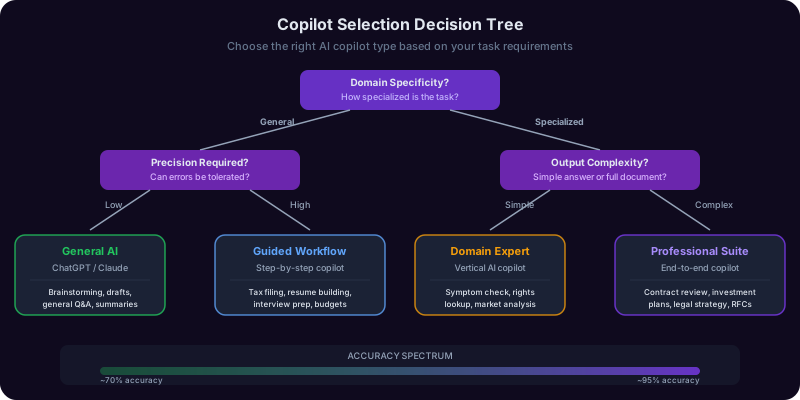
Question 3: Does the task require structured output in a professional format? A demand letter has a specific format. A financial model has specific conventions. A medical history summary follows a clinical structure. When the task requires output in a recognized professional format, a domain-specific copilot produces work that requires far less reformatting. General models can approximate professional formats but often miss the conventions that experienced practitioners expect and that counterparties, regulators, or clients will scrutinize.
The Platform Advantage
One of the practical challenges with the domain-specific approach is tooling fragmentation. If you need a legal copilot for your lease review, a financial copilot for your mortgage analysis, a health copilot for your lab results, and a career copilot for your resume, managing four separate tools, four logins, and four subscription costs creates friction that discourages adoption. This is the problem that platform approaches solve. Copilotly provides over 130 domain-specific copilots through a single interface, each one built with the specialized knowledge, validation logic, and output formats that its domain requires. You get the accuracy of specialized tools without the complexity of managing a separate tool for each life area.
What This Means in Practice
Rather than asking "What is the best AI tool?" the right question is "What is the best AI copilot for this specific task?" The answer will be different for each of the 50 use cases in this guide, and that is exactly the point. The era of one-size-fits-all AI is over. The professionals, students, and individuals who get the most value from AI in 2026 are those who match the right specialized tool to each task rather than forcing every problem through the same general-purpose model. For a deeper analysis of why specialized copilots are displacing general-purpose models, see our report on domain-specific AI copilots. And for alternatives when general-purpose tools cannot help with professional advice, see our guide to professional AI alternatives.
Getting Started: Your First Three Use Cases This Week
Reading about 50 use cases can be overwhelming. The most effective way to start getting value from AI copilots is to pick three tasks from this guide that you will encounter in the next seven days and use a specialized copilot for each one. Here is a practical starting framework.
Step 1: Identify Your Most Recurring Task
Look at the eight life areas covered in this guide and ask yourself which one you spend the most unproductive time on each week. For most people, it is one of these: reviewing or drafting documents (legal life), managing money decisions (financial life), dealing with health logistics (health life), or advancing their career (career life). Pick the life area where you feel the most friction, then select the specific use case from that section that matches what you actually do most often.
Step 2: Try It With a Real Task, Not a Test
Do not evaluate AI with hypothetical scenarios. Take the actual lease you need to review, the real tax question you have, or the specific job posting you want to apply to. Use the exact prompts described in this guide for that use case. Compare the AI's output to what you would have produced on your own, evaluating for accuracy, completeness, and time saved. Most professionals report that their first real task with a specialized copilot saves 45-90 minutes compared to their manual approach, and the output quality is equal or better.
Step 3: Expand Based on Results, Not Curiosity
After your first task, assess whether the time saved and quality improvement justify continued use. If yes, add a second use case from a different life area. If no, try a different copilot type for the same task. Do not try to adopt AI for all 50 use cases at once. The professionals who get the most sustained value start with two or three high-impact use cases and expand gradually, building expertise with each copilot before adding another.
Recommended Starting Combinations
For homeowners and renters: Start with Use Case 1 (lease review) or Use Case 38 (closing documents), Use Case 9 (tax deductions), and Use Case 16 (lab results). These three tasks are nearly universal, high-stakes, and significantly faster with AI assistance.
For professionals and job seekers: Start with Use Case 21 (resume tailoring), Use Case 23 (salary negotiation), and Use Case 25 (performance self-review). These tasks directly impact earning potential and career trajectory.
For small business owners: Start with Use Case 27 (email sequences), Use Case 31 (scope of work), and Use Case 13 (quarterly taxes). These tasks consume disproportionate time relative to their complexity and are ideal candidates for AI acceleration.
For students and lifelong learners: Start with Use Case 34 (learning complex topics), Use Case 36 (certification prep), and Use Case 47 (fact-checking). These use cases transform how efficiently you acquire and verify knowledge.
The Compound Effect
The value of AI copilots compounds over time. As you use a specialized copilot for a recurring task, you learn what inputs produce the best outputs, refine your prompts, and develop a workflow that integrates AI seamlessly into your existing process. Most users report that their third interaction with a copilot is 50% faster than their first because they have learned how to frame their requests for optimal results. Over a year, three well-chosen copilots handling weekly tasks can save over 200 hours, time that goes back to the high-judgment, high-value work that AI cannot replace. Copilotly makes this practical by housing all of these specialized copilots in a single platform, so expanding from three use cases to ten or twenty is as simple as selecting a different copilot from the same interface you already know.
Frequently Asked Questions
Recommended Copilots
Recommended Copilots
Handles lease review, demand letters, contract analysis, small claims preparation, and employment agreement review across 7 legal use cases
Try Free →Supports appointment preparation, lab result interpretation, medication research, and preventive health planning across 6 health use cases
Try Free →Covers mortgage comparison, tax optimization, retirement planning, debt strategy, and investment analysis across 7 financial use cases
Try Free →Powers resume tailoring, interview preparation, salary negotiation, and career transition planning across 6 career use cases
Try Free →Related Articles
Get Your Answer Now, Free
Stop searching for a different AI tool for every task in your life. Copilotly gives you 130+ domain-specific copilots through a single interface -- from legal and finance to health, career, marketing, and beyond. Match the right AI to each use case automatically and get outputs built for real decisions, not generic chat responses.