Why One AI Tool Is Not Enough for Professional Work
The most common mistake professionals make in 2026 is treating AI like a single tool that does everything equally well. It does not. Asking a general-purpose chatbot to review a commercial lease, interpret a blood panel, or build a marketing attribution model is like asking a general practitioner to perform neurosurgery. The tool might produce something that looks right, but the details where expertise matters most will be unreliable.
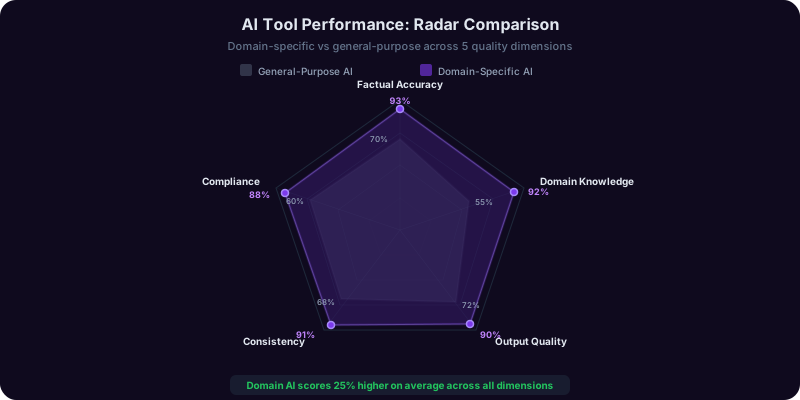
The specialization gap. General-purpose AI models are trained on broad internet data, which means they know a little about everything but lack the deep, structured knowledge that professional work demands. A Stanford HAI study on AI in professional services found that domain-specialized AI tools outperform general-purpose models by 23-41% on accuracy metrics across legal, medical, and financial tasks. The gap widens further on tasks requiring regulatory knowledge, industry-specific terminology, or structured output formats.
What professionals actually need from AI. Professionals do not need a tool that writes generic paragraphs. They need AI that understands the structure of a non-compete agreement, knows the difference between ICD-10 and CPT codes, can calculate loan-to-value ratios correctly, or can generate marketing copy that adheres to FTC endorsement guidelines. These are not trivial distinctions. They are the difference between AI that saves time and AI that creates liability.
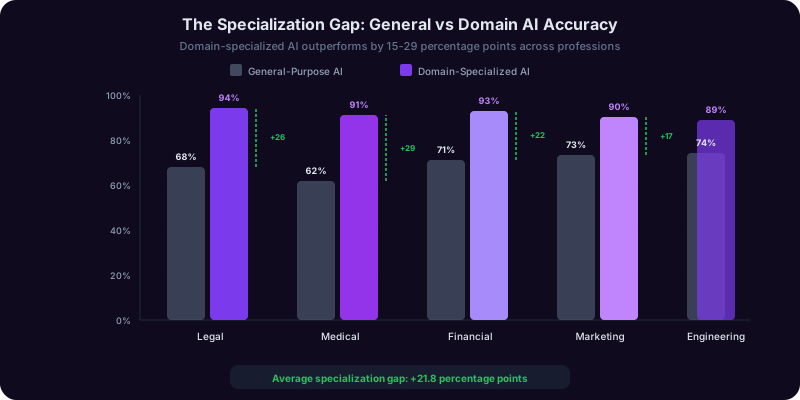
The cost of using the wrong tool. A 2025 survey by McKinsey found that 67% of professionals who used general-purpose AI for specialized tasks reported having to significantly rework the output, with 18% saying the AI-generated work introduced errors they did not catch until after it was shared externally. In legal and medical contexts, those uncaught errors can mean regulatory penalties, malpractice risk, or financial loss.
What this guide covers. We analyzed AI adoption across 20 professional domains and identified the top use cases, recommended approaches, and specific tools that deliver measurable results in each field. Whether you are a solo practitioner, a team lead, or an enterprise decision-maker evaluating AI investments, this guide maps the landscape of professional AI in 2026 so you can choose tools that match your actual work, not just your curiosity. For a broader look at how AI second opinions reduce professional risk, see our guide to professional second opinions.
How to use this guide. Each section groups related professions and covers the highest-impact use cases first. We include a master comparison table, link to specialized tools where appropriate, and explain when a purpose-built copilot is worth the investment versus when a general-purpose model is sufficient. The goal is not to sell you on AI for its own sake. It is to help you identify the two or three specific AI applications that will save you the most time and reduce the most risk in your particular role.
Master Comparison: 20 Professions and Their Top AI Use Cases
The following table maps each of the 20 professional domains covered in this guide to their highest-impact AI use cases, the type of AI approach that works best, and whether a specialized copilot significantly outperforms a general-purpose model.
| Profession | Top AI Use Cases | Best AI Approach | Specialist Advantage |
|---|---|---|---|
| Legal | Contract review, case research, demand letter drafting | Domain-trained NLP with legal databases | High |
| Health / Medical | Symptom triage, treatment research, patient communication | Medical knowledge graphs + clinical guidelines | High |
| Finance | Portfolio analysis, risk modeling, compliance checks | Quantitative models + regulatory frameworks | High |
| Career / HR | Resume screening, salary benchmarking, interview prep | Labor market data + structured evaluation | Medium |
| Marketing | Campaign optimization, content generation, SEO analysis | Multi-channel analytics + creative generation | Medium |
| Engineering | Code review, architecture design, debugging | Code-specific LLMs + static analysis | High |
| Education | Curriculum design, adaptive learning, assessment generation | Pedagogical models + student analytics | Medium |
| Real Estate | Property valuation, market analysis, lease review | MLS data integration + comparative analysis | Medium |
| Tax | Return preparation, deduction identification, audit defense | Tax code databases + scenario modeling | High |
| Writing / Content | Editing, style consistency, fact-checking, SEO optimization | Language models + editorial guidelines | Low |
| Creative / Design | Image generation, brand consistency, layout suggestions | Diffusion models + design systems | Medium |
| E-Commerce | Product descriptions, pricing optimization, inventory forecasting | Demand models + competitive intelligence | Medium |
| Insurance | Claims processing, risk assessment, policy comparison | Actuarial models + document analysis | High |
| Consulting | Market sizing, presentation generation, data analysis | Business frameworks + visualization | Low |
| Research / Academia | Literature review, hypothesis generation, data analysis | Citation graphs + statistical methods | Medium |
| Customer Service | Ticket routing, response drafting, sentiment analysis | Intent classification + knowledge bases | Medium |
| Operations / Supply Chain | Demand forecasting, route optimization, quality control | Time-series models + optimization algorithms | High |
| Sales | Lead scoring, proposal generation, pipeline forecasting | CRM integration + predictive analytics | Medium |
| Project Management | Resource allocation, risk prediction, status summarization | Project analytics + natural language reporting | Low |
| Nonprofit / Government | Grant writing, compliance reporting, public engagement | Regulatory databases + document generation | Medium |
Reading this table. The "Specialist Advantage" column indicates how much better a domain-specific AI tool performs compared to a general-purpose model. "High" means the accuracy or reliability gap is significant enough that using a general tool introduces meaningful risk. "Medium" means a specialist tool is notably better but a general tool can handle simpler tasks. "Low" means general-purpose AI performs adequately for most tasks in that domain.
As the table shows, professions with heavy regulatory requirements, specialized terminology, or high-stakes outputs benefit most from domain-specific AI. The sections below explore each group of professions in depth.
Legal, Finance, and Tax: Where Precision Is Non-Negotiable
These three professions share a defining characteristic: errors are not just inconvenient, they are expensive and sometimes illegal. AI tools in these domains must be accurate to the clause, the decimal, and the regulation. General-purpose models routinely hallucinate case citations, miscalculate compound interest, and miss jurisdiction-specific tax rules. Specialized tools exist precisely because the stakes are too high for approximation.
Legal
The legal profession has moved beyond the early skepticism of AI. By 2026, over 60% of law firms with 10 or more attorneys use some form of AI-assisted research or document review, according to the American Bar Association's 2025 Legal Technology Survey. The use cases that deliver the most value are contract review and analysis (identifying non-standard clauses, missing protections, and one-sided terms in minutes rather than hours), legal research (finding relevant case law, statutes, and regulatory guidance with proper citations), document drafting (generating first drafts of demand letters, pleadings, and memoranda based on case facts), and due diligence (reviewing large document sets for M&A transactions, compliance audits, or litigation discovery).
Why specialized tools matter here. Legal AI must understand jurisdictional variations, procedural requirements, and the precise meaning of terms of art. A general-purpose model might use "liable" and "responsible" interchangeably, but in a legal document, those words can have materially different implications. The Legal Copilot is trained on these distinctions and can flag risks that a general model would miss entirely. For a walkthrough of how AI enhances legal preparation, see our guide to preparing for a lawyer consultation with AI.
Finance
Financial professionals use AI across two broad categories: analysis and compliance. On the analysis side, AI excels at portfolio risk assessment (stress-testing allocations against historical market scenarios), financial modeling (building and iterating on DCF models, comparable analyses, and LBO models), market research (synthesizing earnings calls, SEC filings, and analyst reports into actionable summaries), and personal financial planning (calculating retirement projections, tax-loss harvesting opportunities, and debt payoff strategies). On the compliance side, AI tools monitor transactions for AML/KYC violations, flag suspicious activity patterns, and generate regulatory reports.
The accuracy requirement. Financial AI must handle precise calculations, not approximate them. A general model asked to compare two mortgage offers might round incorrectly or overlook PMI thresholds. The Finance Copilot runs exact amortization schedules, accounts for tax deductibility, and compares total cost of ownership across scenarios with the precision that financial decisions demand.
Tax
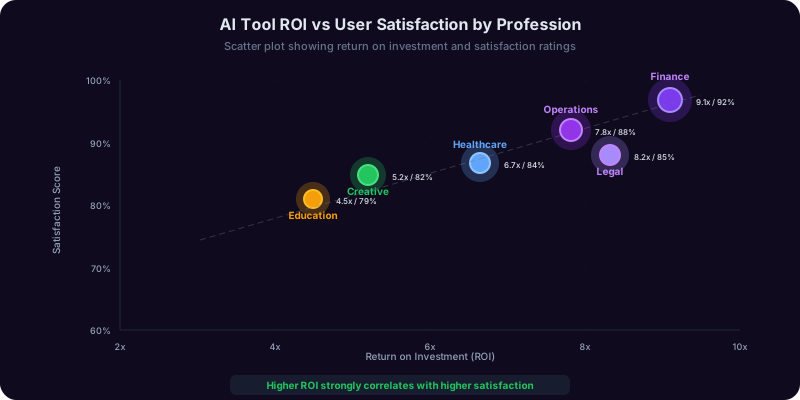
Tax preparation and planning represent one of the highest-ROI applications of specialized AI. The U.S. tax code alone exceeds 10,000 pages, and state-level variations add thousands more. AI tools that understand this complexity can identify deductions that human preparers miss (the IRS estimates taxpayers overpay by $1 billion annually due to unclaimed deductions), model the tax impact of business decisions before they are made, generate audit-ready documentation and support for claimed positions, and automate quarterly estimated tax calculations for self-employed professionals. A general chatbot will give you a rough idea of tax brackets. A specialized tax copilot will calculate your exact marginal rate, identify the optimal Roth conversion amount, and tell you whether your home office qualifies under the simplified or regular method based on your specific situation.

Get Your Answer Now, Free
Stop using generic AI for specialized professional work. Copilotly offers domain-specific copilots built for legal, health, finance, marketing, career, and dozens of other professional fields -- each one trained to deliver the accuracy and output formats your work demands.
Healthcare, Insurance, and Research: Handling Complex Information
These domains generate and consume enormous amounts of structured data, clinical evidence, actuarial tables, and academic literature. AI tools that can navigate this complexity and surface the right information at the right time are transforming how professionals work in each field.
Healthcare and Medical
AI in healthcare has matured beyond the hype cycle and into practical daily use. The most impactful applications are not replacing clinicians but augmenting their efficiency. Clinical decision support systems surface relevant differential diagnoses, drug interactions, and treatment guidelines at the point of care, reducing cognitive load during patient encounters. Medical documentation tools transcribe and structure clinical notes from natural conversation, saving physicians an estimated 2-3 hours daily on administrative tasks. Patient communication assistants generate after-visit summaries, medication instructions, and pre-procedure preparation guides in patient-friendly language. Diagnostic imaging analysis tools assist radiologists with preliminary reads, flagging areas of concern in X-rays, CT scans, and MRIs.
The safety imperative. Medical AI must be conservative. A false negative (missing a condition) is far more dangerous than a false positive (flagging something that turns out to be benign). Specialized medical AI tools are designed with this asymmetry in mind, while general-purpose models often present medical information with an inappropriate level of confidence. The Health Copilot is built to help patients prepare for medical consultations, organize symptoms and medical history, and understand medical terminology, without crossing the line into clinical diagnosis.
Insurance
The insurance industry processes millions of claims, policies, and risk assessments annually, making it a natural fit for AI automation. Claims processing and fraud detection are the two highest-impact use cases. AI tools analyze claims against policy terms, historical patterns, and documentation requirements, flagging incomplete submissions, inconsistencies, and potential fraud indicators. Underwriting AI evaluates risk profiles using far more data points than traditional actuarial tables, incorporating real-time data on weather patterns, property conditions, driving records, and health metrics. Policy comparison tools help both agents and consumers understand the real differences between coverage options, including exclusions and limitations that are often buried in fine print.
Research and Academia
Researchers face an information overload problem that has become unmanageable without AI assistance. Over 3 million scientific papers are published annually, and keeping current with even a narrow subfield requires reviewing hundreds of papers per year. AI-powered literature review tools can scan thousands of papers, identify the most relevant findings, extract key data points, and map citation networks to show how ideas connect. Hypothesis generation tools analyze existing findings to suggest unexplored research directions with high potential impact. Statistical analysis assistants help researchers choose the right methods, check assumptions, interpret results, and generate publication-ready visualizations. Grant writing assistants help structure proposals, align with funder priorities, and ensure compliance with submission requirements.
The reproducibility angle. AI tools that document their analytical steps create a transparency trail that supports reproducibility, one of the biggest challenges in modern research. When an AI tool shows exactly how it arrived at a conclusion, peer reviewers and other researchers can verify and replicate the process.
Marketing, Sales, and E-Commerce: Driving Revenue With AI
Revenue-generating functions were among the earliest adopters of AI tools, and by 2026 the sophistication of these applications has moved well beyond basic content generation. The professionals who get the most value from AI in these domains use it for analysis and optimization, not just output creation.
Marketing
Marketing professionals in 2026 use AI across the entire campaign lifecycle. Campaign planning and audience segmentation tools analyze customer data, market trends, and competitive positioning to recommend targeting strategies that maximize ROI. Content generation systems produce first drafts of ad copy, social media posts, email sequences, and blog content, though experienced marketers know that AI-generated content needs human editing for brand voice and strategic alignment. SEO and content strategy tools analyze search intent, competitive gaps, and content performance to recommend topics, structures, and optimization opportunities. Attribution and analytics tools synthesize data from multiple channels into coherent narratives about what is working and what is not, replacing the manual spreadsheet analysis that used to consume hours weekly.
Where specialization pays off. A general AI model can write a blog post draft. A marketing-specialized copilot can write a draft that accounts for your target keyword cluster, matches your brand voice guidelines, follows your content template structure, and includes the right CTAs for your funnel stage. The Marketing Copilot understands these layers and produces output that requires less human revision. Industry research from HubSpot's 2025 State of Marketing Report found that teams using specialized AI tools reduce content production cycles by 40% compared to those using general-purpose models.
Sales
Sales teams are using AI to work smarter across four key areas. Lead scoring and prioritization systems analyze behavioral signals, firmographic data, and engagement history to rank prospects by likelihood to close, ensuring reps spend time on the highest-value opportunities. Proposal and presentation generation tools create customized sales materials that incorporate prospect-specific data, competitive comparisons, and relevant case studies. Email and outreach optimization tools analyze response patterns to recommend the best send times, subject lines, and messaging frameworks for different buyer personas. Pipeline forecasting uses historical conversion data, deal velocity metrics, and rep activity levels to generate more accurate revenue projections than traditional gut-feel estimates.
E-Commerce
E-commerce businesses apply AI at every stage of the customer journey. Product listing optimization tools generate SEO-friendly titles, descriptions, and bullet points that improve search visibility and conversion rates across Amazon, Shopify, and other platforms. Pricing intelligence systems monitor competitor pricing, demand elasticity, and inventory levels to recommend dynamic pricing strategies that maximize margin without losing market share. Inventory forecasting uses historical sales data, seasonality patterns, marketing calendar inputs, and external factors like weather and economic indicators to predict demand and optimize stock levels. Customer experience personalization recommends products, adjusts site layouts, and customizes messaging based on individual browsing and purchase behavior, driving a 15-25% increase in average order value for well-implemented systems.
For marketing professionals who also handle contracts with vendors and agencies, our guide to reading and negotiating contracts covers key clauses to watch for in service agreements.
Engineering, Creative, and Writing: Augmenting Human Craft
These professions involve deep creative and technical skill where AI serves best as an amplifier of human capability rather than a replacement. The professionals who get the most from AI in these fields use it to handle repetitive or computationally intensive subtasks while retaining full creative and technical control over the final output.
Engineering and Software Development
Software engineers were among the first knowledge workers to integrate AI into daily workflows, and the tooling has matured significantly. Code completion and generation tools like GitHub Copilot, Cursor, and Codeium provide context-aware suggestions that accelerate coding speed by 25-45% on routine tasks. Code review assistants analyze pull requests for bugs, security vulnerabilities, performance issues, and style inconsistencies before human reviewers see them, reducing review cycles and catching issues that humans often miss during long review sessions. Architecture and system design tools help engineers evaluate tradeoffs between different approaches, generate infrastructure-as-code templates, and model system behavior under various load scenarios. Debugging and troubleshooting assistants analyze error logs, stack traces, and system metrics to identify root causes faster than manual investigation.
The context window challenge. Engineering AI tools face a unique challenge: they need to understand not just the code being written but the entire codebase, the architectural decisions behind it, and the business requirements driving it. This is why specialized code AI tools that can index and reason about large codebases outperform general-purpose models that are limited to whatever code you paste into a chat window.
Creative and Design
Creative professionals have a nuanced relationship with AI. The most productive approach treats AI as a brainstorming partner and production accelerator rather than a creative director. Image and visual generation tools produce concepts, mood boards, variations, and asset drafts that serve as starting points for human refinement. Brand consistency tools check new creative assets against existing brand guidelines, ensuring color usage, typography, spacing, and tone remain on-brand across campaigns and channels. Layout and composition assistants suggest arrangements, whitespace balance, and visual hierarchy for design projects, particularly useful for rapid prototyping and A/B testing variations. Motion and animation tools generate intermediate frames, suggest transitions, and create rough motion previews that speed up the animation workflow.
Writing and Content
Professional writers use AI differently from casual users. While anyone can ask a chatbot to write a paragraph, professional writers use AI tools for structural editing (analyzing a long-form piece for logical flow, argument strength, and pacing), style and voice consistency (ensuring a 5,000-word article maintains the same tone throughout, or that a team of writers produces content that reads as if it came from one voice), fact-checking and citation (cross-referencing claims against primary sources and flagging unsupported assertions), and SEO and readability optimization (adjusting content structure, heading hierarchy, and keyword placement without sacrificing quality). The key distinction is that professional writers use AI as an editorial assistant, not as a ghostwriter. The ideas, structure, and voice are human. The AI handles the laborious subtasks that slow down the production process.
Education, HR, and Career Development: Building Human Potential
These professions center on developing people, whether students, employees, or job seekers. AI tools in these domains must balance efficiency with empathy, producing outputs that are personalized and human-centered rather than generic and mechanical.
Education
The education sector has moved beyond the initial panic about AI-generated student work and into a more productive phase of integrating AI into teaching and learning. Adaptive learning platforms adjust content difficulty, pace, and presentation format based on individual student performance, providing the kind of personalized instruction that is impossible for a single teacher to deliver to 30 students simultaneously. Assessment generation tools create rubric-aligned quizzes, exams, and project prompts that test specific learning objectives at appropriate cognitive levels, saving instructors hours of test creation time. Curriculum design assistants help educators align lesson plans with standards (Common Core, NGSS, state-specific requirements), sequence topics for optimal learning progression, and identify gaps in coverage. Student feedback tools analyze written assignments and provide detailed, constructive feedback on structure, argumentation, grammar, and citation, giving students the kind of substantive feedback that time-constrained instructors cannot always provide on every assignment.
The personalization promise. Education is where AI's ability to personalize at scale has the most transformative potential. A specialized educational AI can adapt its explanations to a student's demonstrated understanding level, offer alternative explanations when the first does not land, and track learning patterns over time. General-purpose chatbots provide the same explanation to every student regardless of their background or learning style.
Human Resources
HR departments handle high-volume, high-stakes processes that benefit enormously from AI augmentation. Resume screening and candidate evaluation tools analyze applications against job requirements, scoring candidates on relevant skills, experience, and qualifications while flagging potential concerns, reducing the time to identify qualified candidates from days to hours. Compensation benchmarking tools aggregate salary data from multiple sources (BLS, industry surveys, job postings) to provide accurate market-rate ranges for specific roles, locations, and experience levels, essential for competitive offers and retention. Employee engagement analysis tools process survey responses, communication patterns, and performance data to identify team-level trends, predict turnover risk, and recommend interventions before issues escalate. Policy and compliance tools help HR teams draft, update, and ensure consistency across employee handbooks, benefits documentation, and regulatory filings.
Career Development
Job seekers and career changers use AI tools at every stage of their professional journey. Resume and cover letter optimization tools tailor application materials to specific job descriptions, ensuring keyword alignment and highlighting the most relevant experience. Interview preparation tools generate likely questions based on the role, company, and industry, then provide feedback on practice answers for structure, specificity, and impact. Salary negotiation tools provide market data, suggest negotiation frameworks, and help professionals calculate total compensation packages beyond base salary. Career path analysis tools map the skills, experience, and credentials needed for target roles, identify gaps in current qualifications, and recommend specific actions to close those gaps.
The Career Copilot and Salary Copilot combine labor market data with individual career context to provide guidance that generic AI cannot match. For detailed salary negotiation strategies, see our complete salary negotiation guide.
Real Estate, Operations, and Project Management: Optimizing Complex Systems
These professions manage complex, multi-variable systems where AI's ability to process large datasets and identify patterns provides a decisive advantage over manual analysis and intuition-based decision-making.
Real Estate
Real estate professionals operate in a data-rich environment where AI can deliver significant competitive advantages. Property valuation and comparative market analysis tools analyze MLS data, recent transactions, neighborhood trends, property condition, and market velocity to produce valuations that are more consistent and defensible than manual CMAs. Market timing and investment analysis tools process macroeconomic indicators, local supply-demand dynamics, interest rate trends, and demographic data to advise on buy/sell/hold decisions for investment properties. Lease and contract analysis tools review commercial and residential leases for non-standard terms, unfavorable clauses, and missing protections, a task that is particularly valuable given that most lease agreements are drafted by the landlord's attorney and favor the landlord's interests. Client communication tools generate property descriptions, marketing materials, and client updates that are professional and consistent while saving agents hours of writing time each week.
The data advantage. Real estate AI tools that integrate with MLS databases, public records, and economic data feeds provide analysis that would take a human agent days to compile manually. A specialized real estate copilot can compare a property's price per square foot against every comparable sale in the area over the past 12 months, adjust for condition, location, and market trend, and present the analysis in a format that supports client decision-making.
Operations and Supply Chain
Operations professionals manage the most complex optimization problems in business, and AI is uniquely suited to solving them. Demand forecasting models analyze historical sales data, seasonality patterns, promotional calendars, weather data, economic indicators, and social media trends to predict demand with significantly greater accuracy than traditional statistical methods, reducing both stockouts and overstock costs. Route and logistics optimization tools calculate optimal delivery routes, warehouse picking paths, and transportation mode selections across thousands of variables simultaneously, achieving 10-20% cost reductions that are mathematically impossible to find through manual planning. Quality control systems use computer vision and sensor data analysis to detect defects, anomalies, and process deviations in real time, catching issues before they reach customers. Supplier risk monitoring tools track financial health indicators, news sentiment, regulatory actions, and delivery performance across supplier networks, providing early warning of disruptions.
Project Management
Project managers spend a disproportionate amount of time on status tracking, reporting, and communication rather than strategic decision-making. AI tools are shifting that balance. Automated status reporting tools synthesize updates from project management platforms (Jira, Asana, Monday), communication tools (Slack, Teams), and document repositories into coherent status summaries, saving PMs 3-5 hours per week on reporting. Resource allocation optimization tools analyze team capacity, skill profiles, project priorities, and historical productivity data to recommend staffing decisions that maximize throughput without burning out team members. Risk prediction tools identify patterns in project data that correlate with delays, scope creep, or budget overruns, flagging projects at risk before problems become visible through traditional metrics. Meeting summarization tools generate action items, decisions, and follow-ups from meeting transcripts, ensuring nothing falls through the cracks.
Customer Service, Consulting, and Nonprofit: Scaling Human Impact
These professions share a common challenge: delivering high-quality, personalized service at scale while operating under significant time and resource constraints. AI tools in these domains multiply the impact of individual professionals without sacrificing the quality that clients, customers, and communities depend on.
Customer Service
Customer service has undergone the most visible AI transformation of any profession. The most effective implementations augment human agents rather than replacing them. Intelligent ticket routing systems analyze incoming requests for topic, sentiment, complexity, and customer value to direct each case to the most appropriate agent or team, reducing transfer rates and resolution times by 30-50%. Response drafting tools generate suggested replies based on the customer's issue, relevant knowledge base articles, account history, and previous resolution patterns, giving agents a strong starting point that they can personalize and approve. Sentiment and escalation detection tools monitor conversations in real time for signs of frustration, dissatisfaction, or high-value customer churn risk, alerting supervisors before situations escalate. Knowledge base maintenance tools identify gaps in documentation based on recurring questions that agents cannot find answers to, and generate draft articles to fill those gaps.
The quality paradox. The companies that get AI customer service right are the ones that use AI to make their human agents more effective, not the ones that try to eliminate human agents entirely. Customers consistently report higher satisfaction with AI-assisted human support than with fully automated interactions, according to Forrester's 2025 Customer Experience Index.
Consulting
Management consultants and advisory professionals use AI to accelerate the analytical and presentational aspects of their work while preserving the strategic thinking and relationship management that clients pay for. Market sizing and competitive analysis tools process industry data, financial reports, patent filings, and market research to produce the foundational analyses that consultants historically spent days compiling. Presentation generation tools create structured slide decks from data inputs and written analyses, producing first drafts that follow professional frameworks (MECE, Porter's Five Forces, value chain analysis) and include properly formatted charts and tables. Data analysis and visualization tools process client data sets and produce insights, trend analyses, and visualizations that would take analysts hours to create manually. Benchmarking tools compare client metrics against industry standards, peer groups, and best practices to identify performance gaps and improvement opportunities.
Nonprofit and Government
Resource-constrained organizations benefit disproportionately from AI because they have the greatest gap between the work that needs to be done and the staff available to do it. Grant writing assistants help nonprofit staff craft compelling proposals that align with funder priorities, incorporate required data points, and follow the specific formatting requirements of each funding agency, a process that typically takes 40-80 hours per application. Compliance and reporting tools automate the generation of required reports for government grants, regulatory agencies, and board governance, reducing the administrative burden that pulls program staff away from mission-critical work. Community engagement tools analyze constituent feedback, social media conversations, and survey data to identify emerging needs, measure program impact, and inform strategic planning. Budget optimization tools help organizations allocate limited resources across programs, identifying where additional investment would have the greatest impact and where spending can be reduced without affecting outcomes.
Nonprofits and government agencies often deal with complex contracts and vendor agreements. Our contract review guide covers the key clauses to watch for when limited legal budgets make outside counsel impractical for routine reviews.
How to Choose the Right AI Tool for Your Profession
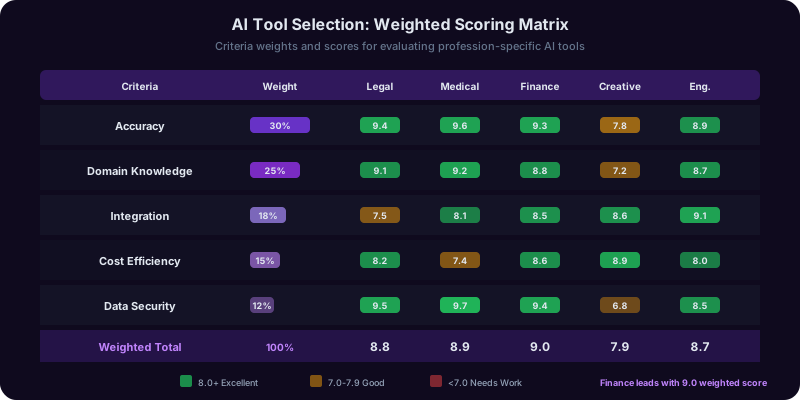
With hundreds of AI tools competing for attention in every professional domain, choosing the right one requires a structured evaluation rather than following the hype cycle. Here is a framework that works across all 20 professions covered in this guide.
Step 1: Identify Your Highest-Value Use Case
Do not try to adopt AI across your entire workflow at once. Start with the single task that consumes the most time relative to the value it produces. For most professionals, this is one of three categories: information synthesis (gathering and making sense of large amounts of data, documents, or research), first-draft creation (producing initial versions of documents, analyses, or plans that require significant human refinement), or pattern recognition (identifying trends, anomalies, or insights in data that would be impractical to find manually). Your highest-value AI investment is the tool that addresses your most time-consuming task in one of these categories.
Step 2: Evaluate Specialization vs. Generality
Refer back to the master comparison table in this article. If your profession has a "High" specialist advantage rating, start with a domain-specific tool. The accuracy and reliability difference will be immediately apparent. If your profession has a "Low" or "Medium" rating, a general-purpose tool with good prompting may be sufficient for initial adoption, with a migration path to specialized tools as your needs mature.
Step 3: Test With Real Work
Never evaluate an AI tool with toy examples. Give it an actual task from your last work week and compare the output against what you produced manually. Evaluate on four dimensions: accuracy (did it get the facts, calculations, or references right?), completeness (did it cover everything a professional output requires?), usability (how much editing or rework was needed to make the output client-ready?), and speed (how much time did it actually save, including the time spent reviewing and correcting the output?).
Step 4: Consider Integration and Workflow
The best AI tool in isolation is worthless if it does not fit into your existing workflow. Evaluate whether the tool integrates with the platforms you already use (your CRM, project management tool, EHR, or document management system), whether it can be accessed at the point of need (in the application where you work, not in a separate browser tab), and whether it supports the input and output formats your work requires.
Step 5: Verify Security and Compliance
For regulated professions (legal, healthcare, finance, insurance, government), data security and compliance are non-negotiable evaluation criteria. Verify that the tool meets your industry's data protection requirements (HIPAA for healthcare, SOC 2 for financial services, CJIS for law enforcement), that client data is not used to train the AI model, and that the tool provides audit trails for regulatory compliance. General-purpose consumer AI tools almost never meet these requirements, which is another reason domain-specific tools are essential for regulated professions.
The Bottom Line
The professionals who get the most from AI in 2026 are not the ones using the most tools. They are the ones using the right tool for their specific use case, integrated into their existing workflow, with a clear understanding of what the tool does well and where human judgment must take over. Start with one high-impact use case, choose a tool that matches your specialization needs, and expand from there based on measured results rather than feature lists. Copilotly's domain-specific copilots are designed around this principle: each copilot is purpose-built for a specific professional domain, trained on domain-relevant data, and structured to produce outputs in the formats that professionals in that field actually need.
Frequently Asked Questions
Recommended Copilots
Recommended Copilots
AI-powered contract review, legal research, and dispute preparation for legal professionals and individuals
Try Free →Medical consultation preparation, symptom organization, and health information research
Try Free →Financial analysis, mortgage comparison, investment evaluation, and budget planning
Try Free →Campaign strategy, content optimization, SEO analysis, and marketing analytics
Try Free →Related Articles
Get Your Answer Now, Free
Stop using generic AI for specialized professional work. Copilotly offers domain-specific copilots built for legal, health, finance, marketing, career, and dozens of other professional fields -- each one trained to deliver the accuracy and output formats your work demands.