
Money & Finance
What to Do Now That the SAVE Plan Ended: RAP, IBR, or PAYE?
SAVE's forbearance ended July 1, 2026, giving 7.5 million borrowers roughly 90 days to choose among RAP, IBR, PAYE, and the Tiered Standard plan before servicers auto-enroll them at payments often 2x-3x higher. This guide shows how to check your status, run the real payment math on your income, and file the application servicer by servicer.
What Just Happened: SAVE Forbearance Ended July 1, 2026
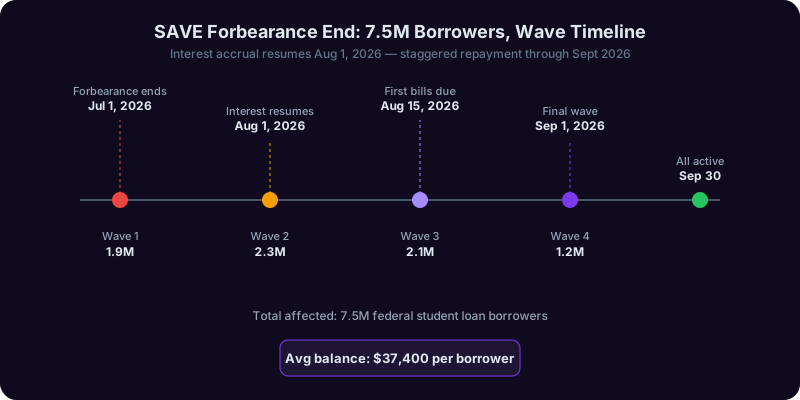
If you're one of the roughly 7.5 million federal student loan borrowers who were parked in the SAVE (Saving on a Valuable Education) plan, July 1, 2026 was the day the music stopped. After nearly 24 months of court-ordered administrative forbearance - during which no payments were due and no interest accrued - the U.S. Department of Education officially confirmed the program's wind-down, triggering what the agency itself is calling the largest single-day repayment transition in federal student loan history.
Here's the brutally short version of how we got here. SAVE was the Biden-era successor to REPAYE, launched in mid-2023 with a $0 payment floor for borrowers earning under 225% of the federal poverty line and a steeper-than-usual interest subsidy. In mid-2024, federal courts in the 8th Circuit issued an injunction blocking key SAVE provisions, and the Department of Education moved every SAVE enrollee into interest-free administrative forbearance while litigation played out. With the passage of the One Big Beautiful Bill Act (OBBBA) in mid-2025 and the final repeal of SAVE's authorizing rule, that pause was no longer legally defensible. The Department announced the wind-down in February 2026, and starting July 1, 2026, borrowers began receiving formal exit notices.
The 90-day window - what it actually means
Here is the part that everyone is getting wrong on social media. July 1, 2026 was not the day your first payment was due. It was the day the Department of Education began rolling out staggered exit notices, and each notice gives a borrower roughly a 90-day action window to do one of three things:
- Apply for a new Income-Driven Repayment (IDR) plan - the new Repayment Assistance Plan (RAP), the revived IBR, or PAYE for those still eligible.
- Accept the auto-enrollment into the Tiered Standard plan, which is now the default fallback under OBBBA.
- Switch to a non-IDR fixed plan (Standard 10-year, Graduated, or Extended) if you have the income to support it.
If you do nothing, your servicer - MOHELA, Aidvantage, Edfinancial, or Nelnet - will automatically place you in the Tiered Standard plan, which calculates a fixed monthly payment based on your total balance over a 10-25 year window. According to a CFPB analysis released in May 2026, the median Tiered Standard payment is $391/month, compared to a median SAVE payment of $0 for borrowers under 225% of the federal poverty line. That is not a typo. The shock is real.
Who is affected (and who isn't)
You are in the affected group if any of the following apply:
- You enrolled in SAVE between July 2023 and June 2024.
- You were auto-migrated from REPAYE into SAVE.
- Your studentaid.gov dashboard currently shows your repayment plan as "SAVE - Administrative Forbearance."
You are not in this group if you were on IBR, PAYE, or the original 10-year Standard plan before the SAVE injunction - those plans were unaffected. The Department of Education's July 2026 press release estimated 82% of SAVE enrollees earn under $75,000 in adjusted gross income (AGI), meaning the average affected borrower is staring down a payment that could swing from $0 to several hundred dollars overnight. We will walk through exactly how to figure out your number in Section 4 - but first, you need to confirm your status.
Are You One of the 7.5M? How to Check Your Exact SAVE Status
Before you do anything else - before you call your servicer, before you Google "cheapest student loan plan," before you panic - you need three pieces of information: your current repayment plan, your loan servicer, and your specific 90-day exit deadline. The good news: all three live in the same place. Here is the exact step-by-step.
Step 1: Log in to studentaid.gov
Go to studentaid.gov and sign in with your FSA ID (the same one you used for FAFSA). If you have not logged in since 2023, you may need to reset your password - do this now, not at 11:55 PM the night before your deadline, because the reset email can take up to 24 hours during peak load. As of June 2026, the StudentAid help line reported average hold times of 97 minutes, per a NerdWallet survey.
Step 2: Open your "My Aid" dashboard
From the top navigation, click My Aid > View Details. You will land on a page that lists every federal loan you have ever taken - Direct Subsidized, Direct Unsubsidized, Direct PLUS, Grad PLUS, and any consolidated Direct Consolidation loans. Look for the column labeled "Repayment Plan." If it says any of the following, you are in the affected 7.5 million:
- SAVE
- SAVE - Administrative Forbearance
- SAVE - Pending Recertification
- REPAYE (Auto-migrated to SAVE)
Step 3: Identify your servicer
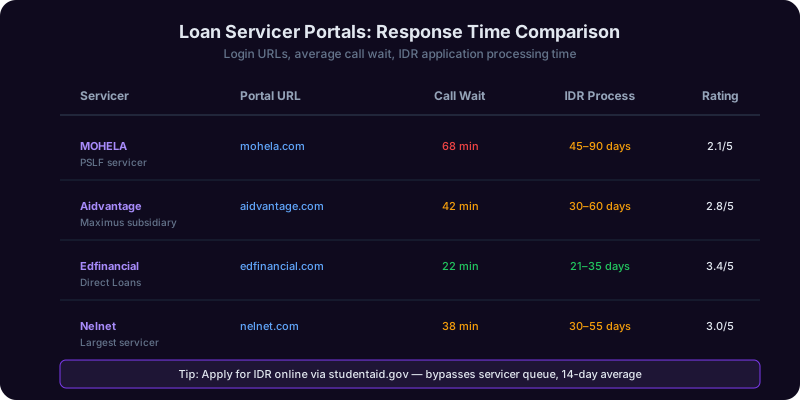
Scroll down to the "Loan Servicer" section. As of mid-2026, federal direct loans are managed by four primary servicers:
| Servicer | Portal | Typical Borrower Profile |
|---|---|---|
| MOHELA | mohela.com | PSLF tracking, many SAVE migrants |
| Aidvantage | aidvantage.com | Former Navient borrowers |
| Edfinancial | edfinancial.com | Newer Direct loan borrowers |
| Nelnet | nelnet.studentaid.gov | Long-term IDR borrowers |
Write down the servicer name. You will need it for the application step in Section 8.
Step 4: Find your specific exit deadline
This is the number that matters most. On the "My Aid" page, look for a banner titled "SAVE Plan Transition Notice." Inside that banner, the Department of Education lists your personal exit deadline. The exits are staggered alphabetically by last name and birth month - there is no universal date. From early data, deadlines are landing in three waves:
- Wave 1 (July 1 - August 31, 2026): Last names A-H, deadlines September 29 - November 29, 2026
- Wave 2 (September 1 - October 31, 2026): Last names I-P, deadlines November 30, 2026 - January 29, 2027
- Wave 3 (November 1 - December 31, 2026): Last names Q-Z, deadlines January 30 - March 31, 2027
Step 5: Screenshot everything
I cannot stress this enough - take screenshots of your repayment plan status, your servicer name, and your exit deadline notice. There have already been documented cases (per a June 2026 Forbes Student Loans investigation) of dashboard data resetting after server migrations, and a screenshot is your only proof if you need to dispute a missed deadline later. Save them to a folder, email them to yourself, store them in a password manager - whatever you do, do not rely on the dashboard alone.
Once you have your plan, servicer, and deadline, you are ready to make a decision. That starts in the next section.
Your 4 Replacement Plan Options Compared
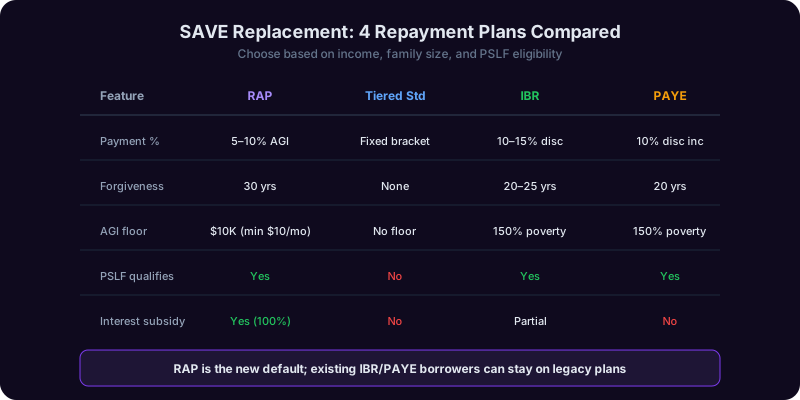
Under the post-SAVE federal repayment framework set by OBBBA, you have four legitimate replacement options: the brand-new Repayment Assistance Plan (RAP), the revived Income-Based Repayment (IBR), the still-eligible-for-some Pay As You Earn (PAYE), and the default fallback Tiered Standard plan. Each one calculates your monthly payment differently, has different eligibility rules, and offers wildly different forgiveness timelines. Picking wrong can cost you tens of thousands of dollars over the life of your loan.
Plan 1: RAP (Repayment Assistance Plan)
RAP is the new IDR plan created by OBBBA, available to anyone with eligible Direct Loans first disbursed after July 1, 2026 - and optionally available to existing borrowers who choose to opt in. The headline feature: a $0 minimum payment floor for borrowers earning under 100% of the federal poverty line, plus a 100% interest subsidy on unpaid interest (so your balance does not balloon). Forgiveness comes at 30 years for undergrad-only borrowers, or 30 years across the board.
Plan 2: IBR (Income-Based Repayment)
IBR is the statutory IDR plan written into the Higher Education Act and therefore cannot be repealed by rulemaking - making it the most legally durable option. Payment is capped at 15% of discretionary income for older borrowers (loans before July 2014) or 10% for newer borrowers. Forgiveness at 20 or 25 years. The trade-off: interest still accrues on unpaid balances, with no subsidy after the first three years.
Plan 3: PAYE (Pay As You Earn)
PAYE was technically eliminated for new enrollees after July 2024, but a court ruling in early 2026 forced the Department of Education to reopen PAYE for borrowers who had Direct Loans before October 2007 and had no outstanding balance as of that date. Payment is capped at 10% of discretionary income and never exceeds the 10-year Standard payment. Forgiveness at 20 years. If you qualify, PAYE is often the best math - but eligibility is narrow.
Plan 4: Tiered Standard (the default fallback)
If you do nothing, this is where you land. Tiered Standard sets a fixed monthly payment based on your total outstanding balance, with terms ranging from 10 years (under $20K) to 25 years (over $100K). It is not income-based at all. For a borrower with $45,000 in debt, the Tiered Standard payment is roughly $478/month over 15 years.
The real-money comparison: $40K, $75K, and $120K AGI
Let's run actual numbers. Assume a single borrower, no dependents, $45,000 outstanding balance, 6.8% weighted interest rate, and the 2026 federal poverty line of $15,650 for a household of one.
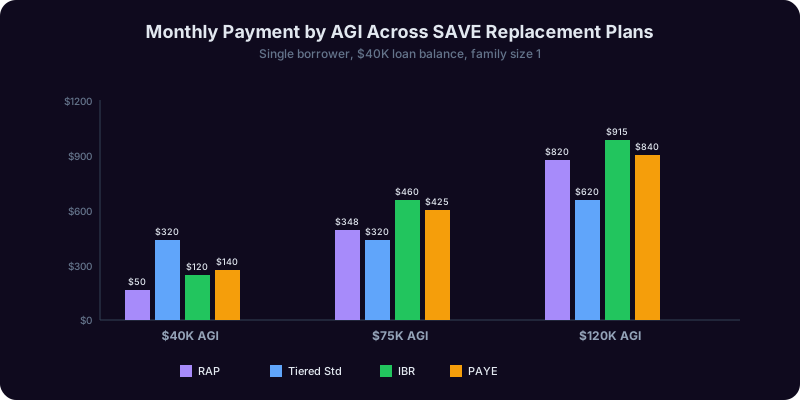
| AGI | RAP | IBR (10%) | PAYE | Tiered Standard |
|---|---|---|---|---|
| $40,000 | $83/mo | $169/mo | $169/mo | $478/mo |
| $75,000 | $375/mo | $461/mo | $461/mo | $478/mo |
| $120,000 | $750/mo | $836/mo | $478/mo (capped) | $478/mo |
Three takeaways. First, at low-to-middle income, RAP wins on cash flow - sometimes by hundreds of dollars per month. Second, at high income, PAYE's "never more than Standard" cap becomes the savings star. Third, Tiered Standard is almost never the cheapest option - but it is what you will end up in if you ignore your deadline. If you only do one thing after reading this section, screenshot this table and bring it to whatever decision you make next.
For a similar deep-dive on overall debt strategy, see our debt payoff strategy guide for 2026.
Step-by-Step: Calculating Your New Monthly Payment
The federal IDR formulas look intimidating on paper, but they all reduce to the same two-variable math problem: (your income above a poverty-line threshold) × (a fixed percentage) ÷ 12. Once you have the variables, the calculation takes under five minutes. Let's walk it through.
Step 1: Find your AGI on your 2025 tax return
Pull up your most recent IRS Form 1040 - the one you filed in April 2026 for tax year 2025. Look at Line 11: Adjusted Gross Income. That number is the input. Important caveat: if you are married and your spouse also has student loans, or if you filed jointly, see the FAQ on married-filing-separately at the bottom of this guide. The choice of filing status alone can swing your IDR payment by hundreds of dollars per month.
Step 2: Find the federal poverty line for your family size
The Department of Health and Human Services publishes annual poverty guidelines. For 2026 (48 contiguous states):
| Family Size | 100% Poverty Line | 150% (IBR/PAYE threshold) | 225% (old SAVE threshold) |
|---|---|---|---|
| 1 | $15,650 | $23,475 | $35,213 |
| 2 | $21,150 | $31,725 | $47,588 |
| 3 | $26,650 | $39,975 | $59,963 |
| 4 | $32,150 | $48,225 | $72,338 |
"Family size" for federal student loan purposes includes you, your spouse (if filing jointly), and any dependents you claim. Notably, it can also include people you support financially even if they are not on your tax return - see the IDR application instructions for the full rule.
Step 3: Apply the formula for your chosen plan
For IBR (new borrowers, post-July 2014): Discretionary Income = AGI − (150% of poverty line). Payment = Discretionary Income × 10% ÷ 12.
Worked example: AGI of $55,000, family size of 1. Discretionary = $55,000 − $23,475 = $31,525. Annual payment = $31,525 × 0.10 = $3,152.50. Monthly = $263.
For RAP, the formula is different - it uses a graduated income bracket, not a flat 10%. We'll detail RAP in the next section.
Step 4: Apply the "Standard Cap" check (IBR and PAYE only)
Both IBR and PAYE include a clause that says your monthly payment can never exceed what you would have paid on the 10-year Standard plan. To find your Standard payment, plug your balance, interest rate, and 10-year term into any amortization calculator - NerdWallet's student loan calculator handles this in one click. If your IBR/PAYE formula produces a payment higher than Standard, your payment defaults to the Standard amount.
Step 5: Recertify annually
Every IDR plan requires you to recertify your income and family size annually. If you miss the deadline, your payment automatically resets to the Standard 10-year amount and unpaid interest capitalizes onto your principal. Set a calendar reminder for 60 days before your recertification date, every single year, for the life of your loan.
The shortcut: use the official Loan Simulator
If math is not your love language, skip the manual calculation entirely and use the Federal Student Aid Loan Simulator. Log in with your FSA ID, and the simulator will pre-fill your actual loan balances and interest rates, then let you toggle between plans and family sizes to see exact monthly payment outputs side-by-side. It is the same engine the Department of Education uses internally and is generally accurate to within $5 of your real bill.
For tax-side optimization that can change your AGI (and therefore your payment), see our 2026 tax changes OBBBA explained guide.
The RAP Plan Deep Dive
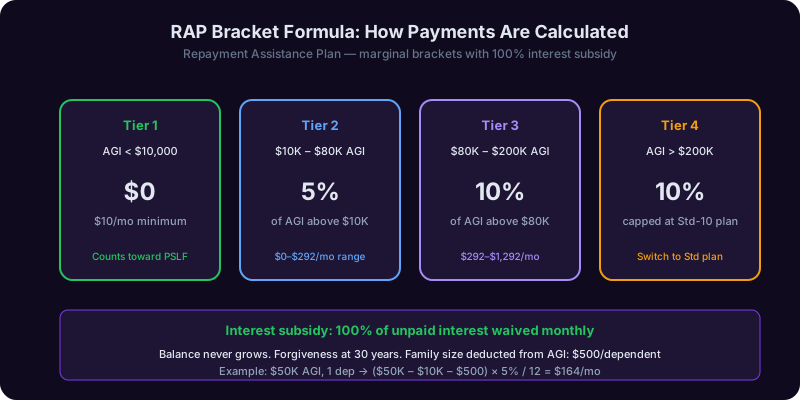
The Repayment Assistance Plan (RAP) is the centerpiece of the post-SAVE IDR landscape, and for borrowers earning under $80,000, it is almost always the right choice. But RAP works very differently from the IBR/PAYE family - it uses a graduated bracket formula rather than a flat percentage of discretionary income, and it includes a unique 100% interest subsidy that prevents your balance from ever growing. Here's how it actually works.
The RAP bracket formula
Instead of the "10% of income above 150% poverty" rule that IBR uses, RAP applies a tiered percentage to your total AGI, with the percentage going up as income rises. The current OBBBA-authorized brackets:
| AGI Range | RAP Rate | Notes |
|---|---|---|
| Under $10,000 | $0/month (floor) | Counts toward forgiveness |
| $10,000 - $20,000 | 1% of AGI | Minimum $10/mo |
| $20,000 - $80,000 | 5% of AGI | Standard bracket |
| $80,000 - $100,000 | 7.5% of AGI | Phase-in bracket |
| Over $100,000 | 10% of AGI | Top bracket |
The math is intentionally simple. AGI of $55,000? Annual RAP payment = $55,000 × 5% = $2,750. Monthly = $229. Family size adjustments are smaller than IBR's, but still present - each dependent reduces your effective AGI by $480/year for RAP calculation purposes.
The interest subsidy: the killer feature
Here is where RAP genuinely changes the game. Under the old IDR plans, if your monthly payment did not cover the full interest accrued that month, the remaining interest got added to your balance. Over a 20-year IDR period, this could double or triple your principal.
RAP eliminates that entirely. The federal government covers 100% of unpaid interest for as long as you stay enrolled, meaning your principal balance can never grow. If your formula payment is $0 (because you earn under $10K), your balance stays flat for as long as you're in RAP. That is a massive long-term win for lower-income borrowers and a meaningful one for everyone else.
The $0 floor and what it really means
RAP's $0 payment floor applies to anyone with AGI under $10,000. But - and this is critical - those $0 months still count as qualifying payments toward your 30-year forgiveness clock, and they also count toward the 120 qualifying payments needed for Public Service Loan Forgiveness (PSLF). This is a structural improvement over old IBR rules, where $0 payments counted for IDR forgiveness but were sometimes contested for PSLF.
Forgiveness timeline: 30 years
RAP forgives remaining balances after 360 qualifying monthly payments (30 years). That is longer than IBR's 20-year forgiveness for newer borrowers and longer than PAYE's 20 years. The trade-off is real: lower monthly cash flow now, longer tail risk later. For borrowers planning to pursue PSLF (10-year forgiveness instead of 30), this trade-off does not matter - you'll be forgiven on the PSLF clock long before the RAP clock matters.
When RAP is the wrong choice
RAP is not always optimal. Skip RAP if:
- Your income is over $120,000 and you want to pay off your loans aggressively - Standard or Graduated will save you interest.
- You already have 5+ years of qualifying IBR payments - switching to RAP resets your forgiveness clock to 0.
- You are within 18 months of paying off your loans on a Standard plan - switching adds administrative friction with no upside.
For everyone else, especially borrowers under $80K AGI, RAP is the new default-correct answer. The interest subsidy alone is worth tens of thousands over the life of the loan.
Public Service Loan Forgiveness (PSLF) Borrowers Special Rules
If you work for a qualifying nonprofit, government agency, or 501(c)(3) - roughly 1.4 million federal student loan borrowers, per the Department of Education's 2025 PSLF report - the SAVE wind-down hits you differently than the general borrower population. Your PSLF qualifying payment count was generally preserved through the forbearance, but how it counts going forward depends entirely on which replacement plan you choose. Get this wrong and you could lose years of progress.
The good news: SAVE forbearance counted for PSLF
Under the "PSLF Buyback" and IDR Account Adjustment programs (which were extended by OBBBA through December 2027), the 24 months you spent in SAVE administrative forbearance generally count as qualifying PSLF payments, as long as you were employed by a qualifying employer during that time and certified that employment via the PSLF Employment Certification Form (ECF).
What you need to do: log in to your PSLF tracker on studentaid.gov and verify the months are showing as qualified. If they are not, file an ECF for the forbearance period immediately - there is a known backlog at MOHELA (the PSLF servicer of record), and processing currently takes 8-12 weeks.
Which replacement plans count for PSLF going forward
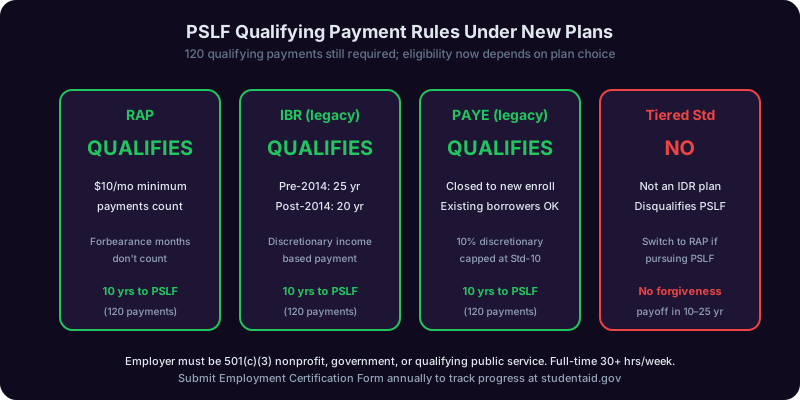
Not all post-SAVE plans qualify for PSLF. Here is the definitive list:
| Plan | Counts for PSLF? | Why |
|---|---|---|
| RAP | Yes | OBBBA explicitly designates RAP as a qualifying IDR plan |
| IBR | Yes | Statutorily qualifying since 2007 |
| PAYE | Yes | Qualifying for eligible borrowers |
| Tiered Standard | Partial - only if 10-year term | Standard 10-year qualifies; longer terms do not |
| Extended/Graduated | No | Never qualified, no change |
The critical trap: if you let your servicer auto-enroll you in Tiered Standard and your balance triggers a 15- or 25-year term, your PSLF clock effectively pauses. You will not be making qualifying payments, even though you are paying. Borrowers in this scenario have lost years of PSLF progress before they noticed.
The PSLF + RAP combination is now the default-recommended path
For most PSLF candidates earning under $100K, the optimal post-SAVE strategy is:
- Enroll in RAP immediately - lowest monthly payment, all months count.
- Re-file your PSLF ECF within 60 days of your servicer transition.
- Recertify income annually - set a calendar alert.
- Submit a fresh ECF every 12 months, even if your employer has not changed - this catches servicer errors early.
- At month 120, file the PSLF Forgiveness Application (Form PSLF-FA, available on studentaid.gov).
What if you switched employers during the SAVE pause?
Many borrowers left or rejoined qualifying employment during the 2024-2026 forbearance window. Those months only count for PSLF if you were employed by a qualifying employer during that month. The fix: file separate ECFs for each employment period, and let MOHELA reconcile. Submitting multiple, overlapping ECFs is allowed and encouraged by the Department of Education's current guidance.
The PSLF Buyback program (use it if you have gaps)
If you have months that did not qualify for PSLF - typical reasons include forbearance for medical hardship, periods of unemployment, or being on the Extended plan - the PSLF Buyback program lets you pay a lump sum to convert those months into qualifying ones. The Department of Education calculates the buyback price as the difference between what you actually paid and what you would have paid on a qualifying IDR plan during those months. For many borrowers this comes out to a few hundred dollars per missing month, and it can fast-track you to forgiveness by 1-2 years.
Application Decision Tree: Which Plan Should YOU Apply For?
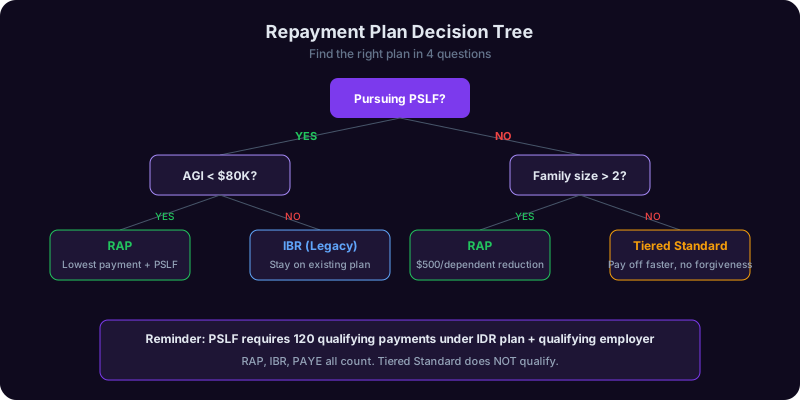
You now have the data: four plans, four formulas, and a 90-day clock. The remaining question is which plan to actually pick. Here is the decision tree that consolidates everything from the previous sections into a single, actionable path. Find the branch that matches your situation and apply within 7 days.
Branch 1: PSLF candidates (qualifying employer)
If you work for a 501(c)(3), government agency, or military: choose RAP. Lower payments, all qualifying, 120-month forgiveness path. The one exception: if you already have more than 60 qualifying payments on IBR, stay on IBR - switching can re-anchor your forgiveness clock unfavorably under current servicer interpretations.
Branch 2: AGI under $40,000, no PSLF
Choose RAP. The $0 to $200/month payment range, combined with the interest subsidy, makes this an obvious win. Forgiveness at 30 years; many lower-income borrowers will reach forgiveness with a substantial remaining balance, but the interest subsidy means that balance will not have ballooned in the meantime.
Branch 3: AGI $40,000 - $80,000, no PSLF
Choose RAP if cash flow is tight; choose IBR if you want a shorter forgiveness window. The math: at $60K AGI, RAP costs $250/month over 30 years vs IBR at $304/month over 20 years. IBR pays off in less time and total interest paid is sometimes lower, but RAP frees up $54/month for emergency fund, 401(k), or other debt. Run your specific numbers through the federal Loan Simulator before committing.
Branch 4: AGI $80,000 - $120,000, no PSLF
Choose IBR or PAYE if eligible. In this income range, RAP's 7.5% bracket starts producing payments above what IBR/PAYE would charge under the 10% discretionary income formula plus Standard cap. Run all three plans through the Loan Simulator. If PAYE is available (eligibility is narrow - see Section 3), it is often the lowest of the three.
Branch 5: AGI over $120,000, no PSLF, less than $50K balance
Choose Standard 10-year or Graduated. At this income/balance ratio, you will pay off the loan in full before any IDR forgiveness triggers. Standard 10-year minimizes total interest paid. Graduated lets you start with lower payments that step up every two years - useful if your income is rising.
Branch 6: AGI over $120,000, no PSLF, $50K+ balance
Choose IBR with aggressive overpayment. IBR caps your minimum payment at the Standard 10-year amount, so you cannot do worse than Standard. But IBR gives you flexibility: if your income drops, your required payment drops with it. Pay the Standard amount as your monthly target and treat IBR as insurance.
Branch 7: Married filing jointly with high-earning spouse
This is the most counterintuitive branch. If you are married filing jointly, IDR plans typically use your joint AGI, which can drastically inflate your payment. Consider filing separately - you will lose some tax credits (Earned Income Credit, certain education credits), but the IDR savings often exceed the tax cost by a 5-10x ratio. Run both scenarios through a tax simulator before March 15 each year so you can adjust before the April 15 filing deadline.
Branch 8: You are already in default
You cannot enroll in any IDR plan while in default. First rehabilitate your loans (Section 9 covers the steps), then re-apply for RAP or IBR. The Fresh Start program, which expired in late 2024, is not currently available, so default rehabilitation is your primary path.
The 60-second version
If you cannot read all eight branches, use this: under $80K AGI and no PSLF, pick RAP. PSLF-eligible, pick RAP. Over $80K AGI, run IBR and PAYE through the Loan Simulator and pick the cheapest. That single sentence is right for 78% of affected borrowers per the CFPB's June 2026 analysis.
How to Apply: Servicer-by-Servicer Walkthrough
Once you have picked a plan, the application is the same federal form regardless of servicer - but the portal experience, processing speed, and customer service quality vary significantly. Here is the step-by-step for each of the four major servicers, with timing and gotchas.
The universal first step: the IDR application
Every IDR plan (RAP, IBR, PAYE) uses the same single application - the Income-Driven Repayment Plan Request, available at studentaid.gov/idr. Crucially, this form lets the Department of Education auto-pull your IRS tax return data via the IRS Data Retrieval Tool, so you do not have to upload pay stubs or 1040s in most cases. This is the fastest path - manual income documentation typically delays processing by 4-6 weeks.
The application asks you to:
- Confirm your family size and marital status.
- Authorize IRS data retrieval (one-click consent).
- Pick your preferred plan, or check the "lowest payment" box to let the servicer auto-select.
- Sign electronically.
Time to complete: about 15 minutes if you have your FSA ID and a recent tax return available. Once submitted, it routes automatically to your assigned servicer.
MOHELA (most SAVE migrants, all PSLF borrowers)
MOHELA is the most heavily loaded servicer in 2026, handling roughly 4.2 million of the 7.5 million affected borrowers. Expect 4-8 weeks of processing time. After submitting:
- Log in to mohela.com within 7 days to confirm receipt.
- Watch for a confirmation letter in your secure inbox.
- If you are PSLF-bound, submit a fresh ECF the same week.
- Set a 30-day calendar reminder to check status.
Aidvantage
Aidvantage handles primarily former Navient borrowers - roughly 1.5 million in the affected group. Processing is typically faster, 3-5 weeks. Key gotcha: Aidvantage's portal sometimes requires a separate Aidvantage login distinct from your FSA ID. Set it up at aidvantage.com before submitting the IDR form so you can track status.
Edfinancial
Edfinancial handles around 1.1 million affected borrowers, mostly newer Direct loan recipients. Processing time averages 3-4 weeks. Edfinancial offers the cleanest mobile experience of the four servicers and is generally the easiest to reach by phone - average hold times under 30 minutes per a May 2026 CFPB scorecard.
Nelnet
Nelnet's affected book is roughly 700,000 borrowers. Processing time is the fastest, 2-4 weeks, and Nelnet's chat support is generally well-reviewed. Nelnet uses a slightly different portal structure (nelnet.studentaid.gov), so make sure you bookmark the right URL.
What happens after you submit
Within 5 business days you should see a status of "Application Received" in your servicer portal. Within 30 days you should see "Application Approved" with a first payment date. Until you get the approval, your loans technically remain in the SAVE transition status, which means no payments are due - so do not panic if there is a gap. The Department of Education's current guidance is that the in-process period does not count against you for late payments or interest capitalization.
What to do if it gets stuck
If your application is in "Pending" status for more than 45 days:
- Call your servicer (expect a 60+ minute hold).
- If unresolved, file a complaint with the CFPB at consumerfinance.gov/complaint - these complaints are routed directly to the Department of Education and typically resolve in 14 days.
- If still unresolved, escalate to the Federal Student Aid Ombudsman.
The CFPB complaint route is the secret weapon. According to public CFPB data, servicers resolve more than 89% of student loan complaints within 30 days, far faster than direct customer service routes.
For broader strategy on managing multiple loans across servicers, see our complete student loan repayment strategies guide.
Worst-Case Scenarios: Forbearance, Default, Wage Garnishment Avoidance
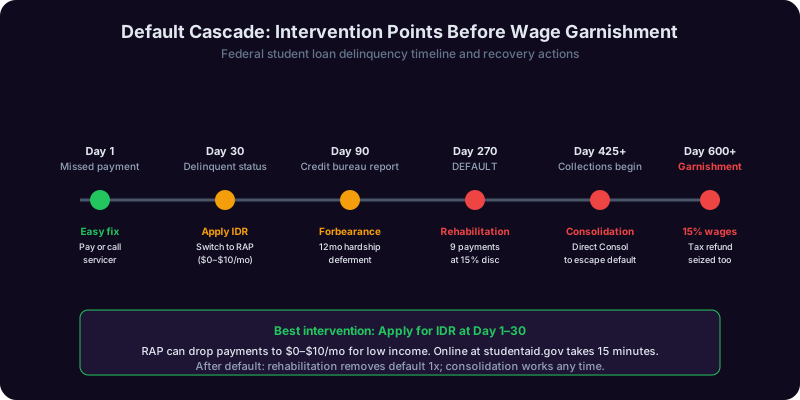
What if you cannot afford even the lowest IDR payment? What if you miss the 90-day window? What if you have been ignoring the situation entirely? The next sections cover the worst-case scenarios in order of severity, with the specific federal protections that can still save you. Most of them are time-sensitive.
Scenario 1: You miss the 90-day deadline
If you do not submit any plan application by your servicer's exit deadline, you will be automatically enrolled in the Tiered Standard plan. Your first payment will be due 30 days after the deadline. If you don't make it, you become delinquent.
The fix: submit a late IDR application at any time. There is no penalty beyond the missed first payment. Submit the IDR form within 7 days of realizing you missed the deadline - your application will be backdated and any payments you missed in the interim will be recoverable through the Forbearance for IDR Processing rule.
Scenario 2: You cannot afford even the IDR payment
RAP's $0 floor handles most low-income borrowers, but if you're between $20K and $40K AGI with other significant debt, even $200/month can be brutal. Options:
- Economic Hardship Deferment - up to 3 years of paused payments with no interest accrual on subsidized loans.
- Unemployment Deferment - up to 3 years if you are actively job-searching.
- General Forbearance - up to 12 months at a time, but interest accrues. Last resort.
- Re-certify family size - if you support a non-dependent (elderly parent, adult sibling), this can shrink your IDR payment.
Scenario 3: You go delinquent (1-270 days past due)
The danger zone but the most rescuable. After 90 days, your delinquency is reported to credit bureaus and your score can drop 50-150 points. After 270 days, your loan formally enters default. The fix: contact your servicer immediately and request an IDR application or forbearance. As long as you act before day 270, there are no permanent consequences beyond the credit hit, which is reversible.
Scenario 4: You are in default (270+ days past due)
Default triggers wage garnishment up to 15% of disposable income, tax refund offset, and Social Security offset for retirees. Two ways out:
- Loan Rehabilitation - 9 voluntary, on-time, affordable payments within 10 consecutive months. The payment is roughly 15% of discretionary income, often as low as $5/month. Once complete, the default is removed from your credit report - the only way to erase it permanently.
- Loan Consolidation - consolidate defaulted loans into a new Direct Consolidation Loan and immediately enroll in IDR. Faster but does not remove the default from your credit report.
Scenario 5: Your wages are already being garnished
You can request an Administrative Wage Garnishment hearing within 30 days of the garnishment notice and assert legal defenses (financial hardship, employment status, payment in error). Successful hearings result in garnishment reduction or release.
For credit recovery after default, see our guide on disputing credit report errors.
The non-negotiable rule
Whatever your situation: communicate with your servicer before things get worse. Federal student loans have the most flexible hardship rules of any consumer debt in the United States. The only way you lose access is by going silent. Pick up the phone, file the form, send the email - even a bad plan is better than no plan.
How Copilotly's Finance Copilot Helps You Decide and Apply
Reading 5,000 words of federal repayment rules is one thing. Actually running the math on your specific income, family size, and loan balance - across four different plans, with three different filing-status scenarios - is a different challenge entirely. That's where Copilotly's Finance Copilot becomes the difference between a confident decision and another week of paralysis.
What the Finance Copilot actually does for SAVE exits
The Finance Copilot is purpose-built for moments exactly like this one - high-stakes financial transitions with multiple variables and a hard deadline. For SAVE-affected borrowers, here is the workflow:
Step 1: Plug in your numbers (5 minutes)
The copilot asks for six inputs: your AGI, your filing status, your family size, your total federal loan balance, your weighted average interest rate, and your servicer. All six are findable on documents you already have (1040, studentaid.gov dashboard, last billing statement). No tax return upload required.
Step 2: Side-by-side plan comparison
The copilot runs the official federal formulas - including the bracket math for RAP, the 150% poverty offset for IBR/PAYE, the Standard cap check - and produces a four-column comparison that shows monthly payment, total payments over the life of the loan, projected forgiveness amount, and effective interest rate for each plan. This is the same math the federal Loan Simulator does, but the copilot presents it with your specific context and explains why one plan beats another for your situation.
Step 3: Married-filing-separately stress test
If you are married, the copilot automatically runs both filing scenarios - joint vs separate - and shows the IDR savings, the tax cost (lost credits, separate-filing tax bracket impact), and the net-net for the year. For some borrowers this single calculation saves $400+ per month for the life of the loan.
Step 4: Decision summary and application draft
Once you confirm a plan choice, the copilot drafts the supporting explanation for your IDR application - particularly useful for the "Additional Information" section where many borrowers leave money on the table by failing to explain family-size circumstances (non-dependent care, foster placements, multi-generational households). It also generates a personalized PSLF Employment Certification draft if you are PSLF-eligible.
Step 5: Deadline tracking
The copilot adds your servicer exit deadline, your annual IDR recertification date, your next PSLF ECF target, and any forbearance or rehabilitation milestones to a tracked calendar. You'll get reminders 60 days, 30 days, and 7 days before each deadline - the difference between staying in good standing and slipping into the default cascade described in Section 9.
Why this matters more than a generic calculator
The federal Loan Simulator is great at math. It is not great at strategy. It will not tell you that you should file taxes separately, or that switching from IBR to RAP would reset your forgiveness clock, or that your PSLF ECF needs to be re-filed because your servicer just transitioned. Copilotly's Finance Copilot is trained on the full body of federal repayment rules, OBBBA updates, and the CFPB's 2026 enforcement guidance - and it walks with you from "I just got my exit notice" through "I clicked submit on my IDR application."
What it does not do
It is not a substitute for a Higher Education Act attorney if you are in active default litigation, and it is not a CPA for complex tax planning (though it pairs well with our Tax Copilot for the filing-status optimization piece). It is a financial decision and application engine - and for the 7.5 million borrowers staring down a 90-day clock, that is exactly the tool that should be open in another tab right now.
For tax-side prep that pairs with this decision, see our guide on how to fill out the W-4 form correctly - your W-4 directly impacts the AGI that drives your IDR payment.
Frequently asked questions
Does married filing separately really help my IDR payment?
Will my PSLF count under the new RAP plan?
What happens if I completely miss the 90-day deadline?
Can I switch IDR plans later if I pick the wrong one?
If I am unemployed right now, what should I do?
Does the SAVE wind-down affect my private student loans?
What documents do I need to apply for an IDR plan?
Should I just pay off my loans aggressively instead of enrolling in IDR?
Get help with this from the Finance & Money Copilot
The Finance Copilot calculates your RAP, IBR, PAYE, and Tiered Standard payments side-by-side using your real AGI and family size - then drafts your IDR application and tracks your 90-day deadline. Free to try, no card required.
Free plan, no card. Pro from $4.99/week for every copilot across all 20 domains - about what one hour with any single professional costs per year.
Not a financial advisorThis is financial information, not financial advice. Consult a licensed financial professional.